

Hex Editor - Viewer
Nirali Kosiya Developer Tools iPhoneiPadiPod touch
Hex Editor - Viewer is a free Developer Tools app for iPhone and iPad by Nirali Kosiya. Requires iOS 17.6. Updated October 28, 2026.
- Price
- Free
- on the App Store
- Size
- 47 MB
- Age 17+
- Updated
- Oct 28
- 2026 · v1.0.2
Screenshots


About Hex Editor - Viewer
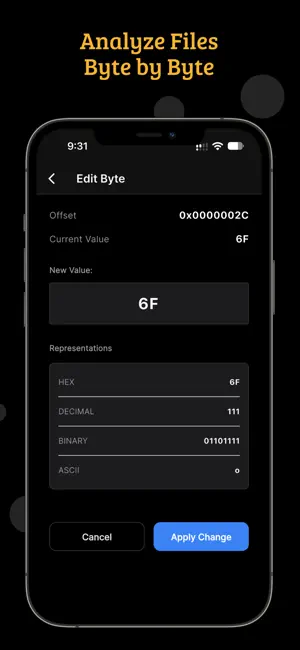
"Hex Editor is built around precise hexadecimal editing rather than treating file inspection as an afterthought. Core search language includes hex editor, binary editor, hexadecimal editor, binary file, byte editor. Open a file, move through its byte data, search for a value or text sequence, copy what you need, change the required bytes, and save the result. Use the editor when a normal document viewer cannot show the actual bytes stored inside a file. Byte-level searching helps locate known signatures, strings, offsets, markers, or values without manually scanning an entire file. File Info gives you a quick view of basic file details before you begin deeper inspection. File Type Detector helps identify a file from its content when the extension is missing, unusual, or not enough for your workflow. Metadata Inspector provides another layer of context for understanding information carried by a file. Bit Inspector lets you move below the byte level and examine individual bits when binary representation matters. Hex Calculator is useful for hexadecimal arithmetic, offsets, values, and other low-level calculations. Byte Converter provides quick conversions when you need to move between byte-oriented values while analysing data. Text-Hex connects readable text with hexadecimal representation so you can investigate how characters appear in raw data. Encoding Converter helps you inspect data across supported character encodings instead of guessing how a byte sequence should be interpreted. Base64 Converter gives you a dedicated way to encode or decode Base64 data during technical investigations. String Scanner helps reveal readable text embedded inside binary content and can speed up an initial inspection. Hash Generator provides hashes for data checks and technical workflows where a repeatable fingerprint is useful. Checksum Tool supports checksum-oriented verification when you need to compare calculated values with expected data. Compare Files helps you identify differences between two files instead of relying on visual inspection alone. Entropy Analyzer provides a statistical view that can help you recognise changes in data characteristics across binary content. Byte Statistics summarises byte-level patterns so you can understand data distribution without reading every value individually. These tools work together for reverse engineering workflows, debugging, file inspection, data recovery preparation, protocol investigation, and general developer work. Hex Editor can also be useful when you need to confirm a small binary change, investigate an unknown file, or validate data before moving it elsewhere. Import your file into the toolkit, inspect the relevant region, make only the required edit, then save the resulting file for your next step. The app keeps common binary utilities close to the editor so you can move from editing to analysis without changing applications. Search, copy, inspect, convert, compare, calculate, and analyse from one mobile workspace. Free access provides limited usage, while Pro is designed for users who need unlimited Hex editing. Hex Editor does not replace specialised forensic or reverse-engineering suites; it provides a practical mobile toolkit for everyday hexadecimal and binary work. Use the editor for focused byte changes and use the supporting tools when the surrounding data needs more context. Whether you are checking a binary structure, looking for a string, comparing versions, or validating a checksum, the workflow stays centred on the file data itself. The interface is designed for direct access to low-level information without requiring a separate desktop utility for every small inspection task. Use it when a binary file needs a small, deliberate change rather than a complete rewrite. Inspect hexadecimal offsets when you need to understand where a value occurs in a file. Terms of Use (EULA): https://www.apple.com/legal/internet-services/itunes/dev/stdeula/"
What’s new
Version 1.0.2 · Updated October 28, 2026
Performance improvements and bug fixes for a smoother editing experience
App privacy
The developer, Nirali Kosiya, reported these privacy practices to Apple.
Data Used to Track You
The following data may be used to track you across apps and websites owned by other companies:
- Identifiers: Device ID
- Usage Data: Product Interaction, Advertising Data
- Diagnostics: Crash Data, Performance Data, Other Diagnostic Data
Data Linked to You
The following data, which may be collected and linked to your identity, may be used for the following purposes:
- Identifiers: Device ID
- Usage Data: Advertising Data, Product Interaction
- Diagnostics: Crash Data, Performance Data, Other Diagnostic Data
Used for: Third-Party Advertising, Analytics
Alternatives to Hex Editor - Viewer
Looking for apps like Hex Editor - Viewer? Here are 6 similar apps on the App Store. The highest rated is Simple Hex Editor: Read Bytes (1.7/5), and all 6 are free to download.
-
 hexJapality
-
 Hash Calculator MD5 SHA256
1.0
Hash Calculator MD5 SHA256
1.0
-
 JAR DLL EXE File Viewer
-
 OMessage - Chat with Local AI
-
 LLLM
LLLM
-
 Simple Hex Editor: Read Bytes
1.7
Simple Hex Editor: Read Bytes
1.7
| App | Rating | Price | Last updated | Compare |
|---|---|---|---|---|
| Hex Editor - Viewer | – | Free | October 28, 2026 | |
| hexJapality | – | Free | Jun 25, 2026 | Compare |
| Hash Calculator MD5 SHA256 | 1.0 / 5 (1) | Free | Aug 15, 2026 | Compare |
| JAR DLL EXE File Viewer | – | Free | Sep 30, 2026 | Compare |
| OMessage - Chat with Local AI | – | Free | May 5, 2025 | Compare |
| LLLM | – | Free | Nov 19, 2025 | Compare |
| Simple Hex Editor: Read Bytes | 1.7 / 5 (3) | Free | Oct 9, 2026 | Compare |