

YOBIOKO - Type Tasks, Wake Up
HUGBIT Productivity iPhoneiPadiPod touch
YOBIOKO - Type Tasks, Wake Up is a free Productivity app for iPhone and iPad by HUGBIT. Requires iOS 26.0. Updated October 12, 2026.
- Price
- Free
- on the App Store
- Size
- 26 MB
- Age 4+
- Updated
- Oct 12
- 2026 · v1.0.2
Screenshots



About YOBIOKO - Type Tasks, Wake Up
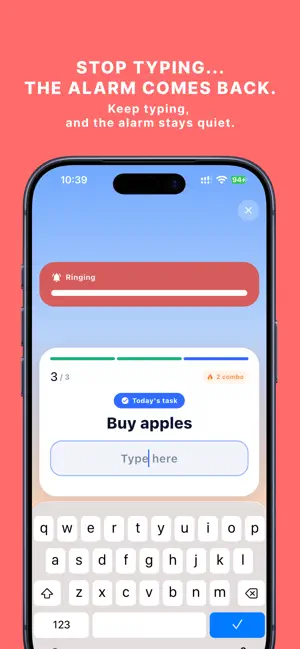
The way to stop the alarm is simple: type today’s tasks. YOBIOKO is an alarm app you stop by typing the things you need to do. “Take out the trash” “Finish the proposal” “Go to the gym” The tasks you created appear when your morning alarm goes off. By the time you finish typing them all, you can start your day with your to-dos already in mind. ■ TYPE YOUR TASKS. WAKE UP. Getting started is simple. 1. Add the tasks you need to do today 2. The alarm rings at the time you set 3. Type the same text shown on the screen 4. Finish all tasks to stop the alarm ■ STOP TYPING, AND IT RINGS AGAIN The alarm stays quiet while you are typing. But if you stop typing for 5 seconds, the alarm starts ringing again. Even if you get sleepy and stop midway, YOBIOKO will remind you again. ■ TURN WAKING UP INTO PREPARATION FOR YOUR DAY Instead of solving math problems or typing random phrases, you type the things you actually need to do that day. YOBIOKO is inspired by the “generation effect,” the idea that information can be easier to remember when you actively produce it yourself. The action of waking up also becomes a chance to remember what you need to do that day. ■ DESIGNED TO MAKE GOING BACK TO SLEEP HARDER • The alarm resumes if you stop typing for 5 seconds • Set snooze time from 1 to 10 minutes • The alarm rings again if you stop typing or leave the app • Optional wake-up confirmation • The alarm can ring even when the screen is off or the phone is in Silent Mode ■ SEE YOUR MORNINGS IN NUMBERS Each morning, YOBIOKO records: • Morning Score out of 1,000 • Rank from S+ to D • Typing speed • Accuracy • Best combo Look back on your mornings and enjoy seeing how they change over time. ■ WHAT’S YOUR MORNING TYPE? Your morning typing style is measured across four dimensions: • Speed • Accuracy • Consistency • Recovery These combine to create 16 different Morning Types. Rabbit, cat, turtle, sloth... As you build more records, you can start to see your own morning patterns. Scores and Morning Types are designed for self-discovery and fun. ■ KEEP YOUR DAILY TASKS ORGANIZED YOBIOKO is not just an alarm. You can also use it as a simple everyday task manager. • Quickly add tasks • Manage completed and incomplete tasks • Repeat tasks every day or on selected days • Set reminder notifications Add what you need to do, and use those same tasks in the next morning’s alarm. ■ CUSTOMIZE IT FOR YOUR MORNING Choose how many tasks to type each morning: • Small: 3 tasks • Medium: 5 tasks • High: 10 tasks You can also adjust typo tolerance, snooze time, and other settings. ■ NO ACCOUNT REQUIRED No registration or login is required. Your tasks and morning records are stored only on your device. ■ PREMIUM Premium includes: • No ads • Unlimited alarms • Ultra level: type all of your tasks • Unlimited access to records and analytics • Detailed morning analytics • Trends by day of the week and wake-up time • Personal bests and tips • Choose wake-up confirmation timing from 5, 10, 15, 20, or 30 minutes The free version still includes: • The full “type your tasks to stop the alarm” experience • Morning Score • Rank • 16 Morning Types ■ SUBSCRIPTION Premium is an auto-renewing monthly subscription. You can cancel at any time. After cancellation, Premium remains available until the end of the current billing period. Refunds are handled according to Apple’s policies. Requires iOS 26 or later Terms of Use https://yobioko.net/terms/ Privacy Policy https://yobioko.net/privacy/ Support https://yobioko.net/support/
What’s new
Version 1.0.2 · Updated October 12, 2026
・Fixed an issue where the next alarm sometimes did not ring after using "Skip the rest of today" ・If you leave the typing screen (go to the Home Screen or lock your phone), the alarm now rings again after 5 seconds ・While the alarm is ringing on the typing screen, a bar now shows the 60 seconds left before the full alarm rings ・Reminders are no longer sent for completed tasks ・Moved the purchase and restore buttons to the top of the Premium screen ・Added a "Remove ads" link above ads ・The app version now appears at the bottom of Settings and on the License screen ・Other small improvements
App privacy
The developer, HUGBIT, reported these privacy practices to Apple.
Data Used to Track You
The following data may be used to track you across apps and websites owned by other companies:
- Location: Coarse Location
- Usage Data: Advertising Data
Data Not Linked to You
The following data, which may be collected but is not linked to your identity, may be used for the following purposes:
- Location: Coarse Location
- Identifiers: Device ID
- Usage Data: Advertising Data
- Diagnostics: Crash Data, Performance Data, Other Diagnostic Data
Used for: Third-Party Advertising, App Functionality