

ThumbFree: AI Voice Keyboard
PRATIK SHRIKANT KABARA Productivity iPhoneiPadiPod touch
ThumbFree: AI Voice Keyboard is a free Productivity app for iPhone and iPad by PRATIK SHRIKANT KABARA. Rated 5.0/5 from 2 ratings. Requires iOS 26.0.
- Rating
- 5.0
- 2 ratings
- Price
- Free
- on the App Store
- Size
- 4 MB
- Age 4+
- Updated
- Nov 3
- 2026 · v1.0.2
Screenshots


About ThumbFree: AI Voice Keyboard
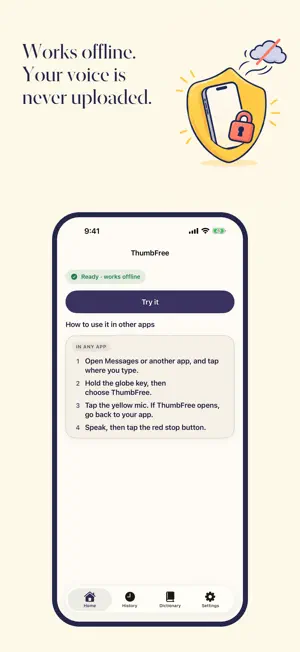
Talk instead of typing, right where your cursor is. ThumbFree is a private, offline voice keyboard for iPhone. Tap the mic, speak, and your words are typed into messages, email, notes and search boxes. HOW IT WORKS 1. Tap a text box and switch to the ThumbFree keyboard with the globe key. 2. Tap the yellow mic at the top right and speak. 3. Tap it again. Your words are typed where your cursor is. iOS does not let keyboards use the microphone, so the first tap of a session opens ThumbFree to turn it on, and one swipe takes you back to your app. While the session lasts, every tap starts at once, right where you are. Want to practice first? Tap Try it on ThumbFree's Home. PRIVATE BY DESIGN • Speech recognition runs on your iPhone, with NVIDIA's open Parakeet AI model. Your voice and your words are never uploaded. • The internet is used only to download the speech model (about 465 MB for English, over Wi-Fi unless you allow mobile data). After that, ThumbFree works in Airplane Mode. • No account, no sign-up and no tracking. FREE No subscriptions, no in-app purchases, no ads and no word limits. FAST Your text is ready about 0.1 seconds after you tap stop at the end of a sentence (measured on an iPhone 16 with iOS 26). Long takes are transcribed while you talk, so there is little left to do when you stop. A FULL KEYBOARD Type whenever you like: letters, numbers and symbols in the layout you know, emoji with search and skin tones, suggestions, autocorrect you can undo, your iOS text replacements, smart punctuation, accents when you hold a key, a space bar that moves the cursor, and a number pad for number fields. YOUR DICTIONARY Add the names and terms you say often. ThumbFree fixes close misspellings of them in your dictation, and autocorrect leaves them alone. Ums and uhs are left out. HISTORY Your recordings and transcripts are kept on your iPhone and left out of backups. Search it, copy it or transcribe it again. Choose how long takes are kept, or clear them all. LANGUAGES Choose English, or a Multilingual model that understands 25 European languages. WHY FULL ACCESS iOS asks for Full Access before a keyboard can work with its own app. ThumbFree's keyboard uses it to start the mic in ThumbFree, bring your words back and share your Dictionary. The keyboard makes no network requests. Without Full Access it still types, with suggestions and emoji. GOOD TO KNOW • Needs iOS 26 or later on iPhone. • Password and phone number fields always use the iPhone's own keyboard. • The open speech models and word list are credited in Settings > About.
App privacy
The developer, PRATIK SHRIKANT KABARA, reported these privacy practices to Apple.
Data Not Collected
The developer does not collect any data from this app.
Alternatives to ThumbFree: AI Voice Keyboard
Looking for apps like ThumbFree: AI Voice Keyboard? Here are 6 similar apps on the App Store. The highest rated is Ping: Never Forget Again (5.0/5), and 5 of the 6 are free to download.
-
 Outloud: Offline Dictation
-
 Heka – Voice Keyboard
-
 Planific
-
 Clocktower Time Tracker
-
 Aether - Open Source AI Agent
-
 Ping: Never Forget Again
5.0
| App | Rating | Price | Last updated | Compare |
|---|---|---|---|---|
| ThumbFree: AI Voice Keyboard | 5.0 / 5 (2 ratings) | Free | November 3, 2026 | |
| Outloud: Offline Dictation | – | Free | Nov 2, 2026 | Compare |
| Heka – Voice Keyboard | – | Free | Nov 11, 2026 | Compare |
| Planific | – | Free | Sep 14, 2026 | Compare |
| Clocktower Time Tracker | – | Free | Jun 27, 2026 | Compare |
| Aether - Open Source AI Agent | – | 2.99 USD | Sep 14, 2026 | Compare |
| Ping: Never Forget Again | 5.0 / 5 (4) | Free | Nov 1, 2026 | Compare |