

Budget Book - Track Spending
junto yanai Finance iPhoneiPadiPod touchApple Watch
Budget Book - Track Spending is a free Finance app for iPhone and iPad by junto yanai. Requires iOS 26.0. Updated October 21, 2026.
- Price
- Free
- on the App Store
- Size
- 14 MB
- Age 4+
- Updated
- Oct 21
- 2026 · v3.3.1
Screenshots

About Budget Book - Track Spending
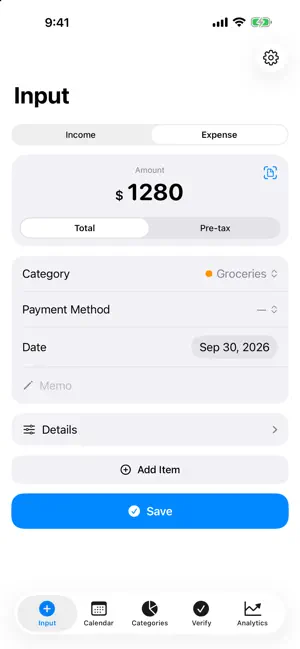
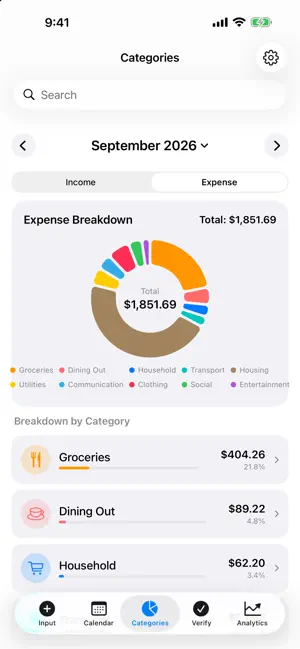
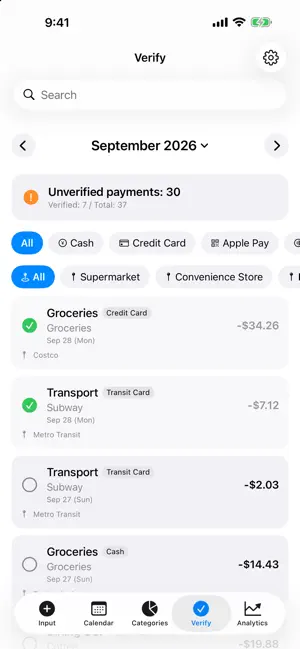
A budget book that lets you look back on your spending by calendar, and shows you where and how your money goes. • Record quickly - Add entries from Siri, Shortcuts or the Action button with just an amount and a category, without opening the app - Ask Siri "How much did I spend on eating out this month?", or point at an entry on screen: "Mark this as checked" - Home Screen widgets jump straight to entry or the receipt camera, and record your usual entries with one tap. You choose those entries in Settings - Stores you've corrected are remembered, so the category and payment method fill in next time - Enter pre-tax amounts, or split one purchase across several categories. You can split or add lines after saving, too - Type an expression such as 120+180 in the amount field and it adds up for you (turn it on in Settings) • Receipt scanning (iPhone and iPad) - Snap a receipt to read the total, date and store name into the entry - Scanning is not perfect yet. Check what was filled in and correct it if it is wrong - The receipt photo is saved with the entry, and you can search by the text read from it, then open the photo - Attach images from your photo library, too - Besides the camera, import from the Photos app or the Files app (images and PDFs) • Calendar and checking - See each month as a calendar and a list, and reorder entries within a day - Check entries off against your card statement. Pick a payment method or place to see that month's total - Link a refund to the expense you fronted - Touch and hold to select several entries and tag them or set the payment method all at once - See spending by category as a chart and a list, after offsets or as paid • Budgets and recurring items - Set monthly budgets, overall and by category, and see how much is left - Register recurring items such as rent and subscriptions and have them recorded automatically - You can turn both off in Settings • Travel currencies - Record the amount in the foreign currency alongside your entry - For cards, add the home-currency amount when the statement arrives. For cash, record the exchange once and keep local payments separate - 19 currencies, including yen, dollars and euros. Choose your main currency • Search - Combine dates and words, like "2026/4/6", "unverified" or "supermarket" • 63 insights (one-time in-app purchase) Eleven chapters: Now, Compare, Forecast, Budgeting, Recurring, Stores, Habits, Spread, Yardsticks, Lifestyle and Looking Back. Charts show trends by day, week and month that you can swipe sideways (totals, by category, by payment method, and a running balance). Star your favorite insights to open them first. Every number shows how it was calculated. Buy once and use it on all devices with the same Apple Account. • Sync with iCloud - Entries, categories, receipt photos and the currency setting stay in step across iPhones and iPads signed in with the same Apple Account. Apple Watch shares entries, categories and the currency setting - The app works without iCloud, too (the Apple Watch app needs iCloud to receive the categories you set up on iPhone). Sync happens only between devices signed in to iCloud • Apple Watch - Record an expense right from your wrist. Say or turn the Digital Crown to enter the amount, then pick a category (income, notes and receipts are on iPhone and iPad) - Categories come from your iPhone through iCloud. Open the app on your iPhone first • Also - Edit a category's name, icon and color. Deleting one asks first and lets you move its entries to another category - iPhone, iPad and Apple Watch. On iPhone Duo, it fits both the outer and the inner display - See this month's spending in Home Screen and Lock Screen widgets - Japanese and English, light and dark mode - Export to CSV, narrowed down by period, payment method and more • Privacy Your data is stored on your device and in your own iCloud. The developer and third parties cannot see it. No ads.
What’s new
Version 3.3.1 · Updated October 21, 2026
・Fixed an issue on iPad where, with only a few search results, the screen behind the keyboard showed through ・Fixed an issue where the app could occasionally quit unexpectedly
App privacy
The developer, junto yanai, reported these privacy practices to Apple.
Data Not Collected
The developer does not collect any data from this app.
Alternatives to Budget Book - Track Spending
Looking for apps like Budget Book - Track Spending? Here are 6 similar apps on the App Store. The highest rated is Kakeibo-家計簿 (5.0/5), and 5 of the 6 are free to download.
-
 Kuro
Kuro
-
 MOA : Budget
-
 Lens: Daily Budget
-
 家計と個人の財務管理 - 家計簿・資産管理
-
 Kakeibo-家計簿
5.0
Kakeibo-家計簿
5.0
-
 AI Expense Manager MoneyPot
| App | Rating | Price | Last updated | Compare |
|---|---|---|---|---|
| Budget Book - Track Spending | – | Free | October 21, 2026 | |
| Kuro | – | 9.99 USD | Oct 9, 2026 | Compare |
| MOA : Budget | – | Free | Aug 14, 2026 | Compare |
| Lens: Daily Budget | – | Free | Oct 10, 2026 | Compare |
| 家計と個人の財務管理 - 家計簿・資産管理 | – | Free | Sep 7, 2026 | Compare |
| Kakeibo-家計簿 | 5.0 / 5 (1) | Free | Oct 16, 2026 | Compare |
| AI Expense Manager MoneyPot | – | Free | Oct 2, 2026 | Compare |