

CellGlide - USB Tethering
Xi Wang Utilities iPhoneiPadiPod touch
CellGlide - USB Tethering is a free Utilities app for iPhone and iPad by Xi Wang. Rated 5.0/5 from 4 ratings. Requires iOS 17.0. Updated November 3, 2026.
- Rating
- 5.0
- 4 ratings
- Price
- Free
- on the App Store
- Size
- 12 MB
- Age 4+
- Updated
- Nov 3
- 2026 · v2.5.0
Screenshots


About CellGlide - USB Tethering
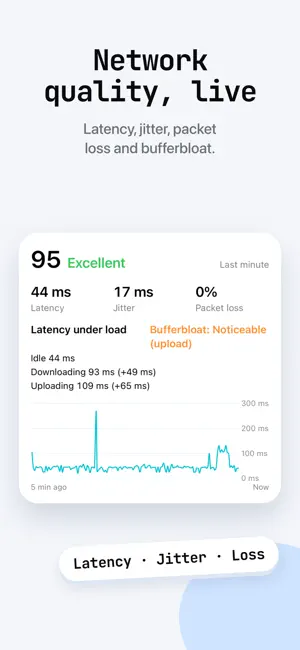
Your computer, online anywhere. Hotel Wi-Fi won’t connect? Broadband down at home? On a call at a café? Connect your iPhone to your computer with a cable, open CellGlide and tap Start sharing, and your computer keeps working on your phone’s connection. Unplug and the computer goes back to its own network. Works with Mac, Linux and OpenWrt routers • Mac and Linux computers: install the CellGlide app and it connects when you plug in • No cable with you: pair your Mac once and it can connect to your iPhone wirelessly (Mac app 1.3.0 or later) • OpenWrt routers: plug your iPhone into the router and the devices you choose go online through it, even when the home broadband is down Why you can rely on it • Plug in and go: with CellGlide on your computer it connects when you plug in, no setup each time • See how it’s doing: live speeds, network quality, latency and loss, and a heads-up when something breaks • Recovers on its own: retries when the phone’s connection drops; send diagnostics in one tap if you need help • Leaves your settings alone: never changes Wi-Fi or other saved network settings Clear on your iPhone too • Dynamic Island countdown and live speeds, plus a black focus page that saves power • This month’s data, allowance reminders and Data saver to protect your plan • Network quality, speed tests and recent results to compare places and networks • Encrypted DNS (DNS over HTTPS, DNS over TLS) and DNS acceleration Going online through your iPhone uses your cellular plan; follow your carrier’s terms. Requires CellGlide on your computer or router, free at cellglide.com; the Mac app needs macOS 13 or later.
What’s new
Version 2.5.0 · Updated November 3, 2026
• New wireless sharing: no cable? Your Mac can still get online through your iPhone (needs CellGlide for Mac 1.3.0) • A short animation on first launch shows how to pair • Test your Wi‑Fi speed too when Wi‑Fi is connected • Uses less energy while sharing • Bug fixes and stability improvements
App privacy
The developer, Xi Wang, reported these privacy practices to Apple.
Data Linked to You
The following data, which may be collected and linked to your identity, may be used for the following purposes:
- Contact Info: Email Address
- User Content: Other User Content
- Diagnostics: Other Diagnostic Data
Used for: App Functionality
Data Not Linked to You
The following data, which may be collected but is not linked to your identity, may be used for the following purposes:
- Identifiers: Device ID
- Usage Data: Product Interaction
Used for: Analytics
Alternatives to CellGlide - USB Tethering
Looking for apps like CellGlide - USB Tethering? Here are 6 similar apps on the App Store. The highest rated is Device Status⁺ CPU x Monitor z (4.8/5), and all 6 are free to download.
-
 Jinx - System-Wide Ad Blocker
4.6
-
 Device Status⁺ CPU x Monitor z
4.8
-
 Aurader: Read Aloud Ebook TTS
4.7
-
 Case Tracker for USCIS
4.8
-
 Portable WiFi - Mobile Hotspot
4.1
-
 ntfy
4.7
| App | Rating | Price | Last updated | Compare |
|---|---|---|---|---|
| CellGlide - USB Tethering | 5.0 / 5 (4 ratings) | Free | November 3, 2026 | |
| Jinx - System-Wide Ad Blocker | 4.6 / 5 (188) | Free | Oct 31, 2026 | Compare |
| Device Status⁺ CPU x Monitor z | 4.8 / 5 (193) | Free | Nov 1, 2026 | Compare |
| Aurader: Read Aloud Ebook TTS | 4.7 / 5 (177) | Free | Oct 27, 2026 | Compare |
| Case Tracker for USCIS | 4.8 / 5 (5,047) | Free | Jun 5, 2025 | Compare |
| Portable WiFi - Mobile Hotspot | 4.1 / 5 (2,236) | Free | Oct 14, 2025 | Compare |
| ntfy | 4.7 / 5 (489) | Free | May 29, 2026 | Compare |