

Heatwise: Phone Heat Monitor
BEGRIP Utilities iPhoneiPadiPod touch
Heatwise: Phone Heat Monitor is a free Utilities app for iPhone and iPad by BEGRIP. Requires iOS 16.0. Updated November 16, 2026.
- Price
- Free
- on the App Store
- Size
- 4 MB
- Age 4+
- Updated
- Nov 16
- 2026 · v1.3.2
Screenshots


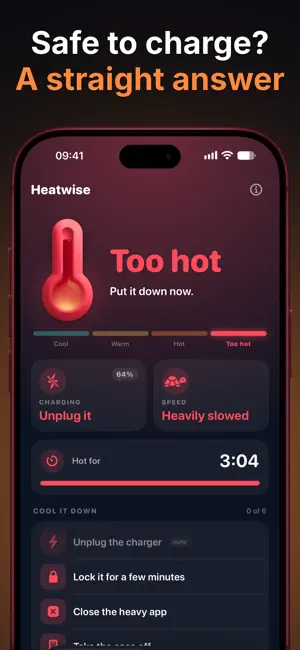

About Heatwise: Phone Heat Monitor
Your phone is hot. Heatwise tells you if that is a problem and what to do about it, using the thermal state iOS itself reports. ONE SCREEN, THREE ANSWERS • How hot it is: Cool, Warm, Hot or Too hot, straight from iOS • Whether it is safe to charge right now • Whether iOS is slowing it down COOL IT DOWN When it runs hot, Heatwise gives you a short checklist in the order that works: unplug the charger, close the heavy app, take the case off, get it out of the sun, turn on Low Power Mode. The charger and Low Power Mode tick themselves, because iOS reports them. A timer shows how long it has been hot and tells you when it is back to normal. WHAT HEATS A PHONE Tap a cause, like a hot car, gaming, charging or a fresh iOS update, to see if that heat is normal and what helps. ALL YOUR DEVICES iPhone, iPad and Mac in one list. Each device shares its heat level through your own iCloud whenever Heatwise or its widget runs on it, with the time it last checked. THROTTLE TEST Runs a fixed workload for up to five minutes and measures how much speed iOS takes away as the chip heats up. It stops by itself at Hot. SIRI AND SHORTCUTS Ask Siri "Is my phone hot in Heatwise". Use the Check Phone Heat and Is It OK to Charge actions in your own automations, for example when a charger is plugged in. GEEKY DETAILS A second tab for people who want the raw numbers: every signal iOS hands an app with its API name, a timeline of the session, time spent in each state, a log of every change and device info. WIDGETS Home Screen and Lock Screen widgets with the thermometer from the app. The large widget shows all your devices. A Control Center button opens the app. WHY THERE ARE NO DEGREES Apple does not let apps read the temperature sensors in an iPhone. An app that shows 41 °C worked that number out from something else. Heatwise shows the real signal iOS uses to slow the chip and dim the screen, in its four real steps. GOOD TO KNOW iOS pauses apps in the background, so Heatwise reads a device while it or its widget is running. Open it when the phone feels warm. No account, no analytics. Device levels travel only through your own iCloud. Runs on iPhone and iPad with iOS 16 or later, and on Macs with Apple silicon.
What’s new
Version 1.3.2 · Updated November 16, 2026
Bigger iPad layout, a Mac version and all your devices in one list. New widget look, throttle test, Siri and Shortcuts, and tips for each cause of heat. Thanks for using Heatwise!
App privacy
The developer, BEGRIP, reported these privacy practices to Apple.
Data Not Collected
The developer does not collect any data from this app.
Alternatives to Heatwise: Phone Heat Monitor
Looking for apps like Heatwise: Phone Heat Monitor? Here are 6 similar apps on the App Store. The highest rated is SwipeClean26: Photo Cleaner (5.0/5), and all 6 are free to download.




| App | Rating | Price | Last updated | Compare |
|---|---|---|---|---|
| Heatwise: Phone Heat Monitor | – | Free | November 16, 2026 | |
| Sparkplug by Motherboard | – | Free | Mar 18, 2026 | Compare |
| しょうがく訴訟ナビ | – | Free | Nov 6, 2026 | Compare |
| GPU Arena | – | Free | Sep 30, 2026 | Compare |
| MultiVolt | – | Free | Sep 2, 2026 | Compare |
| Crager | – | Free | Oct 31, 2026 | Compare |
| SwipeClean26: Photo Cleaner | 5.0 / 5 (1) | Free | Oct 15, 2026 | Compare |