

Guidevi: IPTV Player & EPG
MUSTAFA ENES DEMIRKAYA Entertainment iPhoneiPadiPod touch
Guidevi: IPTV Player & EPG is a free Entertainment app for iPhone and iPad by MUSTAFA ENES DEMIRKAYA. Rated 5.0/5 from 1 ratings. Requires iOS 26.0.
- Rating
- 5.0
- 1 ratings
- Price
- Free
- on the App Store
- Size
- 65 MB
- Age 4+
- Updated
- Nov 15
- 2026 · v1.1.2
Screenshots
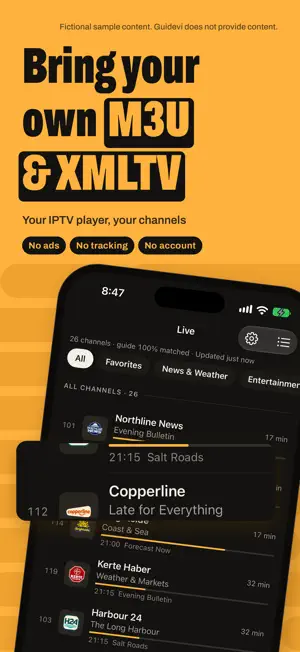


About Guidevi: IPTV Player & EPG
Bring your own M3U or Xtream Codes API compatible source and XMLTV guide, and use them in a native player and TV guide. No ads, no tracking, no account. Guidevi does not provide any content. It is a player: you add sources you already have the right to use, such as your IPTV subscription, a home server or an antenna tuner. BRING YOUR OWN SOURCE • Add an M3U / M3U8 playlist URL or an Xtream account. On iPhone and iPad you can also import a playlist file. • Add your own XMLTV guide address, or use the guide your playlist already points to. • iPhone and iPad: ready-made settings for popular home-server programs build the addresses and test the connection. • Apple TV: scan a QR code with your phone and enter your source there instead of typing with the remote. • Back up sources, favorites and settings to a file and restore them whenever you like. A GUIDE MADE FOR THE LIVING ROOM • A guide grid by channel and time, built for focus navigation with the remote on Apple TV and tuned for iPad. On iPhone, a now-and-next list. • A mini guide in the player, and a quick jump to tonight or tomorrow. • Catch-up: if your provider keeps an archive, watch past programs or restart the program on now. Guidevi plays that archive and keeps no copy of any video. • Open like a TV: Guidevi starts on the channel you watched last. • Guide health: see how well your guide matches your channels and when it refreshes next. • Search across channels, movies, series and program titles. PLAYS WHAT YOUR SOURCE SENDS • Two playback engines. If a stream will not open in one, Guidevi switches to the other. • "Why isn't it playing?" explains in plain words what is wrong with a stream, such as a connection limit or an unsupported format. • A stream info panel with resolution, codec, bitrate and the engine in use. • Audio and subtitle tracks, with subtitle size and color. Your language choices are remembered. • On iPhone and iPad, sound keeps playing when you leave the app or lock the screen, with Lock Screen controls. • Picture in Picture and AirPlay with picture on iPhone and iPad for HLS and MP4 streams. Streams that only the second engine can open go to AirPlay as sound only. • For Xtream accounts and compatible playlists, choose the live stream format: Automatic, HLS or MPEG-TS. MOVIES AND SERIES If your source offers movies and series, browse them with posters, genres and search. Seasons and episodes stay in order, Continue Watching picks up where you left off, and the next episode can play automatically. PRIVATE BY DESIGN • No ads, no analytics, no tracking and no Guidevi server. App Privacy: Data Not Collected. • Parental controls: lock groups behind a PIN. Adult groups stay locked until you set one. • Optional iCloud sync (Premium) keeps your sources, favorites and progress in your own iCloud. Passwords are end-to-end encrypted. • Large lists stay fast: playlists and guides are imported in the background into an on-device database. Measured on an iPhone 12 Pro, a 100 MB XMLTV guide imports in under 2 seconds. FREE, WITH OPTIONAL PREMIUM Playback, one source, the guide for the next 24 hours, Start Over, favorites, resume, parental controls and backup are free, with no ads or watermarks. Guidevi Premium adds unlimited sources, the full guide range, past programs from your provider's archive, program search, iCloud sync and group sorting. Choose yearly (with a 7-day free trial), monthly, or a one-time lifetime purchase. Family Sharing is on for all three. Subscriptions renew automatically unless canceled at least 24 hours before the end of the current period. Payment is charged to your Apple Account at confirmation, and you can manage or cancel in your Apple Account settings. Terms of Use: https://guidevi.com/terms/ Privacy Policy: https://guidevi.com/privacy/ Apple Standard EULA: https://www.apple.com/legal/internet-services/itunes/dev/stdeula/ Questions or ideas? [email protected].
What’s new
Version 1.1.2 · Updated November 15, 2026
A small maintenance update. Everything works as before.
App privacy
The developer, MUSTAFA ENES DEMIRKAYA, reported these privacy practices to Apple.
Data Not Collected
The developer does not collect any data from this app.
Alternatives to Guidevi: IPTV Player & EPG
Looking for apps like Guidevi: IPTV Player & EPG? Here are 6 similar apps on the App Store. The highest rated is ClawTV: IPTV Player (5.0/5), and 5 of the 6 are free to download.
-
 Zapio: IPTV Player
-
 ClawTV: IPTV Player
5.0
-
 Flux: IPTV Player
-
 Marquee: 4K HDR Video Player
-
 Legacy IPTV Pro: M3U & EPG
-
 EasyIpTv
| App | Rating | Price | Last updated | Compare |
|---|---|---|---|---|
| Guidevi: IPTV Player & EPG | 5.0 / 5 (1 rating) | Free | November 15, 2026 | |
| Zapio: IPTV Player | – | Free | Nov 13, 2026 | Compare |
| ClawTV: IPTV Player | 5.0 / 5 (2) | 4.99 USD | Aug 11, 2026 | Compare |
| Flux: IPTV Player | – | Free | Nov 15, 2026 | Compare |
| Marquee: 4K HDR Video Player | – | Free | Nov 12, 2026 | Compare |
| Legacy IPTV Pro: M3U & EPG | – | Free | Nov 17, 2026 | Compare |
| EasyIpTv | – | Free | Apr 4, 2026 | Compare |