

紫毫
辉 王 Utilities iPhoneiPadiPod touch
紫毫 is a free Utilities app for iPhone and iPad by 辉 王. Rated 4.7/5 from 15 ratings. Requires iOS 17.0. Updated November 1, 2026.
- Rating
- 4.7
- 15 ratings
- Price
- Free
- on the App Store
- Size
- 38 MB
- Age 4+
- Updated
- Nov 1
- 2026 · v2.2.0
Screenshots



About 紫毫
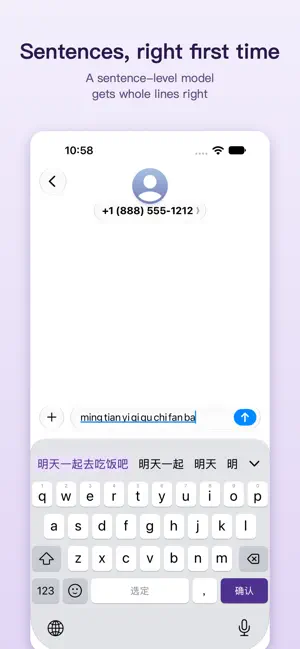
Hit the wrong key and get the wrong word? Picking a long sentence word by word? Ads, and wondering where your typing goes? Hare is a Chinese keyboard built on the Rime engine: it reads what you meant when a key slips, gets whole sentences right, and keeps everything on your device. No ads. SLIPS FORGIVEN • Touch-aware correction: a key hit off-center, a letter too many or too few, and the word you meant still comes first • What you typed always comes first when it is a word itself • A sentence-level language model gets long sentences right in one go, and learns the words you use • 9-key typing corrects slips too TYPE THE WAY YOU LIKE • Full Pinyin on 26 keys, 9-key (T9), Xiaohe Shuangpin and English, switched in a tap • Mixed input: type English words right in Chinese mode, with completions after a few letters • Simplified, Traditional, Taiwan and Hong Kong Traditional output FOR RIME USERS: RIME, AT LAST, ON IPHONE • rime-ice built in, ready to type • Wanxiang, Wanxiang Pro (Xiaohe Shuangpin with shape codes), Frost, Mint, Moqi, LufsX and more, imported in a tap from the recommended list; or bring your own scheme from a GitHub repository or a zip link • Shape-code filtering: tap 辅 and type a code to pick the character inside a word • Date, time, weekday and lunar-date shortcuts in every scheme • Add Pinyin word lists and phrase files to the scheme in use; search and remove what it learned MADE FOR FAST HANDS • Customize every key: swipe-up and long-press symbols, the keys beside space, the 123 key, 9-key punctuation • Swipe left on delete to remove a sentence at a time, up to bring it back; slide on letters or space to move the cursor • The 123 page suggests operators and shows the result of what you type • Text shortcuts, emoji suggestions, clipboard; email addresses and links stay in one piece • Hold return for a new line without sending; long-press for tone marks and more punctuation • Themes and background pictures; made for iPhone, iPad and the split keyboard on iPhone Duo PRIVATE BY DESIGN • Typing, correction, learning and suggestions all happen on your device; what you type is never uploaded • No ads, no pop-ups; the home screen counts characters, never what they were VOICE AND AI (HARE PRO) • Voice input without leaving the app you are in; speak over a playing video and its sound mutes for you • Live translation as you type • AI scripts: translate, polish, summarize, reply, plus fix and rewrite templates, or write your own AI features come with no built-in account or service: you choose a third-party model or translation provider and enter your own key. Requests go straight from your device to that provider, never through Hare's servers; phone numbers, ID and card numbers, email addresses and verification codes are hidden before sending and restored on the device. Without it, typing works as always. PRICE Typing, correction, learning, 9-key, Shuangpin, scheme import and text shortcuts are free, for good. Hare Pro is a one-time purchase with no subscription: voice input, live translation, AI scripts, every theme and background picture, and sync across devices.
Ratings & reviews
4.7
15 ratings
What’s new
Version 2.2.0 · Updated November 1, 2026
Voice input (Hare Pro) • Faster text: words appear about 0.6 s after you start speaking and land about 0.1 s after you let go. • With the punctuation model on, punctuation shows as soon as you pause. • Speak while a video plays: the picture keeps going and its sound is lowered, then restored; opening voice for the first time no longer pauses the video. • The microphone is released as soon as you finish, so the orange dot goes out and headphone stereo comes back. • A single sentence leaves out the final full stop by default; change it in voice settings. Pinyin and candidates • The nine-key pinyin bar shows only what your keys spell, split into syllables; full syllables come first, and short digit strings find more words. • Pick a reading under Pinyin in the expanded candidates: Full Pinyin and Xiaohe list readings from neighbouring keys by where you tapped, and after the first character the next syllables can still be chosen. • After an auxiliary code picks the first character of a two-character word, the code clears so you can type one for the second. • Swipe down on the candidate bar to see all candidates, and on emoji to return to the keyboard; hold the candidate bar arrow to hide the keyboard. • Fewer accidental swipe inputs when typing fast, and better correction between neighbouring keys. Keyboard and themes • The symbol right of space on the 26-key keyboard can be set to any tap content. • English input options are together under 26-Key · Input › English Input. • Per-key colors can differ in light and dark mode; custom key text color also applies to final hints and swipe-up symbol hints. • The side menu of the expanded candidates is more compact. Schemes and data • Sync includes keyboard settings: symbols, keys, gestures, haptics, English options and more. • Wanxiang Pro · Hexing supports native auxiliary-code filtering and the spoken-language grammar model. • custom_phrase.txt can be imported as a dictionary, with line numbers for errors; text shortcuts can be imported from Mac text replacements and searched. • The usage chart scales each page to its own data. Fixes • Fixed old pinyin carried into a new text field, punctuation cycling, long text being cleared, nine-key swipe input missing text-shortcut candidates, and an extra space after a text shortcut.
App privacy
The developer, 辉 王, reported these privacy practices to Apple.
Data Not Linked to You
The following data, which may be collected but is not linked to your identity, may be used for the following purposes:
- User Content: Other User Content
Used for: App Functionality
Alternatives to 紫毫
Looking for apps like 紫毫? Here are 6 similar apps on the App Store. The highest rated is Nubox (5.0/5), and 5 of the 6 are free to download.
-
 NanoMouse - IME for AI era
4.3
-
 元书输入法
4.4
-
 Nubox
5.0
-
 Yore - AI Notes & Reminders
5.0
-
 Vonode
3.7
-
 塔台
5.0
| App | Rating | Price | Last updated | Compare |
|---|---|---|---|---|
| 紫毫 | 4.7 / 5 (15 ratings) | Free | November 1, 2026 | |
| NanoMouse - IME for AI era | 4.3 / 5 (14) | Free | Oct 31, 2026 | Compare |
| 元书输入法 | 4.4 / 5 (26) | Free | Oct 29, 2026 | Compare |
| Nubox | 5.0 / 5 (1) | Free | Oct 23, 2026 | Compare |
| Yore - AI Notes & Reminders | 5.0 / 5 (6) | Free | Oct 26, 2026 | Compare |
| Vonode | 3.7 / 5 (3) | Free | Oct 27, 2026 | Compare |
| 塔台 | 5.0 / 5 (10) | 1.99 USD | Oct 23, 2026 | Compare |
Compare 紫毫 with the top alternatives: ratings, updates, ASO score and keyword gaps →