

Bean Counter: Tally Clicker
Andrew Hamilton Utilities iPhoneiPadiPod touchApple Watch
Bean Counter: Tally Clicker is a free Utilities app for iPhone and iPad by Andrew Hamilton. Rated 5.0/5 from 3 ratings. Requires iOS 18.0.
- Rating
- 5.0
- 3 ratings
- Price
- Free
- on the App Store
- Size
- 69 MB
- Age 4+
- Updated
- Oct 24
- 2026 · v1.1.3
Screenshots

About Bean Counter: Tally Clicker
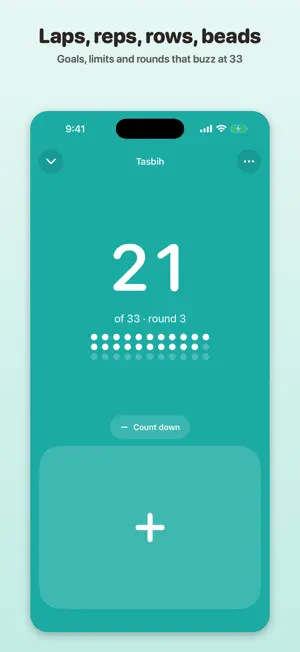
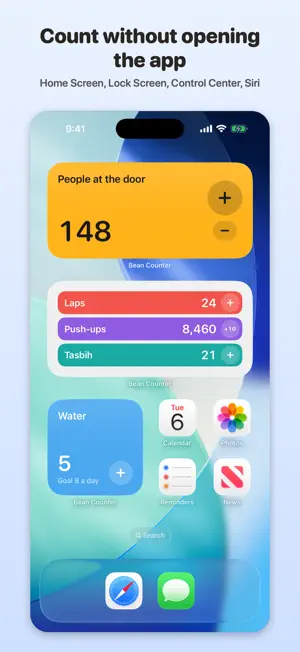
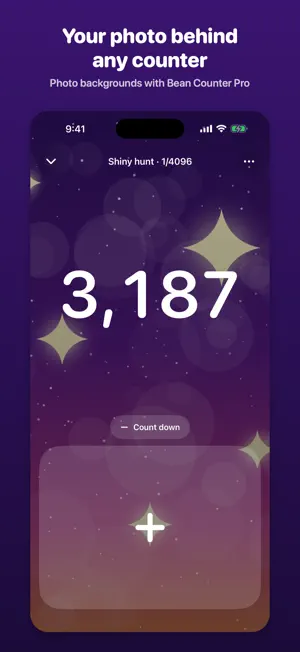
A tally counter that never loses your count. No ads, no sign-up, no subscription, and as many counters as you want, free. Count laps in the pool, reps at the gym, rows of a sleeve, 33 beads of tasbih, resets on a shiny hunt, people through the door. Tap the big button. Bean Counter saves every tap the moment it happens, buzzes when you hit your number, and keeps a history you can check and fix later. BUILT FOR PEOPLE WHO'VE LOST A COUNT BEFORE • Every tap is saved instantly and kept with its time • A backup goes to the Files app every day, automatically • Restoring a backup adds what's missing and never deletes anything • Deleted counters wait 30 days in Recently Deleted • No ads and no upgrade screens in your way, ever • The amount per tap lives in Edit, so a stray thumb can't change it mid-count • Tapped one too many? The button under the number goes the other way COUNT ANYTHING, YOUR WAY • Count and Count down: by 1 or any amount, decimals included • Goals: 8 glasses of water a day • Limits: no more than 3 coffees • Rounds: 33 beads, a decade of the rosary, an 8-row pattern repeat, sets at the gym, with a buzz at the end of each one • Shiny hunts: every reset and encounter, with a + on your Lock Screen and an option to keep the screen on while you play • Uses left: how many more shaves this blade has • Reminders on the days and at the time you choose • Folders, a note on any counter or count, and counts added to past days COUNT WITHOUT OPENING THE APP • Home Screen and Lock Screen widgets with a working + button • Control Center and the Action Button • Siri and Shortcuts: "Count Water in Bean Counter" YOUR COUNTS, YOURS • iCloud sync keeps your iPhone and iPad in step, free • History with a 30-day chart, free • Export to CSV any time, free • No account and no tracking: Bean Counter collects no data BEAN COUNTER PRO One purchase, yours to keep. Never a subscription, and Pro never locks your data: history, backups and export stay free. • Apple Watch app: count from your wrist, in step with your iPhone • Photo backgrounds: your own photo behind any counter, in the app and in widgets • Themes that restyle the whole app, or your own on a color wheel • Any counter color you like, and alternate app icons • Insights: week, month, year and all-time charts, averages, streaks and your best day • Sounds: a click on every count, and a chime at goals and at the end of each round • Folder sessions: save a folder's counts and start fresh in one tap Made by an independent developer. Ideas and questions are welcome on the support page. Available in 44 languages.
What’s new
Version 1.1.3 · Updated October 24, 2026
Give any counter a note, like the row of a pattern or a dose, and see it right under the name. Set a reminder for the days and time you choose. Sort the list by highest number, or turn on Compact list in Settings to see more counters at once.
App privacy
The developer, Andrew Hamilton, reported these privacy practices to Apple.
Data Not Collected
The developer does not collect any data from this app.
Alternatives to Bean Counter: Tally Clicker
Looking for apps like Bean Counter: Tally Clicker? Here are 6 similar apps on the App Store.
-
 Fileen
-
 Kitchen-Timer
-
 Tappy: Tally Counter & Clicker
-
 Tally Counter - Simple Clicker
-
 Re:Count - Tally Counter
-
 Fraction to Percent Converter
| App | Rating | Price | Last updated | Compare |
|---|---|---|---|---|
| Bean Counter: Tally Clicker | 5.0 / 5 (3 ratings) | Free | October 24, 2026 | |
| Fileen | – | Free | Sep 9, 2026 | Compare |
| Kitchen-Timer | – | Free | Oct 9, 2025 | Compare |
| Tappy: Tally Counter & Clicker | – | Free | Oct 14, 2026 | Compare |
| Tally Counter - Simple Clicker | – | Free | Oct 13, 2026 | Compare |
| Re:Count - Tally Counter | – | Free | Oct 7, 2026 | Compare |
| Fraction to Percent Converter | – | Free | Jan 8, 2024 | Compare |