

Nemong - Carousel Maker
ohttne Photo & Video iPhoneiPadiPod touch
Nemong - Carousel Maker is a free Photo & Video app for iPhone and iPad by ohttne. Rated 5.0/5 from 2 ratings. Requires iOS 17.0. Updated October 10, 2026.
- Rating
- 5.0
- 2 ratings
- Price
- Free
- on the App Store
- Size
- 109 MB
- Age 4+
- Updated
- Oct 10
- 2026 · v1.3.0
Screenshots

About Nemong - Carousel Maker
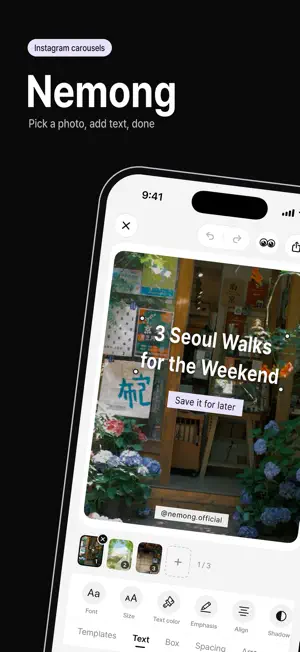
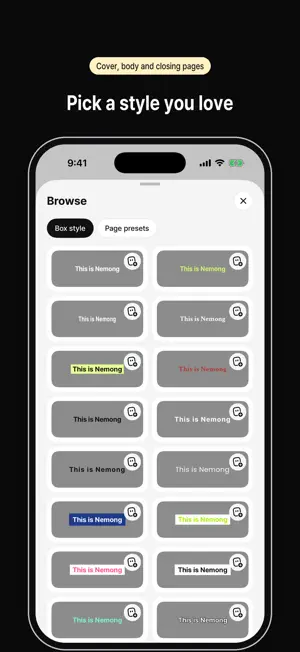
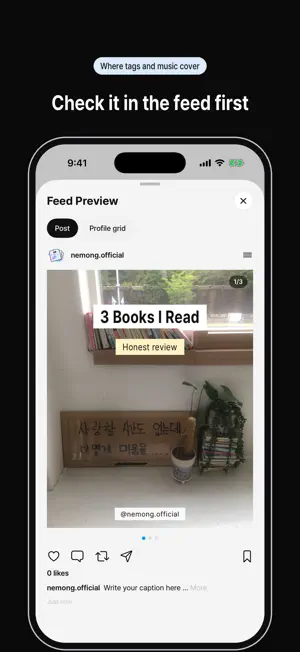
Not sure what to post today? Pick a photo, add what you want to say, and save. With Nemong, an Instagram carousel takes about a minute. TEXT THAT LOOKS GOOD Squeezed bold titles, pastel labels, wiggly letters. Fonts, colors, panels, borders, outlines and shadows — everything you want to tweak is right there. Includes handwritten and display fonts like Caveat, Pacifico, Poppins, Bebas Neue and DM Serif Display. NOT SURE WHERE TO START? BROWSE Over 50 text styles and 25 page presets you see in today's carousels, including 3-page sets with a cover, body and closing page. Tap to try one, save the ones you like, and they're yours next time. MAKE ONE WORD POP Swipe over the letters you want and make just those bold, colored or highlighted. Tap to pick a single letter. TEXT BRUSH Draw a line with your finger and your words follow it, letter by letter. COVER TEXT THAT MOVES Let your text fade, rise, pop or bounce in — 11 motion effects. You can use a video as the background, too. That page is saved as a video. MANY PAGES AT ONCE Pick several photos and videos together, duplicate pages and drag to reorder. Your @handle and page numbers go on every page automatically. CHECK BEFORE YOU POST See how it looks in the feed and on your profile grid. Turn on the safe zone to see where Instagram covers your image with tags, music, buttons and 1/N. AND MORE Crop, rotate, blur, brightness, cover brush, gradient, frosted glass, eyedropper, font import, emoticons, logo library, solid-color pages and auto-save. KEEP IT SIMPLE No sign-up, no ads. Your photos and text stay on your phone. Share straight to Instagram from the share button. NEMONG PLUS Some features — saving your own templates and presets, applying styles from Browse, and removing backgrounds from photo stickers — need Nemong Plus, available as a monthly subscription or a one-time lifetime purchase. The monthly plan renews automatically until you cancel in your App Store account settings at least 24 hours before the end of the current period. Terms of Use (EULA): https://www.apple.com/legal/internet-services/itunes/dev/stdeula/ Privacy Policy: https://www.ohttne.com/nemong/privacy.html Questions? [email protected]
What’s new
Version 1.3.0 · Updated October 10, 2026
Nemong now speaks English! - The whole app is in English, plus 8 new fonts: Poppins, Bebas Neue, Crimson Text, DM Serif Display, Fredoka, Caveat, Pacifico and Courier Prime - Picking words to highlight keeps each word on one line - Gradient and ratio options show the right names in every language
App privacy
The developer, ohttne, reported these privacy practices to Apple.
Data Not Linked to You
The following data, which may be collected but is not linked to your identity, may be used for the following purposes:
- Usage Data: Product Interaction
- Diagnostics: Crash Data
Used for: Analytics
Alternatives to Nemong - Carousel Maker
Looking for apps like Nemong - Carousel Maker? Here are 6 similar apps on the App Store. The highest rated is feelm: Shot-by-Shot Camera (5.0/5), and all 6 are free to download.
-
 feelm: Shot-by-Shot Camera
5.0
feelm: Shot-by-Shot Camera
5.0
-
 bake: AI 숏폼 만들기, 릴스·쇼츠·동영상·편집
5.0
bake: AI 숏폼 만들기, 릴스·쇼츠·동영상·편집
5.0
-
 PULL!-당겨서 찍는 필름 카메라
3.0
PULL!-당겨서 찍는 필름 카메라
3.0
-
 PixMask - Blur Face & Plate
-
 GIF Maker - Batch Video to GIF
-
 Timelog - Auto timestamp vlog
| App | Rating | Price | Last updated | Compare |
|---|---|---|---|---|
| Nemong - Carousel Maker | 5.0 / 5 (2 ratings) | Free | October 10, 2026 | |
| feelm: Shot-by-Shot Camera | 5.0 / 5 (1) | Free | Oct 8, 2026 | Compare |
| bake: AI 숏폼 만들기, 릴스·쇼츠·동영상·편집 | 5.0 / 5 (1) | Free | Oct 5, 2026 | Compare |
| PULL!-당겨서 찍는 필름 카메라 | 3.0 / 5 (2) | Free | Aug 2, 2026 | Compare |
| PixMask - Blur Face & Plate | – | Free | Jul 27, 2026 | Compare |
| GIF Maker - Batch Video to GIF | – | Free | Oct 2, 2026 | Compare |
| Timelog - Auto timestamp vlog | – | Free | Sep 10, 2026 | Compare |