

VeasDei: Land Area Measure
Seyha Sam Utilities iPhoneiPadiPod touch
VeasDei: Land Area Measure is a free Utilities app for iPhone and iPad by Seyha Sam. Rated 5.0/5 from 1 ratings. Requires iOS 16.4. Updated October 21, 2026.
- Rating
- 5.0
- 1 ratings
- Price
- Free
- on the App Store
- Size
- 54 MB
- Age 4+
- Updated
- Oct 21
- 2026 · v1.0.7
Screenshots


About VeasDei: Land Area Measure
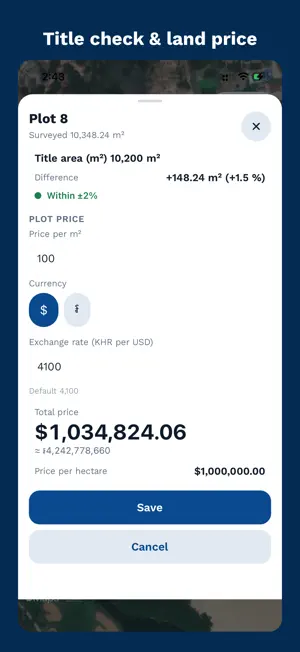
Measure land the easy way. Built in Cambodia, made for everyone. VeasDei turns your iPhone into a land-measuring tool. Tap the corners on a satellite map — or walk around the boundary — and see the area, perimeter and every side length instantly. Free. No ads. No tracking. MEASURE IN SECONDS - Tap corners on the satellite map — area in m², hectares, acres and more - Walk mode: walk the boundary and GPS draws the shape - GPS averaging for more accurate corners, with the accuracy (±m) shown - Every side length shown right on the map - Drag corners to adjust, add a corner between two others, undo anything - Crosshair mode for precise placement - Warns you when lines cross, and fixes the shape in one tap MADE FOR LAND DEALS - Title vs Real: enter the area from your land title and see the difference in m² and % - Price calculator: price per m² or hectare → total, in USD or riel - Notes on every plot SEARCH AND DIRECTIONS - Search places in Khmer or English, get directions (drive, moto, walk) and open them in your favourite maps app SHARE AND EXPORT — ALL FREE - PDF land report: the plot's shape drawn from its corners, plus the area, every side length, corner coordinates and notes - Picture card: a 1080 × 1440 PNG of the plot — shape, area and note — ready to post or send - Share link: anyone can open your plot in a browser — no app needed - KML, KMZ, GeoJSON, GPX, CSV, Shapefile and DXF for Google Earth, GIS and AutoCAD - Import KML, KMZ, CSV and GeoJSON files - Paste a list of coordinates to draw a shape - Export every plot at once as a single ZIP backup FOR SURVEYORS AND PROFESSIONALS - Coordinates in decimal, DMS, UTM (zone 48N) and MGRS - Edit any corner by typing its numbers - Altitude from GPS, when your iPhone reports it - Many units: m², ha, km², acre, ft², yd² · m, km, ft, yd, mi SIMPLE AND PRIVATE - Khmer and English, follows your iPhone's language - Dark mode - Measuring, saving and every export work offline — search, directions and share links need a connection - Your plots stay on your phone unless you create a share link — no account, no ads, no tracking Measurements are for reference only and are not an official land survey. Made in Cambodia by Lemonium · lemonium.app Questions or ideas? Telegram @lemonium99
What’s new
Version 1.0.7 · Updated October 21, 2026
New in 1.0.7 • Draw mode — split land your own way. Drag a line across the plot to cut it, up to 12 parts. Lines snap to corners, sides, 90° and whole metres. • Exact numbers — tap a line to set its distance from a side or make it 90°; tap a part to set its exact size in m², or merge it back. • Move switch — pinch and pan the map while you draw. • More than one road — mark every road side; the first is the main road. Parts away from the road are clearly marked "No road". • Split by size in m², % or metres wide, with whole-metre widths. • Prices — add a price per m² to see each part's value and the total. • Share card — one image of the whole family split, with roads and prices. • Better PDF — parts table with prices, all roads drawn, hectares shown. • Khmer: all numbers now in Latin digits. • Many small fixes and clearer labels.
App privacy
The developer, Seyha Sam, reported these privacy practices to Apple.
Data Linked to You
The following data, which may be collected and linked to your identity, may be used for the following purposes:
- Identifiers: User ID, Device ID
- Other Data: Other Data Types
Used for: Analytics, App Functionality
Data Not Linked to You
The following data, which may be collected but is not linked to your identity, may be used for the following purposes:
- Usage Data: Product Interaction
- Diagnostics: Crash Data, Performance Data, Other Diagnostic Data
- Location: Precise Location
- User Content: Other User Content
Used for: Analytics, App Functionality