

kada: One tap to Record
Naichuan Zhang Productivity iPhoneiPadiPod touchApple Watch
kada: One tap to Record is a free Productivity app for iPhone and iPad by Naichuan Zhang. Rated 5.0/5 from 3 ratings. Requires iOS 18.0.
- Rating
- 5.0
- 3 ratings
- Price
- Free
- on the App Store
- Size
- 13 MB
- Age 4+
- Updated
- Oct 28
- 2026 · v1.2
Screenshots


About kada: One tap to Record
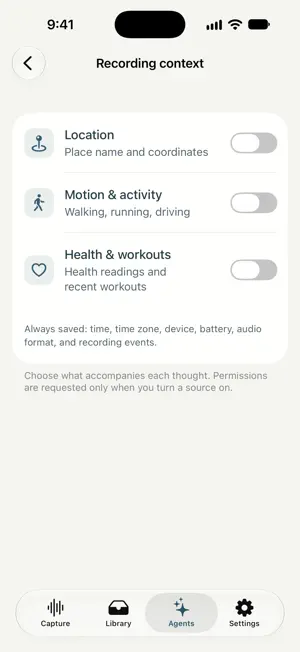
Use the Action Button on a supported iPhone or Apple Watch to record your thoughts, transcribe them in Cloud, and connect your AI agent to work with your notes. YOUR THOUGHTS, READY FOR YOUR AI Kada makes your everyday thoughts useful context for your AI. Capture an idea before it disappears, turn it into text, and bring your notes into the way you think and work. SMART NOTE MERGING (BETA) Let AI bring related thoughts together. Smart Note Merging helps organize related Cloud notes so ideas recorded at different moments can come together. For supported accounts, turn on Auto Note Merging (Beta) in Settings > Cloud notes. RECORD. TRANSCRIBE. CONNECT. Record on iPhone or Apple Watch without signing in. Use the on-screen recorder, an Apple Shortcut, or the Action Button on a compatible device. The Action Button guide explains how to assign Kada in system Settings. Sign in on iPhone for Cloud transcription. New recordings then upload automatically, without a separate Cloud confirmation, and appear in the Library with searchable transcripts and summaries. Record without signing in, or sign out, to keep new recordings local. Your recordings are saved on your device too. Older recordings upload only when you select them. AI processing follows the region assigned to your account when it is created. New accounts created through the mainland China App Store use regional AI services for transcription, summaries, and smart note merging. Existing accounts keep their assigned region. Help identifies your account’s provider. Open the Agents tab to connect ChatGPT or Claude, review connected apps, approve codes, and manage agent access keys. Setup takes place on the agent’s website and requires an account that supports custom MCP servers. You approve access to the text of your Cloud notes, control permissions, and can disconnect an app at any time. Agents never receive your audio; recording details are shared only if you allow that permission. You can also copy or share transcript text with your preferred assistant. CAPTURE WITH LESS FRICTION Start, pause, resume, and finish in the Capture screen, with your choice of animation and navigation available while recording. Capture and Library adapt to wider layouts, letting the note list and transcript appear together when there is room. Help contains the optional welcome guide, recording tips, Cloud information, Watch setup, and feedback options. The included Apple Watch app records independently. Pair the Watch with your account through your iPhone and accept its Cloud disclosure to upload new Watch recordings. You can decline to keep them on the Watch. Local Watch audio does not transfer directly to iPhone. YOUR CONTEXT, YOUR CHOICE Choose what to remember alongside a recording. Location, motion, and health readings are optional and off until you enable them. New signed-in iPhone recordings upload their saved context, including time, device details, and any optional data you chose to collect. Watch context sharing remains an independent choice, off by default. Older recordings require a separate choice to share context.
What’s new
Version 1.2 · Updated October 28, 2026
Connect your Kada notes to ChatGPT or Claude from the Agents tab, manage connected apps, and disconnect them at any time. Capture and Library adapt to wider layouts, and recording stays on the Capture screen. New iPhone recordings upload automatically while you’re signed in; older recordings upload only when you choose them. Includes clearer setup steps and improved button layouts.
App privacy
The developer, Naichuan Zhang, reported these privacy practices to Apple.
Data Linked to You
The following data, which may be collected and linked to your identity, may be used for the following purposes:
- Health & Fitness: Health, Fitness
- Location: Precise Location, Coarse Location
- Contact Info: Email Address
- User Content: Audio Data, Other User Content
- Search History: Search History
- Identifiers: User ID
- Other Data: Other Data Types
Used for: App Functionality
Alternatives to kada: One tap to Record
Looking for apps like kada: One tap to Record? Here are 6 similar apps on the App Store. The highest rated is Walnut Meeting (5.0/5), and all 6 are free to download.
-
 Walnut Meeting
5.0
Walnut Meeting
5.0
-
 Offhand: Voice To Do & Notes
5.0
Offhand: Voice To Do & Notes
5.0
-
 Heurin
5.0
Heurin
5.0
-
 JoinVia: Reminders to Calendar
-
 Tap Tap Counter : MultiCounter
-
 Magic: Human + AI Assistant
| App | Rating | Price | Last updated | Compare |
|---|---|---|---|---|
| kada: One tap to Record | 5.0 / 5 (3 ratings) | Free | October 28, 2026 | |
| Walnut Meeting | 5.0 / 5 (1) | Free | Sep 15, 2026 | Compare |
| Offhand: Voice To Do & Notes | 5.0 / 5 (3) | Free | Oct 6, 2026 | Compare |
| Heurin | 5.0 / 5 (3) | Free | Jul 1, 2026 | Compare |
| JoinVia: Reminders to Calendar | – | Free | Oct 18, 2026 | Compare |
| Tap Tap Counter : MultiCounter | – | Free | Sep 11, 2026 | Compare |
| Magic: Human + AI Assistant | – | Free | Jan 28, 2026 | Compare |