

Savings Circle: Group Savings
Hashim Sultan Abbasi Finance iPhoneiPadiPod touchApple Watch
Savings Circle: Group Savings is a free Finance app for iPhone and iPad by Hashim Sultan Abbasi. Requires iOS 17.0. Updated October 28, 2026.
- Price
- Free
- on the App Store
- Size
- 22 MB
- Age 4+
- Updated
- Oct 28
- 2026 · v1.12
Screenshots
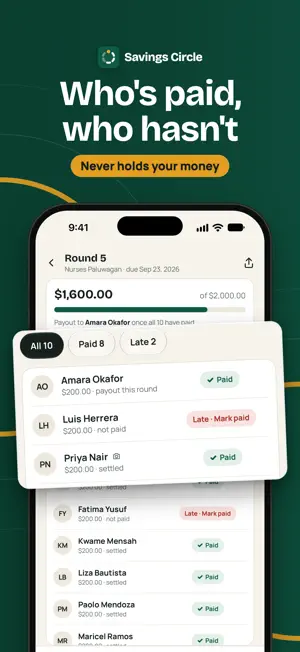


About Savings Circle: Group Savings
Run your paluwagan, susu, committee or savings group from one clear record book on your iPhone: who paid, who is late and whose turn is next. Savings Circle never holds or moves your money. Draw the payout order in front of everyone, get a polite reminder ready to send with one tap, and keep a dated history of every payment and payout. Only you need the app; your members don't install anything. In a rotating savings group (ROSCA), people who know each other pay the same amount each round and one member receives the whole pot, until everyone has had a turn. Savings Circle is made for the organizer, the person who keeps the books. It replaces the paper notebook and the calendar on the fridge. Set up a group • Name each group and pick its type: Paluwagan, Committee, Susu, Tanda, Chama, Arisan, Savings circle or Other. That word shows up on screens, reminders and statements. • Set the currency (one of 24, such as USD, PHP, INR, NGN or MXN), the amount per round, the schedule (weekly, every two weeks, monthly or custom), the first due date and a grace period before a payment counts as late. • Add members by name, with an optional phone number, and pick the language each member's reminders use. A payout order everyone can see • Draw the order at random. The app saves a code (the seed) with the result, so the draw can be checked later. Once made, a draw can't be redone. • Or drag members into the order your group agreed on. • Share the draw result card, seed included, in the group chat. Payments and proof • The Today screen shows who has paid, who is late and who is next. • Log each payment's amount, method, date and reference. • Attach a screenshot or receipt photo as proof. Images stay on your iPhone, and the app flags an image already used for another payment. • Mark proof as verified or reject it, and send the member a receipt message. Polite reminders • One tap opens a pre-written reminder in WhatsApp, SMS or Telegram; you review it and tap Send yourself. The app never sends messages on its own. • Friendly, due-today and late wording, in any of the app's 19 languages, chosen per member. Payouts and history • Record who received the pot; they can sign on screen to confirm. • Confirmed payouts are locked. Corrections are added as new entries, so the history is never rewritten. • If someone drops out midway, replace them; their history stays on record. • Share per-member statements or the full group ledger as a PDF, or a members-by-rounds grid as a CSV spreadsheet (with Pro). Made for iPhone • Ask Siri "Who is late in Savings Circle" or "How much is left to collect in Savings Circle", or add either one to Shortcuts. • Lock the app with a PIN and open it with Face ID or Touch ID. • Optional Sign in with Apple, Google or email keeps your groups on your account, so they come back on a new phone. • Works offline, without an account. Export a password-protected backup file any time. Just a record book Savings Circle only keeps the record of your rotating savings group. It does not hold, collect or transfer money. There is no in-app balance and no link to your bank account or cards. Members keep paying the way they already do, in cash, by bank transfer or with a payment app, and you record it. Every community has its own word for group savings. It is a paluwagan in the Philippines and a committee or kameti in Pakistan and India. It is a susu in Ghana and the Caribbean, a pardner in Jamaica and the UK, and an equb in Ethiopia. Whatever the name, the organizer asks the same question every round: who has paid? One look at Savings Circle tells you. App languages: 19, including English, Spanish, Vietnamese, Portuguese, Arabic and Urdu, chosen in the app. Number formats and suggested payment methods follow your region. Savings Circle is free for your first group. Keep the tradition, lose the notebook: your group savings, in one clear record. Terms of Use (EULA): https://www.apple.com/legal/internet-services/itunes/dev/stdeula/
What’s new
Version 1.12 · Updated October 28, 2026
• Payments to approve now show the screenshot right on the card. Open it full screen to zoom in and look around, then save it to your photos. • Rejected a payment? A copy of its screenshot stays on your phone, under "Rejected payments". • On a round, tap Preview beside a member who has paid to see their screenshot. Check proof lets you zoom in and save it too. • My payments now shows your next three dues. • Invite works right away for a member you've just added. • In a charity fund, "Open round" is now a clear button. • Smaller fixes and polish.
App privacy
The developer, Hashim Sultan Abbasi, reported these privacy practices to Apple.
Data Used to Track You
The following data may be used to track you across apps and websites owned by other companies:
- Identifiers: Device ID
Data Linked to You
The following data, which may be collected and linked to your identity, may be used for the following purposes:
- Location: Coarse Location
- Usage Data: Product Interaction, Advertising Data
- Contact Info: Email Address, Name, Phone Number
- Diagnostics: Other Diagnostic Data
- Purchases: Purchase History
- Financial Info: Other Financial Info
- User Content: Photos or Videos, Customer Support, Other User Content
- Identifiers: User ID, Device ID
Used for: Third-Party Advertising, Developer’s Advertising or Marketing, Analytics, App Functionality
Data Not Linked to You
The following data, which may be collected but is not linked to your identity, may be used for the following purposes:
- Identifiers: Device ID
- Diagnostics: Performance Data, Other Diagnostic Data, Crash Data
- Other Data: Other Data Types
Used for: Third-Party Advertising, Developer’s Advertising or Marketing, Analytics, App Functionality
Alternatives to Savings Circle: Group Savings
Looking for apps like Savings Circle: Group Savings? Here are 6 similar apps on the App Store. The highest rated is MyCircle — Smart Group Savings (5.0/5), and all 6 are free to download.
-
 Jam3eety: Saving Circle Draw
-
 يلا جمعية
-
 Dufaat
-
 MyCircle — Smart Group Savings
5.0
-
 Spending - Simple Budget
-
 MiTandita
4.0
| App | Rating | Price | Last updated | Compare |
|---|---|---|---|---|
| Savings Circle: Group Savings | – | Free | October 28, 2026 | |
| Jam3eety: Saving Circle Draw | – | Free | Oct 1, 2026 | Compare |
| يلا جمعية | – | Free | Sep 23, 2026 | Compare |
| Dufaat | – | Free | Aug 27, 2026 | Compare |
| MyCircle — Smart Group Savings | 5.0 / 5 (1) | Free | Aug 18, 2026 | Compare |
| Spending - Simple Budget | – | Free | Sep 22, 2026 | Compare |
| MiTandita | 4.0 / 5 (1) | Free | Sep 1, 2026 | Compare |