

Close Reader: AI Book Reader
Ilia Ilinskii Book iPhoneiPadiPod touch
Close Reader: AI Book Reader is a free Book app for iPhone and iPad by Ilia Ilinskii. Requires iOS 16.4. Updated November 11, 2026.
- Price
- Free
- on the App Store
- Size
- 61 MB
- Age 9+
- Updated
- Nov 11
- 2026 · v1.3.0
Screenshots
Save to Pinterest

About Close Reader: AI Book Reader
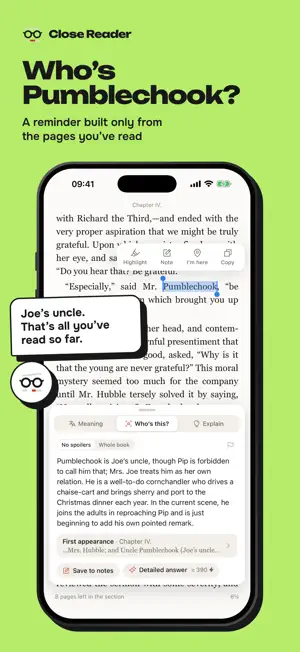
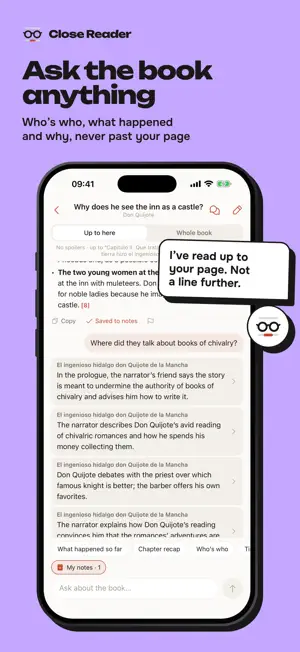
Close Reader is an e-book reader for iPhone and iPad that helps you read any book, in a foreign language or in your own. Press and hold a word for a translation that fits the sentence, and save it to flashcards. Forgot where you left off? Get a recap of what you’ve read so far. Ask the AI who a character is, what a passage means or what lies behind an event, even where the book has no footnote. It knows the book only up to your page, so there are no spoilers. At a glance • Your own books: EPUB, FB2, MOBI, AZW3, PDF and TXT (DRM-free), from Files, Mail or a messenger, or from your OPDS library (Calibre, Kavita, Komga). No store, no sign-up. • Books in any language; translations into more than 40 languages; the app itself speaks 20. • Free to download and read. AI help is free for your first 7 days (1,500 energy, no account), then runs on a plan or energy you buy; Medium starts with a 7-day free trial. • iPhone and iPad, in sync if you sign in. • No ads. Your text isn’t stored or used to train AI models. Help right where you stumble • Hold a word: the translation fits this very sentence. Reading in your own language? You get a plain definition. • Drag the handles to take in a phrase, or translate the whole sentence or paragraph. • Select a name: “Who’s this?” reminds you who that character or place is, from the pages you’ve read, and where they first appeared. • “Explain” gives the background of a passage: history, allusions, idioms and old-fashioned phrasing. • Questions about real history or the author get answers from the web, with sources. No spoilers Every answer comes from what you’ve read, up to the last line on your screen. In “No spoilers” mode we don’t even tell the AI which book it is, so it can’t fill in the plot from memory. Rereading? Switch to “Whole book”. Talk the book over • Ask for a recap, who’s who, or why a character did what they did. “Detailed answer” goes deeper. • Ask where something happened: the answer lists the places, and a tap opens the book there. • Answers link to the passages they rely on. Keep several chats per book; your notes can come along. • Chapters you’ve read have recaps, and rings in the contents show how much of each you’ve read. Learn the words you meet • “Save word” keeps a word with its translation and the sentence where you met it. • Flashcards adapt to your memory, with a daily reminder. Vocabulary exports to CSV. Find your way, keep what matters • The slider is a map of the book: chapters, bookmarks, notes and the time left in the chapter. • Jump anywhere to look around: your reading place stays put, and one tap takes you back. • Search the book. Footnotes open over the page, pictures full screen. • Highlights, notes, quotes shared as pictures, saved AI answers, bookmarks and “I’m here”. Notes export to Markdown. Easy on the eyes Four themes, fonts, text size and line spacing; pages or scrolling; portrait or landscape, with a two-page spread on a wide screen. Energy and plans AI help runs on energy: translating a word costs 1, and bigger requests show their price first. Reading, notes and flashcards are always free. Every feature is on every plan: Light, Medium and Max give 15,000, 40,000 and 80,000 energy a month, enough for everyday help plus about 25, 70 or 150 detailed answers. Extra energy you buy never expires. Subscriptions Light, Medium and Max are auto-renewing subscriptions, billed monthly or yearly. Payment is charged to your Apple Account when you confirm the purchase. A subscription renews automatically unless you cancel it at least 24 hours before the end of the current period. Manage or cancel it in Settings > your name > Subscriptions. Terms of Use: https://closereader.app/terms Privacy Policy: https://closereader.app/privacy
What’s new
Version 1.3.0 · Updated November 11, 2026
• Anonymous usage statistics help us improve the app. They never include your books, notes or what you type, and you can turn them off in Settings → Privacy → Usage statistics. • Small fixes and improvements.
App privacy
The developer, Ilia Ilinskii, reported these privacy practices to Apple.
Data Used to Track You
The following data may be used to track you across apps and websites owned by other companies:
- Purchases: Purchase History
- Location: Coarse Location
- Identifiers: Device ID
- Usage Data: Product Interaction
Data Linked to You
The following data, which may be collected and linked to your identity, may be used for the following purposes:
- Purchases: Purchase History
- Location: Coarse Location
- Identifiers: Device ID, User ID
- Usage Data: Product Interaction
- Contact Info: Email Address
- User Content: Other User Content
Used for: Third-Party Advertising, Developer’s Advertising or Marketing, Analytics, App Functionality
Alternatives to Close Reader: AI Book Reader
Looking for apps like Close Reader: AI Book Reader? Here are 6 similar apps on the App Store.
-
 LexiRead
-
 Lexory: Books & Audiobooks
-
 Tomelet: EPUB & PDF Reader
-
 Kur'an Meal ve Tefsir
-
 ClickBook — Offline AI Reader
-
 Book: EPUB, PDF & FB2 Reader
| App | Rating | Price | Last updated | Compare |
|---|---|---|---|---|
| Close Reader: AI Book Reader | – | Free | November 11, 2026 | |
| LexiRead | – | Free | Nov 9, 2026 | Compare |
| Lexory: Books & Audiobooks | – | Free | Nov 12, 2026 | Compare |
| Tomelet: EPUB & PDF Reader | – | Free | Nov 4, 2026 | Compare |
| Kur'an Meal ve Tefsir | – | Free | Oct 20, 2026 | Compare |
| ClickBook — Offline AI Reader | – | Free | Oct 26, 2026 | Compare |
| Book: EPUB, PDF & FB2 Reader | – | Free | Sep 29, 2026 | Compare |