

Flashback — Photo Shuffle
子鑫 陈 Photo & Video iPhoneiPadiPod touch
Flashback — Photo Shuffle is a free Photo & Video app for iPhone and iPad by 子鑫 陈. Requires iOS 18.0. Updated October 18, 2026.
- Price
- Free
- on the App Store
- Size
- 7 MB
- Age 4+
- Updated
- Oct 18
- 2026 · v1.1
Screenshots


About Flashback — Photo Shuffle
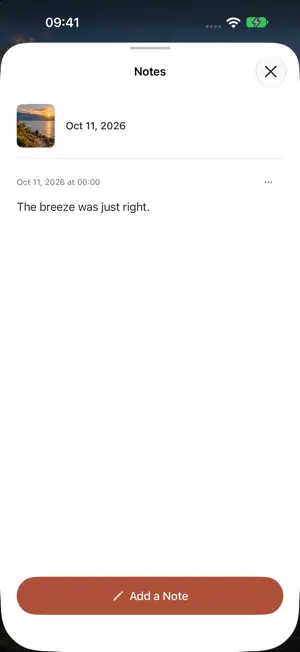
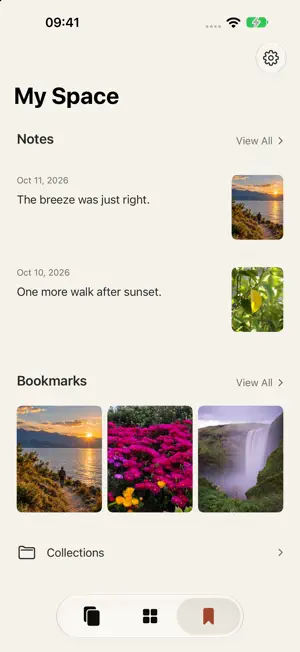
See the photos you already have, again. Flashback turns the iPhone photo library you allow access to into a full-screen, vertical feed. Swipe to discover a random photo, video or Live Photo. No dates to choose and no albums to prepare. SHUFFLE YOUR MEMORIES Videos and Live Photos can play automatically. Tap to pause or resume, and choose whether to turn on sound. See the date and place when that information is available. BOOKMARKS AND PRIVATE NOTES Double-tap to bookmark a moment, then organize it into collections. Write multiple notes on a photo or video, and edit or delete them later. When you revisit a moment, its notes appear one at a time, in chronological order. A FAMILIAR LIBRARY Browse by date, filter photos, videos and Live Photos, or open an existing Photos album. Choose full or limited Photos access and manage your permission at any time. FLASHBACK PRO: A ONE-TIME PURCHASE Combine a year range, album, media type and map area to shuffle within a theme. Save themes to return to them later. You can also exclude individual photos or videos, screenshots and screen recordings from shuffle. Restore them at any time; originals, bookmarks and notes are unchanged. Pro is a one-time in-app purchase with no recurring subscription. Full-library shuffle, bookmarks, collections and text notes remain free. The price is shown in the app. FOR YOUR OWN USE No app account, public feed, ads or third-party analytics SDKs. Bookmarks, notes and themes are stored in this app on your device, without changing your original photos. Cross-device syncing and record export are not currently supported. Deleting the app removes its local records. iCloud originals may be downloaded by the system; place names and maps use Apple services. Supports English, Simplified Chinese, Traditional Chinese, Japanese, Spanish and French, with Dark Mode support. Questions or feedback: [email protected]
What’s new
Version 1.1 · Updated October 18, 2026
Choose what comes back in your shuffle with new Pro exclusions. Hide individual items or exclude screenshots and screen recordings, without changing originals, bookmarks or notes. • A first-launch guide introduces browsing, Photos access and Pro. • Redesigned library filters, My Space, Settings and Pro screens, with improved Dark Mode. • Consistent native capsule buttons and Liquid Glass controls. • A new layered app icon with dark and tinted appearances.
App privacy
The developer, 子鑫 陈, reported these privacy practices to Apple.
Data Not Collected
The developer does not collect any data from this app.
Alternatives to Flashback — Photo Shuffle
Looking for apps like Flashback — Photo Shuffle? Here are 6 similar apps on the App Store. The highest rated is MyReels (5.0/5), and 4 of the 6 are free to download.
-
 MyReels
5.0
-
 Continuous Player - Loop Video
5.0
-
 Local Video Shuffle
3.7
-
 Downloader - Video & Reels
3.3
-
 Lumy
4.8
-
 Split Video: Long Story Maker
4.8
| App | Rating | Price | Last updated | Compare |
|---|---|---|---|---|
| Flashback — Photo Shuffle | – | Free | October 18, 2026 | |
| MyReels | 5.0 / 5 (2) | Free | Jun 3, 2026 | Compare |
| Continuous Player - Loop Video | 5.0 / 5 (1) | 4.99 USD | Oct 20, 2026 | Compare |
| Local Video Shuffle | 3.7 / 5 (3) | Free | Oct 11, 2026 | Compare |
| Downloader - Video & Reels | 3.3 / 5 (6) | Free | Jun 6, 2026 | Compare |
| Lumy | 4.8 / 5 (2,430) | 7.99 USD | Oct 21, 2026 | Compare |
| Split Video: Long Story Maker | 4.8 / 5 (5,003) | Free | Feb 7, 2024 | Compare |