

Offline: Tap to Focus
Akhil Rudrawar Productivity iPhoneiPadiPod touch
Offline: Tap to Focus is a free Productivity app for iPhone and iPad by Akhil Rudrawar. Requires iOS 16.0. Updated October 9, 2026.
- Price
- Free
- on the App Store
- Size
- 8 MB
- Age 4+
- Updated
- Oct 9
- 2026 · v1.0.4
Screenshots


About Offline: Tap to Focus
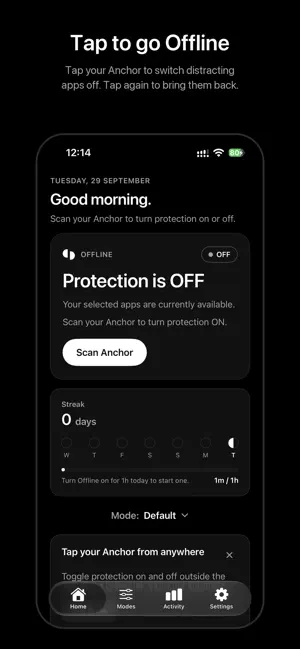
Offline turns your phone's most distracting apps off with a tap — and back on only when you choose to get up and tap again. HOW IT WORKS • Choose the apps that pull you in. Apple's Screen Time keeps your choices private — Offline never even learns their names. • Put your Offline Anchor somewhere you'll have to walk to: your desk, the kitchen, another room. • Tap your phone on the Anchor to turn protection on. Your chosen apps are blocked. • When you really need them, walk back and tap again. The distance is the point. A physical switch creates the pause that willpower alone can't. MODES Build different sets of apps and websites for different parts of your day — Work, Evenings, Study — and switch between them. WEBSITE BLOCKING Block the sites you list in Safari while protection is on. TAP FROM ANYWHERE Set up a one-time Shortcuts automation and your Anchor works from the Lock Screen or any app. ACTIVITY AND STREAKS See your screen time, pickups and most-used apps, how often Offline stepped in, and build a daily streak of time offline. EMERGENCY ACCESS Lost your Anchor or need an app urgently? Use a 5-minute emergency bypass, twice a week. PRIVATE BY DESIGN No account. No analytics. Everything stays on your iPhone. No Anchor yet? You can turn protection on and off from the Home screen instead. Get an Anchor at stayoffline.tech.
What’s new
Version 1.0.4 · Updated October 9, 2026
• Clearer setup for tapping your Anchor from anywhere on iOS 26, with real screenshots for every step • More reliable Anchor scanning, with clearer messages when a tag can't be read • Blocking now covers whole categories and long app lists • A darker, clearer blocking screen
App privacy
The developer, Akhil Rudrawar, reported these privacy practices to Apple.
Data Not Collected
The developer does not collect any data from this app.
Alternatives to Offline: Tap to Focus
Looking for apps like Offline: Tap to Focus? Here are 6 similar apps on the App Store. The highest rated is Span (Did I?) – Task Tracker (5.0/5), and all 6 are free to download.
-
 Mohar - Ditch Distractions
-
 Span (Did I?) – Task Tracker
5.0
-
 Barrier: Screen Time For Focus
4.6
-
 Bento: The Do Less Timer
4.1
-
 Timesheet tasks: Time Deposit
4.6
-
 Sortifyd: All-in-One Organizer
4.6
| App | Rating | Price | Last updated | Compare |
|---|---|---|---|---|
| Offline: Tap to Focus | – | Free | October 9, 2026 | |
| Mohar - Ditch Distractions | – | Free | Sep 8, 2026 | Compare |
| Span (Did I?) – Task Tracker | 5.0 / 5 (4) | Free | Sep 18, 2026 | Compare |
| Barrier: Screen Time For Focus | 4.6 / 5 (341) | Free | Jul 1, 2026 | Compare |
| Bento: The Do Less Timer | 4.1 / 5 (338) | Free | Sep 2, 2026 | Compare |
| Timesheet tasks: Time Deposit | 4.6 / 5 (33) | Free | Apr 27, 2026 | Compare |
| Sortifyd: All-in-One Organizer | 4.6 / 5 (261) | Free | Oct 16, 2026 | Compare |