

ZeroTo: 0-60 & Drag Timer
Vladyslav Shchuka Utilities iPhoneiPadiPod touch
ZeroTo: 0-60 & Drag Timer is a free Utilities app for iPhone and iPad by Vladyslav Shchuka. Requires iOS 17.0. Updated October 12, 2026.
- Price
- Free
- on the App Store
- Size
- 8 MB
- Age 4+
- Updated
- Oct 12
- 2026 · v1.1.1
Screenshots
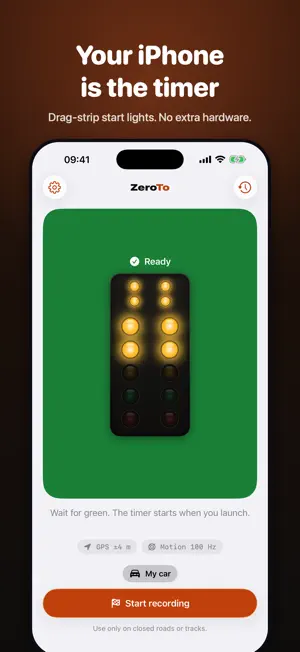

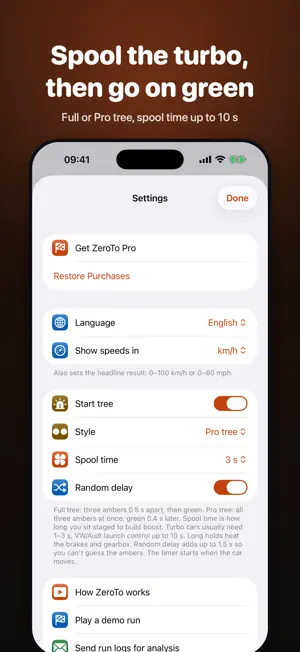

About ZeroTo: 0-60 & Drag Timer
Time your car's 0-60 mph, 0-100 km/h and quarter mile with the iPhone you already have. No GPS box to buy. Mount the phone, stop, and wait for "Ready". Launch when it's safe. The timer starts and stops by itself, and short beeps tell you what's happening, so you never touch the phone while driving. Want the drag-strip feel? Turn on the start tree: staging lights, ambers and green, with time to spool the turbo first. HOW IT STAYS ACCURATE GPS reports speed about once a second, which is too slow to catch a launch. ZeroTo also reads the motion sensors 100 times a second. They pick up the moment the car starts to roll and fill the gaps between GPS readings. GPS, in turn, keeps the speed from drifting. EVERY RUN SHOWS - 0-60 mph, 0-100 km/h, 1/8 and 1/4 mile with trap speed - Road slope from the barometer: uphill, downhill or level - A quality grade, so you know which times to trust - Speed and acceleration charts - Gear shifts: how long each one took and what it cost you - A comparison with your previous run in the same car - A map of where you ran, and a map of all your runs SHARE WITH FRIENDS Turn a result into a card for Instagram Stories or any chat. APPLE WATCH Start, stop and follow the run from your wrist. FREE AND PRO Accuracy is the same for everyone. The free version times the classics above with no limit on runs. ZeroTo Pro is a one-time purchase, not a subscription, and adds: - 60-130 mph, 100-200 km/h, 0-200 km/h, 60 ft, 1/2 mile and rollout times - Every gear shift in detail, compared run to run - A garage with any number of cars and notes for each tune - Unlimited history and CSV export - Share cards without the ZeroTo mark PRIVACY No account, no ads, no tracking. Your runs stay on your iPhone. Use ZeroTo only on closed roads or tracks where it's legal, and follow traffic laws. Terms of Use: https://xzot.github.io/zeroto/terms.html Privacy Policy: https://xzot.github.io/zeroto/privacy.html
What’s new
Version 1.1.1 · Updated October 12, 2026
Pick a mode before you start: 0–60, 0–130, rolling 60–130 or a full run with the quarter mile (km/h: 0–100, 0–200, 100–200). Weak GPS no longer blocks a run. You still get a time, marked as not accurate, and History can hide those runs. Fixed "The car was never standing still" when GPS drifted at a stop. Delete a run right from its result. Logs you send us now go as one zip.
App privacy
The developer, Vladyslav Shchuka, reported these privacy practices to Apple.
Data Not Collected
The developer does not collect any data from this app.
Alternatives to ZeroTo: 0-60 & Drag Timer
Looking for apps like ZeroTo: 0-60 & Drag Timer? Here are 6 similar apps on the App Store. The highest rated is FLASHEX (3.0/5), and all 6 are free to download.
-
 Shortwave SDR Radio: GlobalSDR
-
 Launchly - 0-60 & Quarter Mile
-
 Accel Timer: GPS Speedometer
-
 Vroomist
-
 FLASHEX
3.0
FLASHEX
3.0
-
 Gazer Cloud
| App | Rating | Price | Last updated | Compare |
|---|---|---|---|---|
| ZeroTo: 0-60 & Drag Timer | – | Free | October 12, 2026 | |
| Shortwave SDR Radio: GlobalSDR | – | Free | Oct 5, 2026 | Compare |
| Launchly - 0-60 & Quarter Mile | – | Free | Oct 14, 2026 | Compare |
| Accel Timer: GPS Speedometer | – | Free | Jul 3, 2026 | Compare |
| Vroomist | – | Free | Aug 11, 2026 | Compare |
| FLASHEX | 3.0 / 5 (2) | Free | Oct 23, 2026 | Compare |
| Gazer Cloud | – | Free | Sep 2, 2026 | Compare |