

HLiiC Cam
Nanjing Hengli Image Technology Co., Ltd. Photo & Video iPhoneiPadiPod touch
HLiiC Cam is a free Photo & Video app for iPhone and iPad by Nanjing Hengli Image Technology Co., Ltd. Requires iOS 17.6. Updated October 8, 2026.
- Price
- Free
- on the App Store
- Size
- 34 MB
- Age 4+
- Updated
- Oct 8
- 2026 · v1.0
Screenshots



About HLiiC Cam
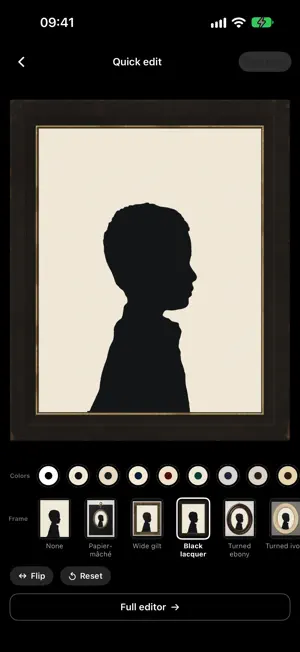
Before photography was common, a profile was how many people kept a likeness. Eighteenth- and nineteenth-century silhouettists worked by eye with a pair of scissors, cutting a face in profile from black paper, laying it on a pale ground and setting it in a small frame. Another path led to color. In a lecture in London in 1861, James Clerk Maxwell took three black-and-white pictures made through red, green and blue liquid filters, projected each through its own colored lantern onto one screen, and the colors of a tartan ribbon returned. HLiiC Cam brings both of these early imaging methods to the phone, as two cameras. Profile Studio Point the camera at a face in profile and the viewfinder shows the silhouette live. Press the shutter and the full silhouette is kept in the app's own album, exactly as framed, never cropped for you. Then swipe through the style page to give the same outline another medium; each one names the period or maker it follows: · Historical: cut-paper bust, gold-ground glass (églomisé), shell cameo, jasperware medallion, painted on convex glass, bronzed silhouette, portrait miniature · Media: cyanotype print, photogenic dye print, sun-faded paper, positive–negative pair, Risograph two-color, layered paper relief, neon tube, woodcut, colored shadows, aggregate silhouette · Line & comic: outline (after Lavater), graphite contour, graphite portrait, light-and-shade sketch, manga screentone, low-poly Thirteen mounts complete the picture: black lacquer with gilt liner, papier-mâché with ormolu, wide gilt frame, turned ebony, turned ivory, gold pendant, rope-twist brooch and pendant, octagon card, museum mat, hairline aluminum, rounded sticker and double rule. The nineteenth-century frames are kept for the historical styles and cyanotype; they do not go around a neon tube. In the quick editor, a saved silhouette can take another color scheme or frame, or be flipped, and then exported to Photos. TriColor Lab With the camera fixed on a tripod, change the filter in front of the lens, red, green, blue, and take one black-and-white frame through each. The app aligns the frames and adds them back in their own colors to make one color photograph. Shoot with the iPhone, guided step by step, or pick separation shots from another camera in your library; DNG, HEIC and JPEG originals keep their EXIF. After compositing, the red, green and blue records can be viewed one by one and exported as 16-bit TIFF, and a photograph of a color chart solves a correction matrix for your own set of filters. No filters at hand? Open How it works: the app runs four built-in test frames through the method on the spot, separating, coloring the light and adding, one step at a time. Everything is processed on the device. No sign-up, no ads, no uploads, no data collected. The interface is in English and Simplified Chinese, follows the system language, and can be switched from the home screen. HLiiC is a studio in Nanjing, founded in 2020, devoted to the research and practice of nineteenth-century handmade photography.
App privacy
The developer, Nanjing Hengli Image Technology Co., Ltd., reported these privacy practices to Apple.
Data Not Collected
The developer does not collect any data from this app.
Alternatives to HLiiC Cam
Looking for apps like HLiiC Cam? Here are 6 similar apps on the App Store. The highest rated is Silhouette Maker (4.8/5), and 5 of the 6 are free to download.
-
 i3DSteroid
4.4
i3DSteroid
4.4
-
 TwinViewer
4.0
TwinViewer
4.0
-
 Silhouette Maker
4.8
Silhouette Maker
4.8
-
 Parallax: 3D Photo Editor
4.7
Parallax: 3D Photo Editor
4.7
-
 PopPic - 3D Photo Camera
4.8
PopPic - 3D Photo Camera
4.8
-
 Social Print Studio
4.8
Social Print Studio
4.8
| App | Rating | Price | Last updated | Compare |
|---|---|---|---|---|
| HLiiC Cam | – | Free | October 8, 2026 | |
| i3DSteroid | 4.4 / 5 (38) | 2.99 USD | Oct 10, 2026 | Compare |
| TwinViewer | 4.0 / 5 (24) | Free | Jul 9, 2024 | Compare |
| Silhouette Maker | 4.8 / 5 (183) | Free | Oct 24, 2026 | Compare |
| Parallax: 3D Photo Editor | 4.7 / 5 (5,644) | Free | Dec 12, 2025 | Compare |
| PopPic - 3D Photo Camera | 4.8 / 5 (27,165) | Free | Oct 18, 2026 | Compare |
| Social Print Studio | 4.8 / 5 (26,321) | Free | Oct 26, 2026 | Compare |
Compare HLiiC Cam with the top alternatives: ratings, updates, ASO score and keyword gaps →