

miolo: Time Tracker & Journal
Fuzalabs LTDA Productivity iPhoneiPadiPod touch
miolo: Time Tracker & Journal is a free Productivity app for iPhone and iPad by Fuzalabs LTDA. Requires iOS 16.4. Updated October 9, 2026.
- Price
- Free
- on the App Store
- Size
- 56 MB
- Age 12+
- Updated
- Oct 9
- 2026 · v1.1.0
Screenshots



About miolo: Time Tracker & Journal
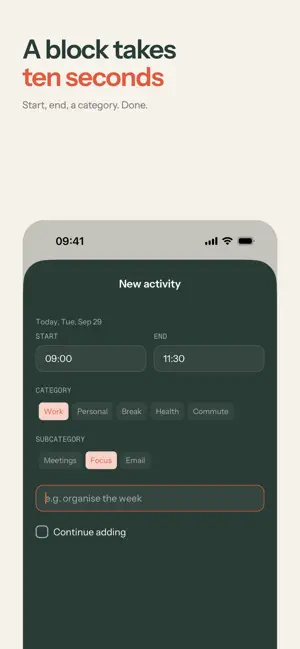
Where did your day go? miolo answers without a timer to start and forget. When you have a minute, you write down a block: when it started, when it ended, what it was. The day fills in as a timeline, one block after another, on a 15-minute grid. It is a time tracker and daily log for people who are tired of apps that want attention all day. It records what happened, not what you planned. It shows where the time went and what you meant to do, without distractions. WHO IT IS FOR • Freelancers, students and people working from home who want to track hours without a spreadsheet. • Anyone building habits or keeping routine goals with an honest activity log. • Anyone who tried a stopwatch time tracker and gave up on day two. RECORD THE DAY • Start, end, category. A title if you want one. • Or hold and drag over an empty stretch of the day: it opens a block with the start and end filled in. • Categories and subcategories are yours to name: Work › Focus, Personal › Family, Break › Coffee. • Save a block, or save and keep going through the day. • Edit or delete any block later. SEE THE DAY • Every block sits at the hour it happened and shows how long it lasted, with the present moment marked. • A summary of the day by category greets you when you open it, then steps aside. • Go back to any day. SEE WHERE THE TIME WENT • The last 7 days, 30 days, 12 months, or any stretch you pick. • Your time by category, as a pie. Tap a slice to open its subcategories. • Each day drawn as one line, so you see when the time was spent, not only how much. • The activity list shows what you did over up to 60 days, filtered by category or searched by title. NOTICE WHAT YOU MEANT TO DO • A goal is an intention: at least 8 hours of Focus a week, at most 5 hours of Meetings, exactly 3 workouts a month. • miolo measures it against what you actually recorded and says it plainly: met, in progress, missed, over the limit. • Every goal keeps its history. TWO REMINDERS, NOT TWENTY • They start off. Turn them on and there are two: one at midday, one in the evening, so a forgotten day still gets recorded. If you were just in the app, they stay quiet. YOURS ALONE • Start without an account: your records stay tied to the device. • Sign in with Google or Apple when you want them to follow you to your next phone. • Export your activities as a spreadsheet (CSV) and keep them wherever you like. • Light, dark or system. English, Portuguese and Spanish. • Delete your account, and everything in it, from inside the app. No ads. No feed. No streaks to keep alive. A productivity app that does not compete for your attention. Start today: the first block takes ten seconds. Your time, without noise.
What’s new
Version 1.1.0 · Updated October 9, 2026
• Hold and drag on the day to select a stretch and record it • Activity list: filter by period, category and title • Export the list as a spreadsheet (CSV) • Every block now shows its duration • Tell us what you think in Settings › Send feedback • An invitation to turn reminders on • Better text contrast, and forms that stay clear of the keyboard
App privacy
The developer, Fuzalabs LTDA, reported these privacy practices to Apple.
Data Linked to You
The following data, which may be collected and linked to your identity, may be used for the following purposes:
- Contact Info: Email Address, Name
- User Content: Other User Content
- Identifiers: User ID
Used for: App Functionality
Data Not Linked to You
The following data, which may be collected but is not linked to your identity, may be used for the following purposes:
- Location: Coarse Location
- User Content: Other User Content
- Identifiers: Device ID
- Usage Data: Product Interaction
- Diagnostics: Crash Data, Other Diagnostic Data
Used for: Analytics, App Functionality
Alternatives to miolo: Time Tracker & Journal
Looking for apps like miolo: Time Tracker & Journal? Here are 6 similar apps on the App Store. The highest rated is Exocium: Daily Planner & Habit (5.0/5), and all 6 are free to download.
-
 Everyish: ADHD Habit Tracker
-
 Rice Pop: Visual Study Timer
-
 Pomodoro Focus: Study Timer
4.0
-
 Exocium: Daily Planner & Habit
5.0
-
 Focusly - Pomodoro & Tasks
5.0
-
 Control: Habit Tracker & Goals
5.0
| App | Rating | Price | Last updated | Compare |
|---|---|---|---|---|
| miolo: Time Tracker & Journal | – | Free | October 9, 2026 | |
| Everyish: ADHD Habit Tracker | – | Free | Oct 23, 2026 | Compare |
| Rice Pop: Visual Study Timer | – | Free | Aug 3, 2026 | Compare |
| Pomodoro Focus: Study Timer | 4.0 / 5 (1) | Free | Oct 15, 2026 | Compare |
| Exocium: Daily Planner & Habit | 5.0 / 5 (1) | Free | Oct 9, 2026 | Compare |
| Focusly - Pomodoro & Tasks | 5.0 / 5 (1) | Free | Mar 5, 2026 | Compare |
| Control: Habit Tracker & Goals | 5.0 / 5 (1) | Free | Sep 9, 2026 | Compare |