

DrumClock - Drums to MIDI
CREEDYSOLUTIONS, LLC Music iPhoneiPadiPod touch
DrumClock - Drums to MIDI is a free Music app for iPhone and iPad by CREEDYSOLUTIONS, LLC. Requires iOS 17.0. Updated October 26, 2026.
- Price
- Free
- on the App Store
- Size
- 3 MB
- Age 4+
- Updated
- Oct 26
- 2026 · v1.0.3
Screenshots



About DrumClock - Drums to MIDI
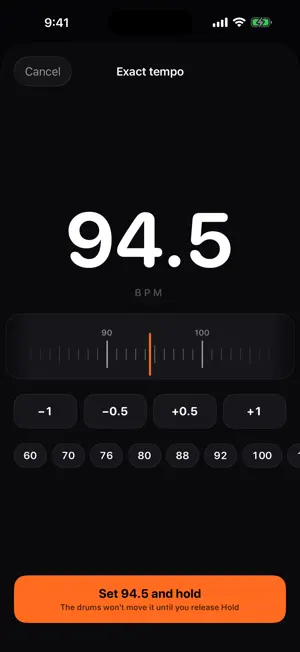
Your drummer is the click. DrumClock listens to the drums and turns the groove into MIDI clock and tap-tempo CC, live. No click track, no count-in from a laptop, no tapping a pedal every song. The drummer plays, and your delays, arps and sequencers land on the beat. HOW IT WORKS Put an iPhone in the drum cage or clip it to a stand, or feed a kick/snare mic through a USB interface. DrumClock finds the tempo in a few bars, locks to it, and keeps following when the drummer pushes or pulls. Fills and ghost notes don't throw it. Breaks don't either: it holds the last tempo and picks the beat back up when the drums return. WHAT IT SENDS • MIDI clock (24 pulses per beat, Start/Stop) for anything that syncs to clock: Helix, Strymon, Ableton, MainStage, synth arpeggiators. • Tap-tempo CC: a controller message on every beat, for apps and pedals that can't read clock but can map a CC to Tap Tempo (Sunday Keys, many delays). • Either one, or both at once. You pick. WHERE IT SENDS • Wired USB MIDI: the way to go for clock. A class-compliant interface into a powered hub, a 5-pin cable to the keys rig. Sub-millisecond jitter. • A virtual “DrumClock” port for apps on the same iPad. Zero latency, no hardware. • Network MIDI (RTP) over Ethernet or Wi-Fi, for a Mac running your DAW. • Bluetooth MIDI for cable-free rehearsals. Each output tells you what it's good for and where it falls short before you pick it. USING SUNDAY KEYS? Sunday Keys can't take MIDI clock, only a tap tempo you MIDI-Learn — so someone has had to tap it by hand, every song. DrumClock taps it for you on every beat, on the drummer's time. Map it once; the delays and arps are in time all service long. Works on the same iPad through the DrumClock port, or wired from a phone by the kit. (Sunday Keys is a product of Sunday Sounds; DrumClock is not affiliated.) BUILT FOR A STAGE • One screen: tempo, a pulse you can read from behind the kit, Tap, and a big Start/Stop. • Tap in a tempo yourself when you want to. ÷2 and ×2 when the tracker picks half-time. • Hold freezes the clock through a rubato bridge or a drum solo. • Gain control with a meter, because some drummers are loud. iOS automatic gain is off while DrumClock listens. • Keeps running with the screen locked or another app in front. Nothing is recorded. Audio is analysed on the device and never leaves it. Made by Creedy Solutions, the people behind Chartless. DRUMCLOCK PRO DrumClock is free to try: MIDI clock output runs 10 minutes a day on the free tier. DrumClock Pro removes the limit. Pro is $19.99/year (auto-renewing subscription) or $49.99 once for lifetime access. The yearly subscription is charged to your Apple Account, renews automatically unless cancelled at least 24 hours before the end of the current period, and can be managed or cancelled in Settings > Apple Account > Subscriptions. Terms of Use: https://www.apple.com/legal/internet-services/itunes/dev/stdeula/ Privacy: https://creedysolutions.com/drumclock-privacy
What’s new
Version 1.0.3 · Updated October 26, 2026
The tempo now stays within 8 BPM of what you set, so a wild fill or a missed beat can’t drag your delays off a cliff. Tap it, set it, pick a song or count it in, and that’s the anchor. DrumClock also ignores the stray hits and double-time readings that used to make it jump. A new tip on the tempo controls shows how it works. Fixed: on some iPhones the Save preset box closed as soon as you tapped the name field. It stays put now.
App privacy
The developer, CREEDYSOLUTIONS, LLC, reported these privacy practices to Apple.
Data Linked to You
The following data, which may be collected and linked to your identity, may be used for the following purposes:
- Contact Info: Email Address
Used for: App Functionality
Data Not Linked to You
The following data, which may be collected but is not linked to your identity, may be used for the following purposes:
- Diagnostics: Other Diagnostic Data
Used for: App Functionality
Alternatives to DrumClock - Drums to MIDI
Looking for apps like DrumClock - Drums to MIDI? Here are 6 similar apps on the App Store. The highest rated is Ear Drum: Practice & Rudiments (5.0/5), and all 6 are free to download.
-
 SetPilot
-
 mobileinearStage
-
 SoloTracks - Music Player
4.9
-
 Ear Drum: Practice & Rudiments
5.0
-
 RandL
-
 Drum Practice App: Drumbitious
4.9
| App | Rating | Price | Last updated | Compare |
|---|---|---|---|---|
| DrumClock - Drums to MIDI | – | Free | October 26, 2026 | |
| SetPilot | – | Free | Oct 21, 2026 | Compare |
| mobileinearStage | – | Free | Jun 18, 2026 | Compare |
| SoloTracks - Music Player | 4.9 / 5 (16) | Free | Oct 11, 2026 | Compare |
| Ear Drum: Practice & Rudiments | 5.0 / 5 (5) | Free | Oct 29, 2026 | Compare |
| RandL | – | Free | May 26, 2026 | Compare |
| Drum Practice App: Drumbitious | 4.9 / 5 (8) | Free | Aug 24, 2026 | Compare |