

Wireless Remote: Smart TV
Ali Raza Utilities iPhoneiPadiPod touchApple Watch
Wireless Remote: Smart TV is a free Utilities app for iPhone and iPad by Ali Raza. Requires iOS 18.0. Updated October 19, 2026.
- Price
- Free
- on the App Store
- Size
- 39 MB
- Age 4+
- Updated
- Oct 19
- 2026 · v1.2
Screenshots

About Wireless Remote: Smart TV
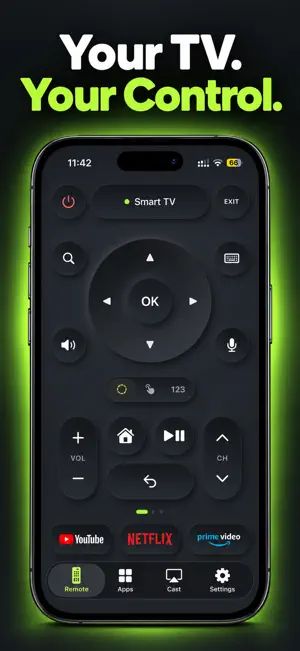
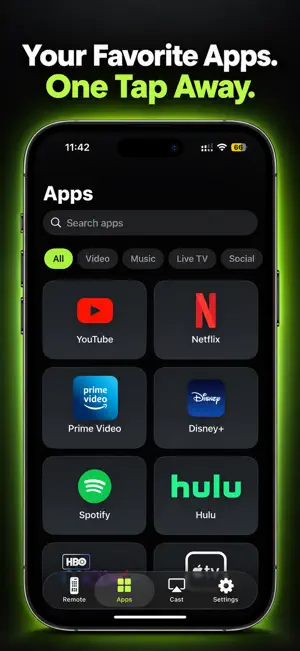
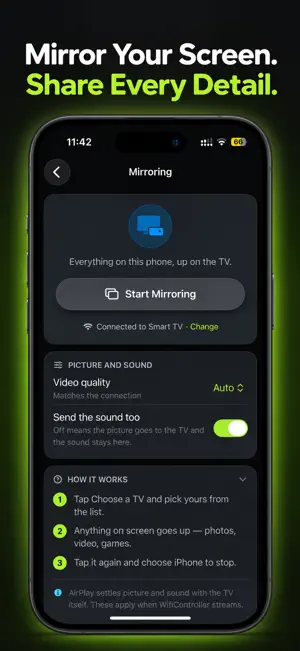
Your iPhone, and every television in the house. Wireless Remote finds the TVs on your Wi-Fi and controls them directly. No cables, no infrared, no extra hardware to buy, and no account to sign up for. THREE REMOTES, ONE SCREEN Switch between a D-pad, a number pad and a touchpad without leaving the remote. Volume, channels, playback and power sit where your thumb already is — and you can rearrange the face and change its theme to suit the TV you use most. TYPE INSTEAD OF HUNTING Search your television with the iPhone keyboard instead of picking out letters one at a time with arrow keys. Or hold the mic key and just say it. KEYS THAT MATCH YOUR TV Televisions do not all speak the same vocabulary. The remote asks yours what it actually has, and puts those keys on the face — so you are never pressing something the set was always going to ignore. ON YOUR WRIST The Apple Watch app carries the keys you reach for without looking: power, home, back, the D-pad, play and pause, and volume on the Digital Crown. SEND SOMETHING TO THE SCREEN Photos and videos from your library, on the big screen. YouTube too — find it here on the phone, play it there on the TV. WHAT IT WORKS WITH Android TV and Google TV — the full remote: keys, typing, voice and the Apps tab. Chromecast and Google TV Streamer — playback and casting. Apple TV and Fire TV do not let other apps send button presses, so on those the app opens apps and casts rather than driving the on-screen menus. PRIVATE BY DESIGN Everything happens on your own Wi-Fi. Key presses go from your phone straight to your television and nowhere else. There is no account to create, and the app does not ask you for one. WIRELESS REMOTE PRO Pro is optional. You can subscribe weekly or yearly, or pay once for lifetime access. Payment is charged to your Apple Account at confirmation of purchase. A subscription renews automatically unless it is turned off at least 24 hours before the end of the current period; your account is charged for renewal within 24 hours of the end of the current period. Manage or cancel a subscription in your Apple Account settings after purchase. Terms of Use: https://blueorbit-website.vercel.app/terms-and-conditions.html Privacy Policy: https://blueorbit-website.vercel.app/privacy-policy.html
What’s new
Version 1.2 · Updated October 19, 2026
• Improved stability and reliability • Bug fixes
App privacy
The developer, Ali Raza, reported these privacy practices to Apple.
Data Not Collected
The developer does not collect any data from this app.
Alternatives to Wireless Remote: Smart TV
Looking for apps like Wireless Remote: Smart TV? Here are 6 similar apps on the App Store. The highest rated is Universal TV Remote Control HD (5.0/5), and all 6 are free to download.
-
 Universal TV Remote Control HD
5.0
Universal TV Remote Control HD
5.0
-
 FGSCDA
5.0
FGSCDA
5.0
-
 NumPad Pro: Number Keyboard
5.0
NumPad Pro: Number Keyboard
5.0
-
 Remote for Android / Google TV
4.7
Remote for Android / Google TV
4.7
-
 TV Remote Genie - Cast & Apps
5.0
TV Remote Genie - Cast & Apps
5.0
-
 Smart TV Remote - AnyRemote
4.5
Smart TV Remote - AnyRemote
4.5
| App | Rating | Price | Last updated | Compare |
|---|---|---|---|---|
| Wireless Remote: Smart TV | – | Free | October 19, 2026 | |
| Universal TV Remote Control HD | 5.0 / 5 (2) | Free | Oct 14, 2026 | Compare |
| FGSCDA | 5.0 / 5 (1) | Free | Feb 4, 2026 | Compare |
| NumPad Pro: Number Keyboard | 5.0 / 5 (1) | Free | Oct 16, 2026 | Compare |
| Remote for Android / Google TV | 4.7 / 5 (59) | Free | Sep 30, 2026 | Compare |
| TV Remote Genie - Cast & Apps | 5.0 / 5 (3) | Free | Sep 24, 2025 | Compare |
| Smart TV Remote - AnyRemote | 4.5 / 5 (11) | Free | Oct 23, 2026 | Compare |