

ToVue: Virtual Drone Travel
Kazuki Kuraya Travel iPhoneiPadiPod touch
ToVue: Virtual Drone Travel is a free Travel app for iPhone and iPad by Kazuki Kuraya. Requires iOS 17.0. Updated October 17, 2026.
- Price
- Free
- on the App Store
- Size
- 7 MB
- Age 4+
- Updated
- Oct 17
- 2026 · v1.1.2
Screenshots


About ToVue: Virtual Drone Travel
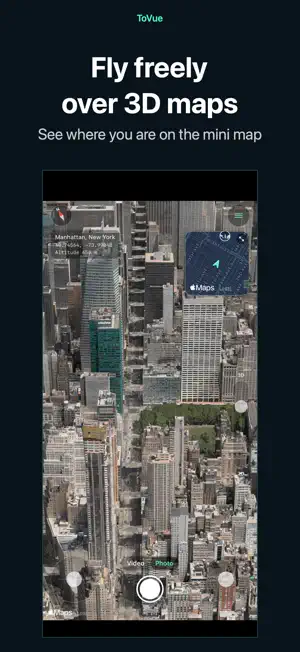
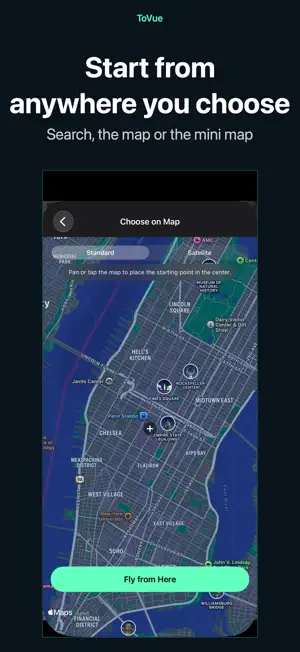
Explore 3D maps with a virtual drone camera on iPhone and iPad. Move through cities with on-screen sticks, or with one hand, and capture the map without the controls. CHOOSE A PLACE • ToVue opens above a well-known station or capital chosen from your device's Region setting. It never uses GPS and never asks for your location. • Search for places, or pick a spot on a standard or satellite map, and start flying from there. FLIGHT CONTROLS • Two on-screen sticks in a fixed Mode 2 layout: the left stick climbs, descends and turns; the right stick moves forward, back and sideways. • One-Hand Mode in the menu: a single stick. Touch it to fly forward, push up or down to climb or descend, and left or right to turn. • Pan, pinch, rotate and tilt the map directly. • A 3D tilt slider on the right edge tilts the view from straight down toward the horizon. You can hide it in the menu. • Adjust flight, climb and turn speeds in the menu. • Show or hide place and building labels. CAPTURE AND SHARE • The shutter captures the map itself, without the controls. • Photos can show the place name, coordinates and altitude, or you can hide them for a cleaner image. • Share or save your photo from the preview right after capture. Apple Maps attribution always stays on the photo. VIDEO AND MINI MAP • Switch between Photo and Video like the Camera app and record your flight as it happens. • Recordings show the map itself, without the controls. You can choose to include the sticks or the mini map. • Pick the frame rate and resolution in the menu. • A mini map in the top corner shows where you are and which way you face. Choose standard or satellite, and tap it to pick a new place on the map. FREE, WITH A ONE-TIME UPGRADE ToVue is free and shows ads: a banner, plus an occasional full-screen ad right after you move to a new place (never while you are flying). A one-time in-app purchase removes all ads and the ToVue logo on photos and videos. It is not a subscription, and you can restore it on your other devices signed in with the same Apple Account. GOOD TO KNOW • ToVue is a virtual viewer for fun and exploration. It does not control a real drone and is not a navigation or flight-planning tool. • Altitude is the height of the virtual camera, not a measured height above the ground. • 3D buildings and terrain come from Apple Maps and vary by area; some places are shown in less detail. • An internet connection is required. No account or sign-up needed.
What’s new
Version 1.1.2 · Updated October 17, 2026
New: Orbit a Building Tap the orbit button at the top left, then tap a building to circle it and take in every side. You can record a video while orbiting. Change the speed and direction in Menu > Controls. Also Updated the links to the ToVue website, support pages, terms of use, and privacy policy.
App privacy
The developer, Kazuki Kuraya, reported these privacy practices to Apple.
Data Linked to You
The following data, which may be collected and linked to your identity, may be used for the following purposes:
- Location: Coarse Location
- Identifiers: Device ID
- Usage Data: Product Interaction, Advertising Data
Used for: Third-Party Advertising, Analytics, App Functionality
Data Not Linked to You
The following data, which may be collected but is not linked to your identity, may be used for the following purposes:
- Diagnostics: Performance Data, Other Diagnostic Data, Crash Data
Used for: Third-Party Advertising, Analytics, App Functionality
Alternatives to ToVue: Virtual Drone Travel
Looking for apps like ToVue: Virtual Drone Travel? Here are 6 similar apps on the App Store.
-
 瞬速!コインランドリー検索
-
 MeguLog - 趣味巡りの記録
-
 TomeMemo — Parking Spot Note
-
 Lumap : Travel Photo Map
-
 AI Audio Tours: Japan Walking
-
 HIS Travel eSIM
| App | Rating | Price | Last updated | Compare |
|---|---|---|---|---|
| ToVue: Virtual Drone Travel | – | Free | October 17, 2026 | |
| 瞬速!コインランドリー検索 | – | 2.99 USD | Apr 24, 2026 | Compare |
| MeguLog - 趣味巡りの記録 | – | Free | Oct 18, 2026 | Compare |
| TomeMemo — Parking Spot Note | – | Free | Mar 20, 2026 | Compare |
| Lumap : Travel Photo Map | – | Free | Sep 30, 2026 | Compare |
| AI Audio Tours: Japan Walking | – | Free | Jul 26, 2026 | Compare |
| HIS Travel eSIM | – | Free | Sep 30, 2026 | Compare |