

KnitBuddy: Knitting & Yarn
EU Studio Lifestyle iPhoneiPadiPod touchApple Watch
KnitBuddy: Knitting & Yarn is a free Lifestyle app for iPhone and iPad by EU Studio. Requires iOS 18.0. Updated October 22, 2026.
- Price
- Free
- on the App Store
- Size
- 26 MB
- Age 4+
- Updated
- Oct 22
- 2026 · v1.6
Screenshots


About KnitBuddy: Knitting & Yarn
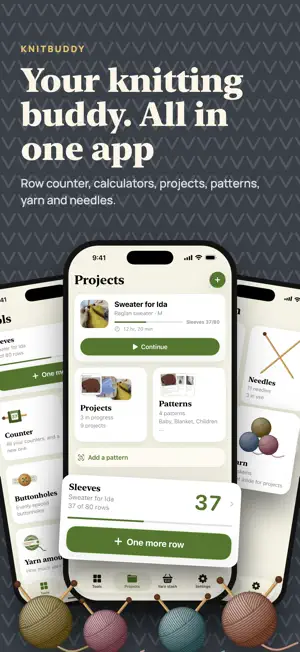
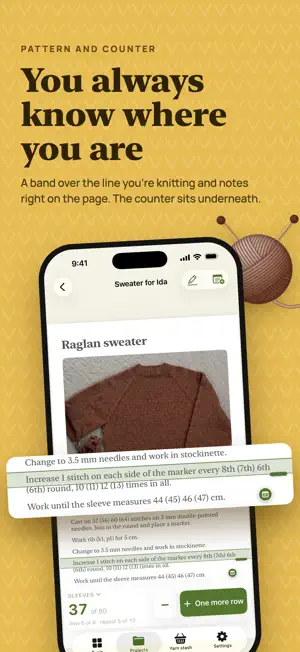
KnitBuddy is your knitting buddy. Your projects, knitting patterns, yarn and needles are in one place, so you can always see what is on your needles, where you are, and what you have at home. That leaves your mind free for the knitting, and for enjoying it. WHAT YOU GET • All your projects in one place, with pattern, yarn and needles • Your knitting patterns at hand, with the counter on the same screen • An overview of the yarn and needles you have, before you buy more • You always know where you are • The maths done for you YOUR PROJECTS IN ONE PLACE Each piece of knitting gets its own project with pattern, counters, yarn, needles, notes and photos, so everything belongs together. Tap Continue, and the pattern opens on the page where you left off, with the counter ready at the bottom. All a project needs to get started is a name. YOUR KNITTING PATTERNS AT HAND Keep all your patterns in one place, so you do not have to search through emails, folders and piles of paper. Add a PDF from Files or Mail, take photos of a printed pattern, or scan the pages so the edges are found and the page is straightened. Sort your patterns into categories, and find them again with search. AN OVERVIEW OF YARN AND NEEDLES See at a glance what you have at home before you buy more or cast on. Take a photo of the ball band, and the brand, grams, meters and needle size are filled in for you. Your needles are in the stash, and you can see which are in use and which a project is still missing. Yarn you have entered before is suggested, and a finished project takes its yarn out of the stash by itself. THE COUNTER THAT KEEPS TRACK Give the body, the sleeves and the repeats a counter each with a goal, and feel a small buzz when you reach it. Count on iPhone and iPad at the same time, and both count. The screen stays on while you knit. THE MATHS DONE FOR YOU • Even increases and decreases, in the round and back and forth • Buttonholes evenly spaced along the band • The pattern converted to your own gauge • Gauge swatches written down and compared with the pattern Tick off each line as you knit, and save the calculation in the project. A BUDDY YOU CAN TRUST No account, no ads, and it works offline. Your projects are kept in your own iCloud, which we cannot see, and nothing is sent to us. KnitBuddy comes in 35 languages with each language's own knitting abbreviations, in a light or dark design, in ten yarn colors, and works with large text and VoiceOver. SEE THE APP FIRST Look around the whole app with an example before you decide. When you are ready, choose a yearly subscription with a free trial for new subscribers, or unlock the app for good with a single purchase. The subscription renews automatically every year until you cancel it, and you can cancel it at any time in your App Store settings. Privacy Policy: https://www.eustudio.org/privacy Terms of Use: https://www.apple.com/legal/internet-services/itunes/dev/stdeula/
What’s new
Version 1.6 · Updated October 22, 2026
New in 1.6: • Count by voice: tap the microphone in the pattern and say “next” or “one more row” when your hands are full. Only your phone hears what you say, and it never leaves it. (Requires iOS 26.) • Draw on the pattern: circle your size or mark a line with your finger or Apple Pencil. Drawings belong to the project, so the same pattern can be knitted again in another size, and they come along when you share the project. • All the project’s counters sit as tiles above the counter bar in the pattern. One tap switches counter. • Leftover yarn comes back: when a project is finished, the app asks how much you used and puts the rest back in the yarn stash. If you correct it later, the stash follows. • Gauge on yarn: “22 sts × 30 rows” is read from the ball band and shown in the yarn stash and next to suggestions for other yarn. • An increase or decrease, or buttonholes, saved in a project now opens in the project, so you can tick off the lines with the counter below. • The yarn stash’s numbers are easier to read with large text. New in 1.5.1: • Your progress is kept. Ticked-off lines in Increase/Decrease and Buttonholes stay ticked when the app is closed. They go with a calculation saved in a project, also to your iPad. • Recently deleted: bring back a deleted project, pattern or yarn for 30 days, under Settings. • Notes and numbers are saved as you type, and the app asks before it deletes or resets anything. • Undo start over stays in the counter's menu and keeps the rows counted since. Rows counted on another device before it heard of the start-over are kept too. • The pattern reader uses the whole screen, and the counter's reminder sits in the counter bar.
App privacy
The developer, EU Studio, reported these privacy practices to Apple.
Data Not Collected
The developer does not collect any data from this app.
Alternatives to KnitBuddy: Knitting & Yarn
Looking for apps like KnitBuddy: Knitting & Yarn? Here are 6 similar apps on the App Store.
-
 Simple row counter
-
 Crochet Row Counter: Patterns
-
 knittingale
-
 Stitchory: Knit & Crochet
-
 RowGlow: Knitting Row Counter
-
 Ullie: Knitting Row Counter
| App | Rating | Price | Last updated | Compare |
|---|---|---|---|---|
| KnitBuddy: Knitting & Yarn | – | Free | October 22, 2026 | |
| Simple row counter | – | Free | Oct 6, 2026 | Compare |
| Crochet Row Counter: Patterns | – | Free | Oct 9, 2026 | Compare |
| knittingale | – | Free | Feb 25, 2026 | Compare |
| Stitchory: Knit & Crochet | – | Free | Jun 23, 2026 | Compare |
| RowGlow: Knitting Row Counter | – | Free | Sep 22, 2026 | Compare |
| Ullie: Knitting Row Counter | – | Free | Oct 9, 2026 | Compare |