

LifeBack – Screen Time Control
Xuan Ham Nguyen Productivity iPhoneiPadiPod touch
LifeBack – Screen Time Control is a free Productivity app for iPhone and iPad by Xuan Ham Nguyen. Requires iOS 26.0. Updated October 19, 2026.
- Price
- Free
- on the App Store
- Size
- 17 MB
- Age 4+
- Updated
- Oct 19
- 2026 · v1.0.7
Screenshots


About LifeBack – Screen Time Control
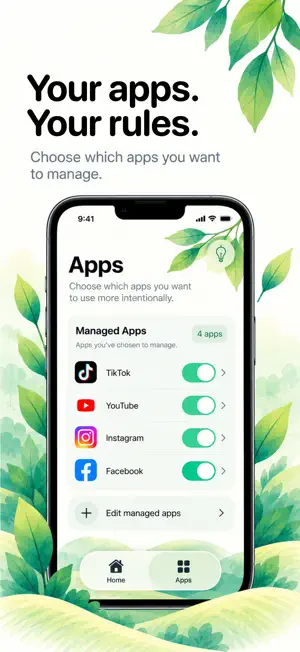
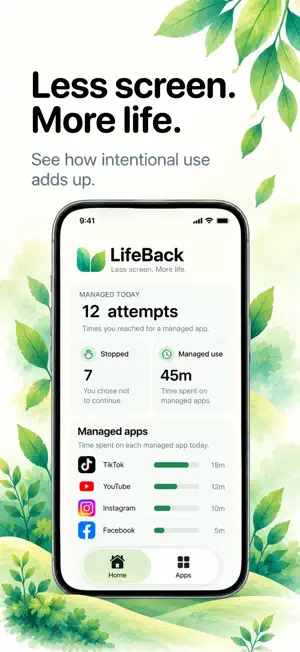
LifeBack helps you use apps with intention and take back control of your screen time. HOW IT WORKS Choose why – Decide what you’re opening an app for. Choose how long – Set how much time you want to spend. Check in again – When time’s up, decide whether you need more. FEATURES • Manage the apps you want to control • Track daily and weekly screen time • See your attempts and stops • Understand your usage habits • Make more intentional choices No strict limits. Just a moment to think before you continue. Less screen. More life. Terms of Use (EULA): https://www.apple.com/legal/internet-services/itunes/dev/stdeula/
What’s new
Version 1.0.7 · Updated October 19, 2026
Bug fixes and improvements.
App privacy
The developer, Xuan Ham Nguyen, reported these privacy practices to Apple.
Data Not Collected
The developer does not collect any data from this app.
Alternatives to LifeBack – Screen Time Control
Looking for apps like LifeBack – Screen Time Control? Here are 6 similar apps on the App Store. The highest rated is Deep Work : Stay Focused (5.0/5), and all 6 are free to download.
-
 DuoPrompter
-
 CCList
-
 Deep Work : Stay Focused
5.0
-
 Time Tracker With Detailed Log
3.7
-
 Deep Focus Time: FocusMode
4.3
-
 Daily Planner - Tidify
4.7
| App | Rating | Price | Last updated | Compare |
|---|---|---|---|---|
| LifeBack – Screen Time Control | – | Free | October 19, 2026 | |
| DuoPrompter | – | Free | Oct 2, 2026 | Compare |
| CCList | – | Free | Oct 21, 2026 | Compare |
| Deep Work : Stay Focused | 5.0 / 5 (1) | Free | May 7, 2025 | Compare |
| Time Tracker With Detailed Log | 3.7 / 5 (7) | Free | Mar 1, 2025 | Compare |
| Deep Focus Time: FocusMode | 4.3 / 5 (3) | Free | Aug 20, 2026 | Compare |
| Daily Planner - Tidify | 4.7 / 5 (7) | Free | Nov 4, 2026 | Compare |