

iCut: Background Remover
Koichiro Umemiya Photo & Video iPhoneiPadiPod touch
iCut: Background Remover is a free Photo & Video app for iPhone and iPad by Koichiro Umemiya. Requires iOS 17.0. Updated October 17, 2026.
- Price
- Free
- on the App Store
- Size
- 12 MB
- Age 4+
- Updated
- Oct 17
- 2026 · v1.2
Screenshots

About iCut: Background Remover
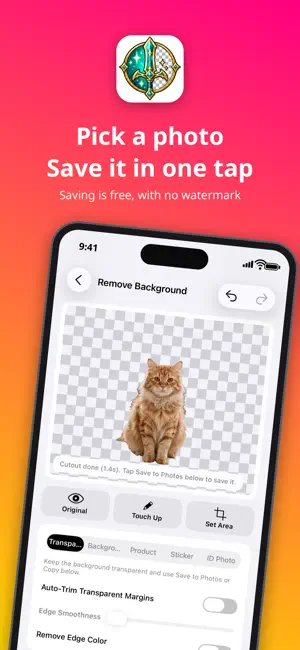
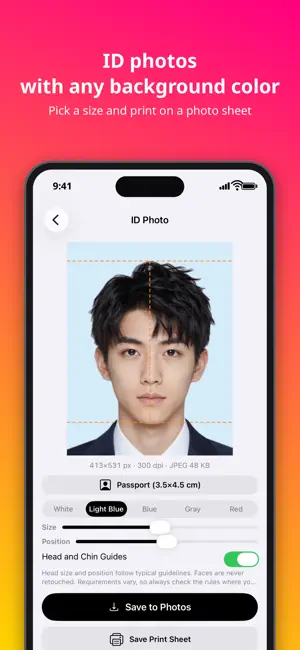
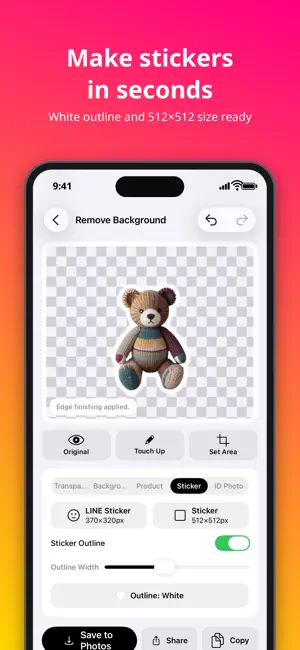
Pick a photo and iCut removes the background cleanly. Works on the latest iOS. Saving is free with no watermark, and your photos never leave your device. Great for marketplace and online shop listings, social posts and stickers. ■ Remove the background, just by picking a photo • On-device AI finds the subject and removes the background automatically • Copy, share or save the result as a transparent PNG ■ Finish it as a product photo • Use white, black, any color or one of your photos as the background • Adjust a natural shadow, margins, and the subject's size and position • Choose the output size (original / 1024 / 2000 / 3000 px) • Save a transparent PNG and a white-background JPEG at once ■ Fix the details by hand • Trace to erase or restore, with the cursor just above your finger so it never hides the spot • Erase similar colors in one tap to cut out logos and illustrations • Choose which subjects to keep, or set an area before cutting out • Change how the edges are cut and try again ■ Batch background removal • Process many photos at once (up to 20 per run; 5 photos a day in the free version) ■ Peace of mind • All processing happens on your device. Photos are never sent to a server • Open images from the camera, Photos, Files or the clipboard • Supports iPad drag and drop, side-by-side layout and Shortcuts • Available in 16 languages, with Dark Mode ■ New in 1.1 • Lasso: draw around what you want to keep and erase everything outside it (or erase/restore inside) • Magnifier: see a close-up around your finger while you fix the details • ID photos: automatically sized from the face position for résumé, passport and other formats, with a background color of your choice, plus a print sheet (faces are never retouched) • Export stickers at 370×320 and 512×512 • Manual edits are kept until you save, so you can pick up where you left off • Open photos straight from the Share menu of Photos and other apps • Choose the sticker outline color: white, black or any color • ID photos: red background option, saved with 300 dpi information, and print sheets in 4×6 in too • Draw with Apple Pencil and move the picture with your finger (double-tap the Pencil to switch erase/restore) ■ Saving is free • Cutting out, manual edits, saving and sharing are free with no watermark, at the original size • Transparent PNGs stay transparent. iCut also explains how to send them when a chat app turns them white ■ iCut Premium • Removes ads and unlocks unlimited batch background removal • Unlocks background photos and subject placement • Choose a one-time purchase or a monthly plan Terms of Use: https://umebo.net/en/terms/
What’s new
Version 1.2 · Updated October 17, 2026
• Save to Photos, Share and Copy now stay at the bottom of the screen, so you can save right after the cutout • Pick a goal (transparent, background, product, sticker, ID photo) to see only the settings you need • Start ID photos, stickers and product photos straight from the home screen • Undo and redo in the editor, even after manual touch-ups • After saving you stay in the editor, with quick links to Photos and the next photo • Fewer ads • A new app icon
App privacy
The developer, Koichiro Umemiya, reported these privacy practices to Apple.
Data Not Linked to You
The following data, which may be collected but is not linked to your identity, may be used for the following purposes:
- Identifiers: Device ID
- Usage Data: Advertising Data, Other Usage Data
- Diagnostics: Crash Data
Used for: Third-Party Advertising, Analytics
Alternatives to iCut: Background Remover
Looking for apps like iCut: Background Remover? Here are 6 similar apps on the App Store. The highest rated is Background Remover・Eraser Tool (4.9/5), and 5 of the 6 are free to download.
-
 CutOut
-
 Sukemaru: Verified Cutout PNG
-
 スタンプ抜き - イラスト背景透過・切り抜き
-
 Background Remover・Eraser Tool
4.9
Background Remover・Eraser Tool
4.9
-
 Zeno: AI Magic Eraser & Edit
-
 Remove BG & Eraser
| App | Rating | Price | Last updated | Compare |
|---|---|---|---|---|
| iCut: Background Remover | – | Free | October 17, 2026 | |
| CutOut | – | Free | Jul 8, 2026 | Compare |
| Sukemaru: Verified Cutout PNG | – | 1 USD | Oct 27, 2026 | Compare |
| スタンプ抜き - イラスト背景透過・切り抜き | – | Free | Oct 15, 2026 | Compare |
| Background Remover・Eraser Tool | 4.9 / 5 (9) | Free | Oct 5, 2026 | Compare |
| Zeno: AI Magic Eraser & Edit | – | Free | Jul 2, 2026 | Compare |
| Remove BG & Eraser | – | Free | Oct 12, 2026 | Compare |