

Teleprompter Video Camera
New Marketing Lab, Inc Photo & Video iPhoneiPadiPod touch
Teleprompter Video Camera is a free Photo & Video app for iPhone and iPad by New Marketing Lab, Inc. Rated 5.0/5 from 2 ratings. Requires iOS 18.0.
- Rating
- 5.0
- 2 ratings
- Price
- Free
- on the App Store
- Size
- 1 MB
- Age 4+
- Updated
- Nov 7
- 2026 · v1.1
Screenshots
Save to Pinterest


About Teleprompter Video Camera
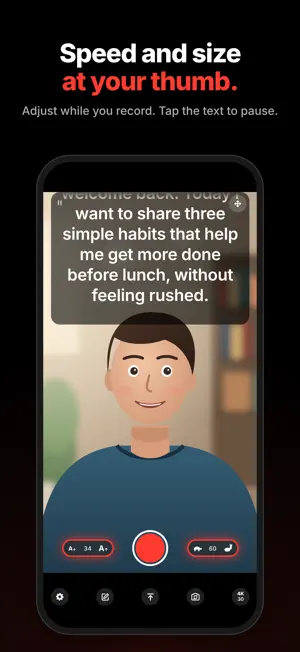
Read your script while you record, so you can look at the camera and keep eye contact with your viewers. Teleprompter Video Camera puts a scrolling script on top of your camera view, right below the lens. Tap record, a short countdown plays, and your text starts scrolling. When you stop, the video is saved straight to your Photos library, ready to post to TikTok, YouTube, Instagram, Facebook, LinkedIn or anywhere else. No account to create. No watermark. No ads. No paid upgrade. Completely unrestricted. RECORD GREAT-LOOKING VIDEO • Record in 4K, 1080p or 720p, at the frame rates your device supports • HDR video on supported iPhones and iPads • Front or back camera • Enhanced stabilization when you walk and talk • Optional mirroring for front camera videos • Optionally save where each video was recorded, just like the Camera app WRITE AND TIME YOUR SCRIPT • Simple script editor with a live word count • Estimated speaking time, based on a natural pace of about 150 words per minute • Your script is saved automatically CHOOSE YOUR FONT • Pick from 9 easy-to-read fonts: San Francisco, SF Rounded, New York, SF Mono, Avenir Next, Helvetica Neue, Futura, Gill Sans and Georgia • See a live preview of each font before you choose • Set the text size from small to extra large, so you can read it from a distance PUT THE PROMPTER WHERE YOU WANT IT • Drag the prompter anywhere on the screen • Set its height, separately for portrait and landscape • Choose the background color and how see-through it is SCROLLS AT YOUR PACE • Change the scroll speed and text size with the buttons next to the record button, even while recording • Tap the text to pause and resume • Drag the text to go back or skip ahead • Jump back to the top with one tap WORKS ON IPHONE AND IPAD • Portrait and landscape • On iPad, the camera fills the screen and the controls sit along the side GREAT FOR • TikTok videos, YouTube videos and Shorts, Instagram Reels and Stories • Facebook and LinkedIn posts • Vlogs, online courses and product demos • Presentations, sales pitches and video messages • Auditions, self-tapes and announcements • Anyone who wants to speak to the camera without memorizing lines TIP: Keep your eyes near the top of the screen, close to the camera, so you look like you are talking straight to your audience.
What’s new
Version 1.1 · Updated November 7, 2026
Minor improvements and bug fixes.
App privacy
The developer, New Marketing Lab, Inc, reported these privacy practices to Apple.
Data Not Collected
The developer does not collect any data from this app.
Alternatives to Teleprompter Video Camera
Looking for apps like Teleprompter Video Camera? Here are 6 similar apps on the App Store. The highest rated is Veritake AI Video Teleprompter (5.0/5), and all 6 are free to download.
-
 CueTide: Teleprompter Recorder
-
 Veritake AI Video Teleprompter
5.0
-
 Smart Teleprompter for Video
4.2
-
 ShareSpeak Teleprompter
3.0
-
 AI Video Script & Captions
-
 Wispim: Voice Teleprompter
5.0
| App | Rating | Price | Last updated | Compare |
|---|---|---|---|---|
| Teleprompter Video Camera | 5.0 / 5 (2 ratings) | Free | November 7, 2026 | |
| CueTide: Teleprompter Recorder | – | Free | Nov 11, 2026 | Compare |
| Veritake AI Video Teleprompter | 5.0 / 5 (2) | Free | Oct 14, 2026 | Compare |
| Smart Teleprompter for Video | 4.3 / 5 (4) | Free | Nov 15, 2026 | Compare |
| ShareSpeak Teleprompter | 3.0 / 5 (1) | Free | Nov 24, 2025 | Compare |
| AI Video Script & Captions | – | Free | Sep 24, 2026 | Compare |
| Wispim: Voice Teleprompter | 5.0 / 5 (4) | Free | Nov 25, 2026 | Compare |