

Between: Workout Timer
Anthony Frigo Health & Fitness iPhoneiPadiPod touch
Between: Workout Timer is a free Health & Fitness app for iPhone and iPad by Anthony Frigo. Rated 4.8/5 from 4 ratings. Requires iOS 18.0.
- Rating
- 4.8
- 4 ratings
- Price
- Free
- on the App Store
- Size
- 21 MB
- Age 4+
- Updated
- Oct 23
- 2026 · v1.0.3
Screenshots



About Between: Workout Timer
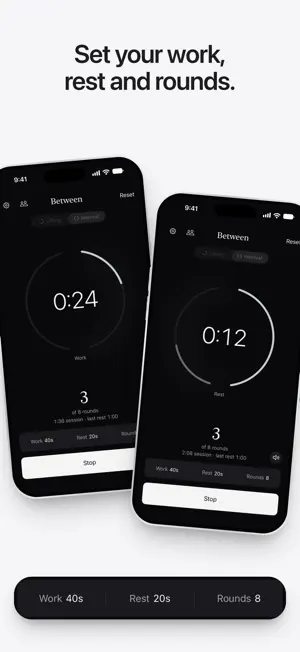
Between is the easiest way to time your workout. Log a set and keep track of your rest time automatically. Prefer intervals? Pick your work and rest times, then let the rounds run. No setup, no account, no learning curve. LIFTING, ONE TAP AT A TIME • Tap log set when you rack the weight. Your rest timer countdown starts, with your set count right underneath. • Choose a rest length with one tap: 45, 60, 90, or 120 seconds or create custom lengths that match best for your workouts. • A chime plays when it's time to lift again. It plays over your music instead of pausing it. • When your rest runs out, the clock starts counting your set from 0:00, so you always know where you are. • One calm screen that stays put as you log. Nothing to dig through mid-workout. INTERVALS THAT RUN THEMSELVES • Set your work time, rest time, and number of rounds, then press start. • Everything runs on one ring: work, rest, round after round, from Tabata-style 20/10 to longer circuits of up to 50 rounds. • A chime and a gentle tap mark every change, even with your phone locked, so you never need to look down. ON YOUR LOCK SCREEN AND WRIST • The countdown stays on your Lock Screen and in the Dynamic Island, with logging your set just one tap away. No need to unlock. • Your rest shows in the Apple Watch Smart Stack, so you can log the next set right from your wrist. In vibration mode, the watch buzzes 10 seconds before your rest ends and again at zero. No watch app to open. STAYS OUT OF YOUR WAY • The rest counter keeps you on track, even when your phone is locked or you switch apps. • Sound, haptics only, or silent: whatever suits your gym. • No account, no sign-up. Open it and go. TRAIN TOGETHER • Sharing equipment? Log up to four lifters on one phone. Between keeps everyone's count and shows whose rest is running. • Training side by side? Link phones with friends doing the same sets. Anyone's Log set starts the same rest on every phone. Phones connect directly, the way AirDrop does, so it works in a basement gym with no Wi-Fi or signal. HANDS-FREE WITH SIRI Say "Log a set in Between," "Check my rest in Between," or "Rest 2 minutes in Between." Every answer is spoken, so your phone can stay in your pocket with AirPods in. The same actions work in Shortcuts, Spotlight, and on the Action Button. MAKE IT YOURS Four themes to match your mood: Night, Day, Navy, and Moss. Terms of Use: https://www.apple.com/legal/internet-services/itunes/dev/stdeula/
What’s new
Version 1.0.3 · Updated October 23, 2026
When another app shares the Dynamic Island, Between now shows just your rest countdown, so the time is easy to read. Small improvements behind the scenes.
App privacy
The developer, Anthony Frigo, reported these privacy practices to Apple.
Data Not Linked to You
The following data, which may be collected but is not linked to your identity, may be used for the following purposes:
- Purchases: Purchase History
- Identifiers: Device ID
- Usage Data: Product Interaction, Advertising Data
- Location: Coarse Location
- Diagnostics: Crash Data
Used for: Third-Party Advertising, Analytics, App Functionality
Alternatives to Between: Workout Timer
Looking for apps like Between: Workout Timer? Here are 6 similar apps on the App Store. The highest rated is FitYog: AI Calorie & Workout (5.0/5), and all 6 are free to download.
-
 FitYog: AI Calorie & Workout
5.0
FitYog: AI Calorie & Workout
5.0
-
 Sport Timer
-
 BoulderBuilder
5.0
BoulderBuilder
5.0
-
 IntervalFlow: HIIT Timer
-
 PeakInterval: HIIT Timer
-
 Shift: Workout Interval Timer
| App | Rating | Price | Last updated | Compare |
|---|---|---|---|---|
| Between: Workout Timer | 4.8 / 5 (4 ratings) | Free | October 23, 2026 | |
| FitYog: AI Calorie & Workout | 5.0 / 5 (1) | Free | Oct 17, 2026 | Compare |
| Sport Timer | – | Free | Sep 7, 2026 | Compare |
| BoulderBuilder | 5.0 / 5 (1) | Free | Oct 17, 2026 | Compare |
| IntervalFlow: HIIT Timer | – | Free | Sep 21, 2026 | Compare |
| PeakInterval: HIIT Timer | – | Free | Oct 7, 2026 | Compare |
| Shift: Workout Interval Timer | – | Free | Oct 22, 2026 | Compare |