

MultiRoll: Shared Camera Roll
OV, LLC Photo & Video iPhoneiPadiPod touch
MultiRoll: Shared Camera Roll is a free Photo & Video app for iPhone and iPad by OV, LLC. Rated 5.0/5 from 1 ratings. Requires iOS 18.0.
- Rating
- 5.0
- 1 ratings
- Price
- Free
- on the App Store
- Size
- 11 MB
- Age 17+
- Updated
- Oct 16
- 2026 · v1.0
Screenshots



About MultiRoll: Shared Camera Roll
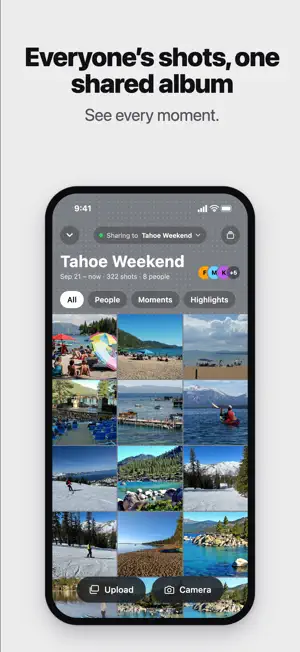
See the moments you missed. You can't be everywhere at once. MultiRoll lets everyone at your wedding, trip, birthday or party shoot into one shared album, so you can see the whole event — not just the moments you happened to capture. No more chasing down photos. No more asking, "Can you send me those?" ONE SHARED CAMERA Start an album and invite your crew with a QR code or 6-character code. Once they join, anything they shoot is shared with everyone in the album in seconds. Photos from other people arrive live, right on the camera screen. Keep shooting and watch the story of the event come together around you. CAPTURE IT YOUR WAY MultiRoll opens straight to a real camera with: • Photo and video • Front and back cameras • Flash • 0.5x, 1x and 2x zoom • Tap to focus • 12 built-in looks • An album-wide look chosen by the host Choose from natural, film-inspired, black-and-white and camera-style looks. Some looks add a little extra character, including Disposable with a date stamp and Instant with a frame. SEE THE WHOLE EVENT The shared album brings everyone's shots together in one place. Browse the full grid or explore views like People, Moments and Highlights. Open photos full-screen, pinch to zoom, like your favorites and leave comments. Because the best photo from the night might be one you weren't there to take. MAKE IT YOUR ALBUM Give each album its own identity with custom covers featuring patterns, colors, title fonts and up to three cover photos. Create a printable poster with the album's QR code so guests can join easily. SHARE ONLY WHAT YOU CHOOSE Save any shot to your Photos, or turn on automatic saving for your own shots. You can also upload specific photos and videos from your library. MultiRoll never reads your photo library or automatically shares anything from it. You choose exactly what to upload. WORKS OFFLINE Keep shooting without a connection. Your shots stay on your phone and send automatically when you’re back online. You can also choose to upload only over Wi-Fi. PRIVATE BY DEFAULT Albums are private. Only people in the album can see what’s shared. YOUR EVENT, FROM EVERYONE’S POINT OF VIEW The photos you take are only one version of what happened. MultiRoll gives you the rest of the story.
App privacy
The developer, OV, LLC, reported these privacy practices to Apple.
Data Linked to You
The following data, which may be collected and linked to your identity, may be used for the following purposes:
- Identifiers: User ID, Device ID
- Usage Data: Product Interaction
- Contact Info: Name
- User Content: Photos or Videos
Used for: Analytics, Product Personalization, App Functionality
Alternatives to MultiRoll: Shared Camera Roll
Looking for apps like MultiRoll: Shared Camera Roll? Here are 6 similar apps on the App Store. The highest rated is 16-Bit Camera (5.0/5), and all 6 are free to download.
-
 Snapper: Interval Camera
-
 Organic Camera: Photo & Video
-
 Sideways: Portrait Grip Camera
-
 GeoCam: GPS Map Camera
-
 PipCam: Front & Back Camera
-
 16-Bit Camera
5.0
16-Bit Camera
5.0
| App | Rating | Price | Last updated | Compare |
|---|---|---|---|---|
| MultiRoll: Shared Camera Roll | 5.0 / 5 (1 rating) | Free | October 16, 2026 | |
| Snapper: Interval Camera | – | Free | Sep 22, 2026 | Compare |
| Organic Camera: Photo & Video | – | Free | Oct 19, 2026 | Compare |
| Sideways: Portrait Grip Camera | – | Free | Sep 24, 2026 | Compare |
| GeoCam: GPS Map Camera | – | Free | Oct 8, 2026 | Compare |
| PipCam: Front & Back Camera | – | Free | Aug 3, 2026 | Compare |
| 16-Bit Camera | 5.0 / 5 (1) | Free | Jan 10, 2026 | Compare |