

Tobari Quiet: Dark Mode Safari
Tetsuo Kusumoto Utilities iPhoneiPadiPod touch
Tobari Quiet: Dark Mode Safari is a free Utilities app for iPhone and iPad by Tetsuo Kusumoto. Requires iOS 18.0. Updated November 12, 2026.
- Price
- Free
- on the App Store
- Size
- 15 MB
- Age 4+
- Updated
- Nov 12
- 2026 · v1.1.5
Screenshots

About Tobari Quiet: Dark Mode Safari
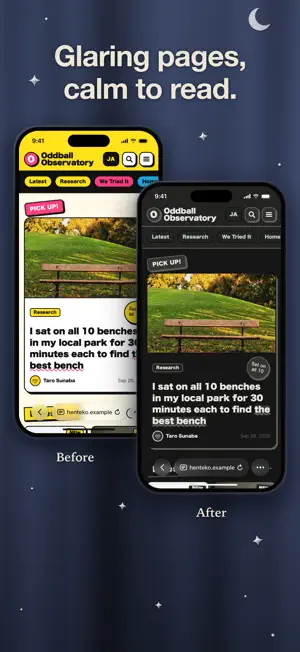
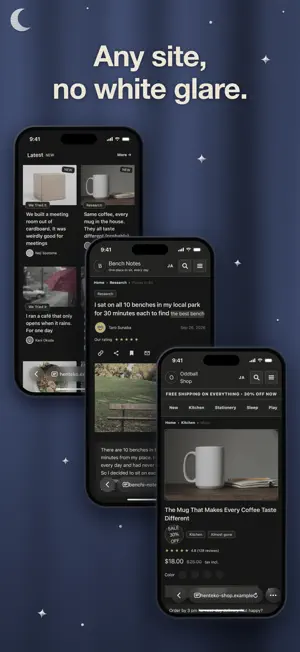
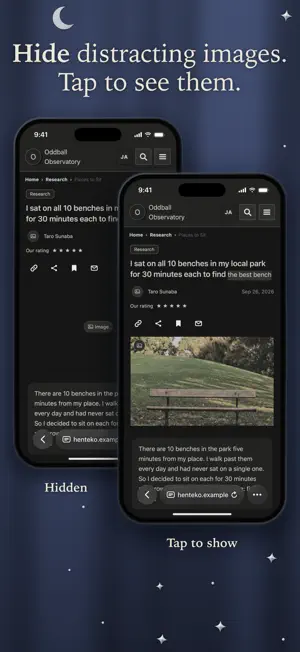
Tobari Quiet shows the pages you open in Safari on iPhone in calm, dark colors that don't glare. Sites without a dark mode and bright white pages become easy to read. Images stay as they are. When you want to tone down images or video too, add Quiet view on top. Links, forms, and menus keep working as usual. Colors starts on Dark, which gives pages muted, dark colors. If another dark mode extension already handles colors, choose Don't change. Page colors are left to that extension, and Tobari Quiet handles images only, through Quiet view. You can also choose Match device, which follows your device's appearance, or Light, which uses light, muted colors. Quiet view tones down images and text further. Turn it on and pick a preset. Presets never change Colors. • Wind Down: Before bed. Makes images black-and-white and faint, and softens text. • Low Key: Tones down image colors and softens text a little. • Keep Private: Hides images. Tap a hidden image to show it right where it is. • Custom: Set image treatment, strength, transparency, and text softness yourself. While Quiet view is on, headings, body text, spacing, and decoration are evened out too. Turn off “Even out text size and spacing” if you'd rather keep the page's own sizes. Auto switch turns Quiet view on with the preset or Custom settings you choose, from sunset to sunrise or during hours you set. Colors stay as they are. Tap the button at the edge of the screen to turn Quiet view on or off for that site. Pull it toward the center or press and hold to switch between the presets and your custom setting, or to set Colors to Dark or Don't change. Tap the selected preset again to turn it off. You can put the button on the left or right edge. Turn Tobari Quiet off to restore the original look on every site, or choose “Turn off on this site” to restore it on just one. To get started, open Tobari Quiet and tap “Open Safari extension settings.” Turn the extension on in Settings and allow access to the websites you want to use it with. If the button does not open Settings, go to Settings app > Apps > Safari > Extensions (on some OS versions: Settings > Safari > Extensions). Tobari Quiet works only on http:// and https:// pages you have allowed. It does not apply to special pages such as settings screens, or inside a page embedded in another page (an iframe). If it cannot finish starting within a few seconds, the page returns to its original look. The extension sends no data anywhere. Settings stay on your device, and the page’s own network requests are left untouched. It works alongside ad blockers. One-time purchase, with no in-app purchases and no subscription.
What’s new
Version 1.1.5 · Updated November 12, 2026
• The app now appears in Traditional Chinese when your device is set to that language. • Added a link to write a review on the App Store in the popup and settings. • Fixed text on dark bars blending into the background on some sites. • Fixed the three-line menu button turning white and disappearing on some sites.
App privacy
The developer, Tetsuo Kusumoto, reported these privacy practices to Apple.
Data Not Collected
The developer does not collect any data from this app.
Alternatives to Tobari Quiet: Dark Mode Safari
Looking for apps like Tobari Quiet: Dark Mode Safari? Here are 6 similar apps on the App Store. The highest rated is Sonara: Decibel & Noise Meter (5.0/5), and all 6 are free to download.
-
 Colour Invert
-
 PhotoSpaceSlim: Photo Cleaner
-
 Sonara: Decibel & Noise Meter
5.0
-
 Tallied - Score Keeper
-
 Sunglasses at Night
-
 PDF to DOCX - Offline
| App | Rating | Price | Last updated | Compare |
|---|---|---|---|---|
| Tobari Quiet: Dark Mode Safari | – | Free | November 12, 2026 | |
| Colour Invert | – | Free | Sep 15, 2026 | Compare |
| PhotoSpaceSlim: Photo Cleaner | – | Free | Nov 9, 2026 | Compare |
| Sonara: Decibel & Noise Meter | 5.0 / 5 (2) | Free | Nov 12, 2026 | Compare |
| Tallied - Score Keeper | – | Free | Nov 11, 2026 | Compare |
| Sunglasses at Night | – | Free | Nov 11, 2026 | Compare |
| PDF to DOCX - Offline | – | Free | Sep 25, 2026 | Compare |