

Parking Heater Remote
Christian Bumberger Utilities iPhoneiPadiPod touchMacApple Watch
Parking Heater Remote is a free Utilities app for iPhone and iPad by Christian Bumberger. Requires iOS 18.0. Updated October 18, 2026.
- Price
- Free
- on the App Store
- Size
- 6 MB
- Age 4+
- Updated
- Oct 18
- 2026 · v1.6
Screenshots


About Parking Heater Remote
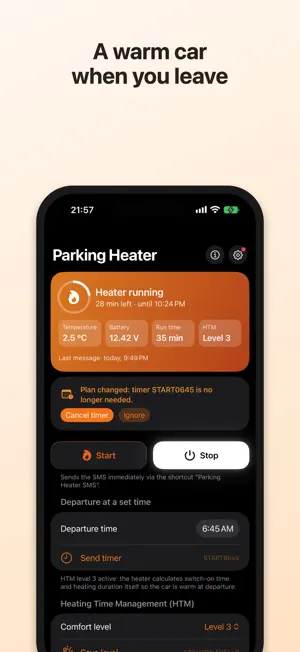
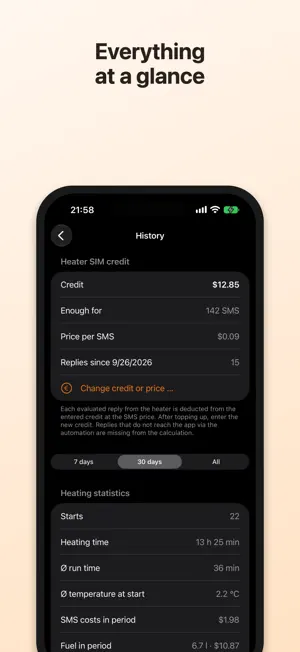
Parking Heater controls your Webasto parking heater with ThermoCall TC3 or TC4 via SMS – and turns it into a proper app: start, stop, timer, status and temperature with one tap. The heater’s replies are evaluated and shown in the app, in widgets and on Apple Watch. CONTROL • Start, stop, status and temperature with one tap • Timer for your departure time – with Heating Time Management (HTM) the heater calculates switch-on time and duration itself • Set run time, comfort level, auxiliary output and temperature alarm • Confirmation before starting and changing settings, can be turned off • Send automatically via a shortcut – no detour through the Messages app UNDERSTAND REPLIES • Reply SMS from the heater are evaluated: state, remaining time, cabin temperature, battery voltage • Live Activity on the Lock Screen and in the Dynamic Island while the heater is running • Notification when the run time ends and warning on low battery voltage • Battery trend: detects when the voltage keeps dropping day after day WEEKLY SCHEDULE • Departure time per weekday, pause for holidays or home-office days • Heat only when cold: weather forecast for where the car is parked (Open-Meteo) • Calendar: departure before your first appointment, optionally with travel time from Apple Maps • Start check: verifies shortly before departure that the timer really fired • Preview of the next 7 days AT A GLANCE • Widgets for the Home and Lock Screen, controls in Control Center • Apple Watch app with complication • History with battery voltage, temperature, heating statistics and fuel costs • Keeps an eye on the heater SIM’s credit and warns before it runs out • Sync between iPhone, iPad and Watch via iCloud • Siri: “turn on Parking Heater” REQUIREMENTS • Webasto parking heater with ThermoCall TC3 (firmware 3.2 or later) or TC4 (SMS control) and a SIM card in the unit • Your iPhone must be registered in the ThermoCall unit as an authorized number • Every reply from the heater is an SMS – charges may apply depending on your plan • Automatic sending and evaluating use Apple’s Shortcuts app; the in-app guide explains every step • Ready-made shortcuts to add are available on the support page: www.bumberger.at/en/standheizung This app is an independent project and is not affiliated with the Webasto Group. Webasto and ThermoCall are trademarks of Webasto SE.
What’s new
Version 1.6 · Updated October 18, 2026
New home screen: while the heater runs, an orange card with a progress ring shows the time left. Otherwise the next run is front and centre – with weather forecast, week strip and whether the heater confirmed the timer. A paused weekly schedule can be resumed right from the home screen. Also: choose Light, Dark or System appearance, animated launch screen, longer times in days and hours, the new overview on Mac and more reliable iCloud sync of the weekly schedule.
App privacy
The developer, Christian Bumberger, reported these privacy practices to Apple.
Data Not Linked to You
The following data, which may be collected but is not linked to your identity, may be used for the following purposes:
- Location: Coarse Location
Used for: App Functionality
Alternatives to Parking Heater Remote
Looking for apps like Parking Heater Remote? Here are 6 similar apps on the App Store. The highest rated is Lew App (5.0/5), and 5 of the 6 are free to download.


| App | Rating | Price | Last updated | Compare |
|---|---|---|---|---|
| Parking Heater Remote | – | Free | October 18, 2026 | |
| ESTAR Home | – | Free | Apr 7, 2026 | Compare |
| Flexcon PA | – | Free | Dec 13, 2024 | Compare |
| Fireplay | – | Free | Oct 20, 2025 | Compare |
| Lew App | 5.0 / 5 (3) | 1.99 USD | Mar 5, 2024 | Compare |
| Smart Buds | – | Free | Aug 28, 2024 | Compare |
| VEVOR | – | Free | Sep 8, 2026 | Compare |