

GTA CUE
Giffin Tripp Music iPhoneiPadiPod touch
GTA CUE is a paid Music app for iPhone and iPad by Giffin Tripp. Rated 5.0/5 from 4 ratings. Requires iOS 17.0. Updated October 16, 2026.
- Rating
- 5.0
- 4 ratings
- Price
- 19.99 USD
- on the App Store
- Size
- 9 MB
- Age 4+
- Updated
- Oct 16
- 2026 · v3.0.53
Screenshots



About GTA CUE
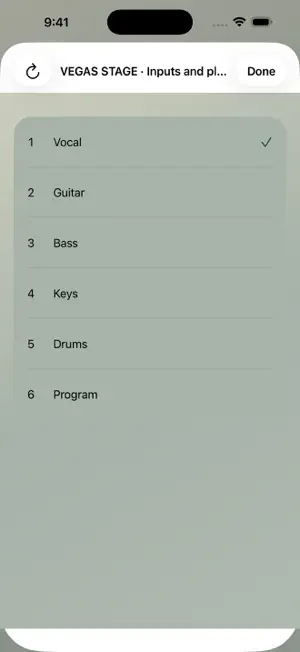
A quick listen into your audio network. GTA CUE brings local network audio metering and listening to your iPhone and iPad. Select a compatible Dante-network source, choose a channel, check its level and tap CUE to listen. SINGLE CUE OR AN EIGHT-INPUT MIX Use Single CUE for a quick channel check, or enable Cue Mix in Options to combine up to eight inputs into a local stereo monitor mix. Choose sources and channels on the detail pages, adjust each input's trim and pan, and use Mute, Solo and channel-pair links. Four memories store assignments and controls for quick recall. Your monitor controls do not change the transmitter's audio. CUE MIX REQUIRES ETHERNET Connect a compatible iPhone or iPad Ethernet adapter to the audio network. Cue Mix offers wired Ethernet interfaces only and does not switch to Wi-Fi if the cable is disconnected. Single CUE also supports Wi-Fi through an access point connected to the audio network; congestion and packet loss can interrupt wireless audio. Bluetooth listening adds a separate output delay. LOCAL CUE SHARING Compatible GTA CUE devices on the same local network can share an available audio feed. Settings > Network > CUE Sharing shows the audio path and connected peers. Transmitter capacity and available feeds still apply. Keep a supplying device connected. Active CUE listening on iPhone and iPad can continue in the background or while locked; a silent standby does not remain available in the background. Quitting the supplying app or disconnecting its network can interrupt listeners. Restore the supplying device and reconnect when needed. YOUR LOOK, YOUR METERS Choose the dark Slate theme or the light console-inspired The Hive, with customizable knobs and meters. Use segmented RMS or analog-style metering, optional outside meters and Pre Trim/Post Trim measurement. Printed analog-face numbers are decorative. The iPad shows network, sample-rate and bit-depth information in landscape as well as portrait. YOUR CONNECTION Choose your network adapter and match the source with manual 44.1, 48, 96 or 192 kHz selection. Receive supported 24-bit or 32-bit signed-integer PCM streams. Inspect packet and playback diagnostics, and optionally scan a reachable IPv4 range for compatible sources. LOCAL BY DESIGN Audio decoding, metering and playback run locally. No account, ads, analytics SDK or developer-operated cloud audio service is required. A clearly labeled, silent Demo Mode lets you explore the controls without a transmitter. BEFORE YOU BUY Real metering and listening require a compatible transmitter and access to its local network. Supported formats and capacity depend on the transmitter and configuration; selectable sample rates do not guarantee support from every source. Start CUE playback from a compatible external source. Active listening can continue while the app is in the background or the device is locked. A silent standby does not stay available in the background. Output-route changes mute listening. There is no AVB or PTP-locked output. Monitor protection is not calibrated hearing protection; set output volume appropriately. By GIFFTRIPPAUDIO.
What’s new
Version 3.0.53 · Updated October 16, 2026
Cue Mix brings eight inputs to your local monitor, with per-input trim, pan, Mute and Solo, channel-pair links and four mix memories. Compatible GTA CUE devices can share available audio feeds on the local network. A new Sharing Guide explains the audio path and source-device requirements. Cue Mix now requires Ethernet on iPhone and iPad. Wi-Fi remains available in Single CUE. The iPad's network, sample-rate and bit-depth bar is visible in landscape. Includes interface selection and reconnect improvements. Fixes selection of local-only Ethernet adapters in Cue Mix, including adapters without an internet route. Moves the Ethernet requirement explanation into the Operation Guide.
App privacy
The developer, Giffin Tripp, reported these privacy practices to Apple.
Data Not Collected
The developer does not collect any data from this app.
Alternatives to GTA CUE
Looking for apps like GTA CUE? Here are 6 similar apps on the App Store. The highest rated is eighty32 Listen (5.0/5), and 5 of the 6 are free to download.
-
 eighty32 Listen
5.0
-
 BrownBox: Line Array Rigging
5.0
-
 PatchBoy: Stage Plot & Patch
4.0
-
 Virgil: Remote Controller
5.0
-
 Unsound ToneGen
-
 SoundScope VR
3.9
| App | Rating | Price | Last updated | Compare |
|---|---|---|---|---|
| GTA CUE | 5.0 / 5 (4 ratings) | 19.99 USD | October 16, 2026 | |
| eighty32 Listen | 5.0 / 5 (1) | Free | Jun 29, 2026 | Compare |
| BrownBox: Line Array Rigging | 5.0 / 5 (1) | Free | Sep 3, 2026 | Compare |
| PatchBoy: Stage Plot & Patch | 4.0 / 5 (2) | Free | Sep 4, 2026 | Compare |
| Virgil: Remote Controller | 5.0 / 5 (1) | Free | Oct 27, 2026 | Compare |
| Unsound ToneGen | – | Free | Jan 23, 2024 | Compare |
| SoundScope VR | 3.9 / 5 (8) | 24.99 USD | Oct 20, 2026 | Compare |
Compare GTA CUE with the top alternatives: ratings, updates, ASO score and keyword gaps →