

Pocketrack: Budget & Expenses
Ervin Petrisevac Finance iPhoneiPadiPod touch
Pocketrack: Budget & Expenses is a free Finance app for iPhone and iPad by Ervin Petrisevac. Requires iOS 26.0. Updated October 7, 2026.
- Price
- Free
- on the App Store
- Size
- 2 MB
- Age 4+
- Updated
- Oct 7
- 2026 · v1.1
Screenshots


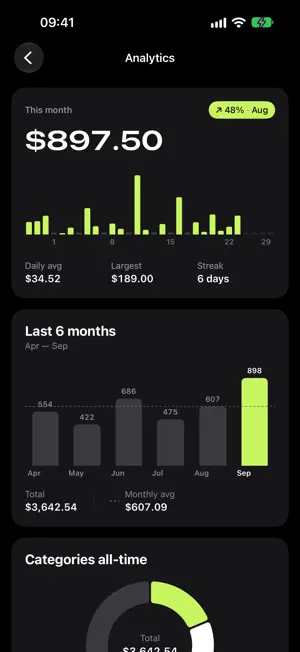
About Pocketrack: Budget & Expenses
Pocketrack is the expense tracker that gets out of your way. Log a purchase in seconds, see where the month went, and keep every number on your iPhone. No account, no cloud, no ads. LOG IT IN SECONDS Type the amount, tap a category, save. Notes and dates are there when you want them and out of the way when you don't. Long-press Add to jump straight to a category, or start from the widget on your Home Screen. SNAP THE RECEIPT, SKIP THE TYPING Scan a receipt and Pocketrack fills in the amount, date and shop name, and suggests a category. The text is read on your iPhone, with Apple Intelligence where available, and the photo is never uploaded or kept. A BUDGET THAT KEEPS YOU ON TRACK Set one number for the month. Pocketrack shows what's left and how much you can spend each day to stay within it. Hide the budget from Home whenever you like without losing it. SEE WHERE THE MONEY WENT • Every day of this month, with your daily average and biggest purchase • This month against the last six • Spending by category • Your five largest purchases FIND ANYTHING Search by note, category or amount, filter by category and open any past month. Swipe to edit or delete, with undo if you change your mind. WIDGETS Home Screen widgets in three sizes and Lock Screen widgets keep your monthly total and budget in view. Add an expense straight from the medium or large widget. LOCKED WHEN YOU WANT IT Protect the app with a PIN and Face ID or Touch ID. The PIN stays in your iPhone's Keychain. YOUR LANGUAGE, YOUR CURRENCY English, Bosnian, Serbian and Spanish. Euro, US dollar, British pound, convertible mark, Serbian dinar and Colombian peso, each written the way it is at home. PRIVATE BY DESIGN • No account or sign-up • No cloud and no servers • No analytics or tracking • No ads, subscriptions or in-app purchases Your expenses are part of your normal iPhone backup, so they come with you to a new phone. Also: light and dark mode, larger text, Reduce Motion and VoiceOver support. Pocketrack is free and needs iOS 26 or later. Questions or ideas? [email protected]
What’s new
Version 1.1 · Updated October 7, 2026
New in 1.1: • Sort your expenses by date, amount or category with the button at the top right. • Delete all expenses from Settings. Your currency, budget and appearance stay as they are. • Press and hold the app icon to add an expense or scan a receipt straight away. Fixes: • Receipt scanning reads amounts such as 1234,56 and 1,234.56 correctly, no longer picks up dates in the future or misreads two-digit years, and suggests categories more reliably. • With a category selected, the comparison with last month uses the same category, and the budget still counts the whole month. • "Other" appears only once in the category chart. • The date picker stops at today.
App privacy
The developer, Ervin Petrisevac, reported these privacy practices to Apple.
Data Not Collected
The developer does not collect any data from this app.
Alternatives to Pocketrack: Budget & Expenses
Looking for apps like Pocketrack: Budget & Expenses? Here are 6 similar apps on the App Store. The highest rated is Mizaniya Pay (5.0/5), and all 6 are free to download.


| App | Rating | Price | Last updated | Compare |
|---|---|---|---|---|
| Pocketrack: Budget & Expenses | – | Free | October 7, 2026 | |
| Tefter | 3.0 / 5 (2) | Free | Apr 18, 2024 | Compare |
| Planet Residence | – | Free | Oct 7, 2026 | Compare |
| Velorra | – | Free | Oct 7, 2026 | Compare |
| BudgetApp - Expenses tracker | – | Free | Nov 12, 2025 | Compare |
| Mizaniya Pay | 5.0 / 5 (1) | Free | Oct 19, 2026 | Compare |
| VaulFi | 5.0 / 5 (2) | Free | Oct 14, 2026 | Compare |