

Experto: Organize o que quiser
Experto: Organize o que quiser Productivity iPhoneiPadiPod touch
Experto: Organize o que quiser is a free Productivity app for iPhone and iPad by Experto: Organize o que quiser. Requires iOS 16.4. Updated October 20, 2026.
- Price
- Free
- on the App Store
- Size
- 8 MB
- Age 4+
- Updated
- Oct 20
- 2026 · v0.17.1
Screenshots


About Experto: Organize o que quiser
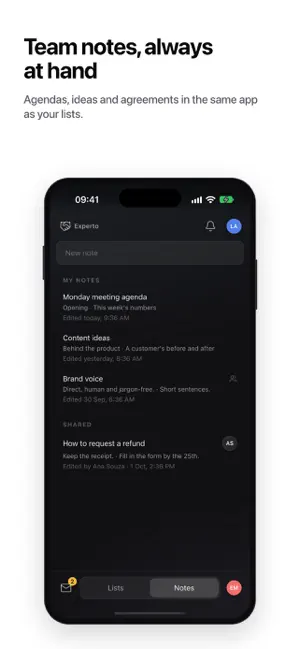
Organize anything, effortlessly. The client's request, the meeting agenda, the grocery list: in Experto, everything becomes a list, and every list shows what's left and who has it. Nobody has to hand out tasks or ask in the group chat who took the request. EACH PERSON PULLS WHAT THEY'LL DO With Pull and Push, nobody has to pick an owner for every task. Swipe a task to the right and Pull it: it lands in your day, and the team's list shows your dot on it. Finish it, and everyone sees it done. Ran out of time? A Push hands the task back to the team, without breaking anything. RIGHT AT HOME ON IPHONE Touch and hold a task to open its menu: copy, duplicate, select or delete. Swipe left to copy or delete. Select several and complete, move or duplicate them all at once. Touch and hold the Experto icon on your Home Screen to add a task, see what's due today or open your messages. Your iPhone gives haptic feedback when you complete, Pull or Push, and notifications arrive with Experto's own sound. DEADLINES THAT WARN YOU Every task has a start, a deadline and an estimate. What's late turns red before anyone has to chase it. CONNECTED LISTS Finish a task in one list and it moves on to the next by itself: requests, in progress, approval. The work flows without anyone pushing it. NOTICES WITH READ RECEIPTS A notice reaches the whole team at the same time, and you see who has read it. Important ones stay on screen until they're read, and everyone can reply with a reaction. NOTES NEXT TO YOUR LISTS Agendas, ideas and agreements in the same app as your tasks, just for you or for the whole team. Photos and files stay attached to the task itself. Share a task or a note with the iPhone share sheet. A SUB-ACCOUNT FOR EVERY CLIENT, STORE OR DEPARTMENT Turn on sub-accounts and use the name your business already uses: clients, projects, units, stores, sites or departments. People from outside join as guests, see only their own sub-account, get the notices and complete items with a check. AI DOES ONLY WHAT YOU ALLOW Through Experto MCP, the AI assistant you already use turns your meeting agenda into tasks, in the right list, and tells you what's late. AI connections start turned off, the AI only sees what you see, and it never deletes anything. Admins decide who can connect and whether the AI can only read or also edit. FOR YOUR PERSONAL LIFE, TOO Household bills, the grocery list, your studies and your next trip, all in one place. Share a list with the people you live with, and each person checks off what they did. THE SAME WORK, WHEREVER YOU ARE Every change shows up for everyone right away, on iPhone, on the web, on Mac and on Windows. On the computer, a tab on the edge of the screen opens the panel with one click, on top of any app. On the web, the Organizer lays out the team's week, list by list or person by person. Create your free account right in the app and share your first list with the team whenever you want. In English, Portuguese and Spanish. Made by experts, for experts.
What’s new
Version 0.17.1 · Updated October 20, 2026
- Search your account's items by title, description, attachment name or code, right from the list picker. - Pin the lists you use most to a group of your own, right below My lists. - Groups in the list menu now collapse; press and hold a title to expand or collapse them all. - Tap … on any list to see its details and pin it. - Every item now has a short code, like MTO-431, so it's quick to find and mention. - An item's sub-account (a client, a project) shows on its row, in its color. - More at home on iPhone: iOS-sized text and touch targets, haptics, press and hold for actions, and quick actions on the app icon. - Open PDFs, images and text files from your items without leaving the app, and annotate on top. - Each list can have its own email address: emails sent to it become items, with their attachments. - Guests can leave a comment when they complete an item. - Choose the app's color and language. - Simpler sign-up, in steps. - Public links last 90 days and show when they expire. - Fixes and improvements.
App privacy
The developer, Experto: Organize o que quiser, reported these privacy practices to Apple.
Data Linked to You
The following data, which may be collected and linked to your identity, may be used for the following purposes:
- Contact Info: Email Address, Name
- User Content: Emails or Text Messages, Photos or Videos, Other User Content
- Identifiers: User ID
Used for: App Functionality