

Ate: Food Photo & Weight Log
IndieWay Health & Fitness iPhoneiPadiPod touch
Ate: Food Photo & Weight Log is a free Health & Fitness app for iPhone and iPad by IndieWay. Requires iOS 17.0. Updated October 23, 2026.
- Price
- Free
- on the App Store
- Size
- 20 MB
- Age 4+
- Updated
- Oct 23
- 2026 · v1.3.0
Screenshots


About Ate: Food Photo & Weight Log
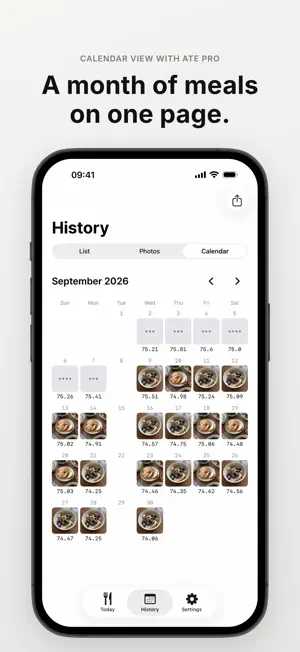
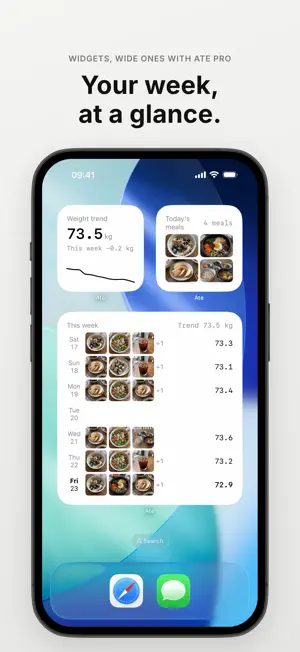
Ate is a low-effort food journal and weight log. Snap what you ate, jot down one number for your weight, and let the trend line do the rest. • A PHOTO FOR EACH MEAL Tap the meal button, take a picture, done. Add a short note if you like. Breakfast, lunch, dinner, or snack is picked from the time you ate. You can move each photo to choose the part that shows in small tiles and on share cards. • OR PICK FROM YOUR LIBRARY Choose up to 10 photos at once and each one becomes a meal. Photos use the time they were taken, when the photo includes it. You can also add photos to a past day. • CALORIES ONLY IF YOU WANT THEM No food search and no nutrition tables. Turn it on in Settings to type in calories for each meal yourself and see the total you logged for the day. Turn it off and the field is hidden. • YOUR OWN MEAL TYPES AND TAGS Rename breakfast, lunch and the rest, or create meal types of your own such as brunch. Add words you use often, like "Eating out" or "No clothes", as tags with one tap, and add, edit or delete tags yourself. • HOW YOU FEEL, AND A DAILY JOURNAL Note how your body feels, such as "Tired" or "Full", on its own or together with a meal or weigh-in. You can also write one journal entry a day to look back on. • JUST THE PHOTOS Browse a grid of only your meal photos in History, and find past records by their notes and tags. A deleted meal or weight can be undone right away. • A WEIGHT TREND, NOT A DAILY VERDICT Your weight goes up and down every day. Ate shows a moving-average trend line so you can see where it's really heading. Tap a tag such as "No clothes" or "After a workout", or add a note, and see the change since your previous weigh-in. • MEALS AND WEIGHT SIDE BY SIDE The History screen puts your weight chart on top and your days below it, each with that day's weight and meal photos. • GOAL, IF YOU WANT ONE Set an optional goal weight and see a simple estimate based on the trend you've logged. • WIDGETS AND A CAMERA BUTTON Small widgets for your weight trend and today's meals on the Home Screen, and your weight trend on the Lock Screen. On iOS 18 or later, open the camera straight from Control Center or the Lock Screen with the Ate Camera button. • A MORNING REMINDER, IF YOU WANT ONE One quiet weigh-in reminder that skips the days you've already logged. • SHARE AS A CARD Turn today's or this week's meal photos into a single image to share. Your weight is never on the card. • ON IPAD TOO Ate works on iPad in any orientation. • YOUR DATA STAYS WITH YOU No account and no ads. Ate never sends your photos or records to a server. They stay on your device and in your device backup, and leave only when you export or share them. The network is used only to check your purchase status. Export everything as a zip anytime. Viewing and exporting your own records will always be free. • ATE PRO Logging meals with one photo each, one weight entry a day (edit it anytime), trends up to 3 months, the full history list and each day's page, small and Lock Screen widgets, reminders, export and import, share cards, photo positioning, the photo grid and note search, calorie entry, meal types and tags, how you feel, and the daily journal are free. Ate Pro adds the 1-year and all-time trend, a calendar view with a month of meal photos and weights, wide widgets (the medium Today widget and the large This Week widget), more than one weight entry a day, a second photo for each meal, this week's and last week's meal photos side by side by weekday, and choosing the photo shown for each day on the calendar. Records you already have are never locked. Ate Pro is available as a monthly or yearly subscription, or a one-time lifetime purchase. Ate doesn't give medical or dietary advice. Terms of Use (EULA): https://www.apple.com/legal/internet-services/itunes/dev/stdeula/ Privacy Policy: https://indieway.xyz/en/apps/ate/privacy
What’s new
Version 1.3.0 · Updated October 23, 2026
- Browse just your meal photos and find past records by notes and tags. - Create your own meal types. - Quickly log tags and how your body feels. - Write a daily journal to look back on your day. - Choose the photo shown on your calendar. - Log calories for meals if you want to. - Improved stability and usability.
App privacy
The developer, IndieWay, reported these privacy practices to Apple.
Data Not Linked to You
The following data, which may be collected but is not linked to your identity, may be used for the following purposes:
- Purchases: Purchase History
Used for: Analytics, App Functionality
Alternatives to Ate: Food Photo & Weight Log
Looking for apps like Ate: Food Photo & Weight Log? Here are 6 similar apps on the App Store.
-
 배꼽시계 - 간헐적 단식 타이머
-
 Ate That
-
 Daily Weight | Easy Log
-
 Kilo - 가볍게 이어가는 체중 기록
-
 Chakchak: Workout & Meal Log
-
 Porkfolio: Photo food diary
| App | Rating | Price | Last updated | Compare |
|---|---|---|---|---|
| Ate: Food Photo & Weight Log | – | Free | October 23, 2026 | |
| 배꼽시계 - 간헐적 단식 타이머 | – | Free | Oct 23, 2026 | Compare |
| Ate That | – | Free | Sep 19, 2026 | Compare |
| Daily Weight | Easy Log | – | Free | Jul 17, 2026 | Compare |
| Kilo - 가볍게 이어가는 체중 기록 | – | Free | Aug 31, 2026 | Compare |
| Chakchak: Workout & Meal Log | – | Free | Oct 24, 2026 | Compare |
| Porkfolio: Photo food diary | – | Free | Oct 16, 2026 | Compare |