

Video Splitter: Split & Cut
Amandeep Singh Photo & Video iPhoneiPadiPod touch
Video Splitter: Split & Cut is a free Photo & Video app for iPhone and iPad by Amandeep Singh. Rated 4.5/5 from 2 ratings. Requires iOS 18.0.
- Rating
- 4.5
- 2 ratings
- Price
- Free
- on the App Store
- Size
- 2 MB
- Age 4+
- Updated
- Oct 26
- 2026 · v1.0.2
Screenshots


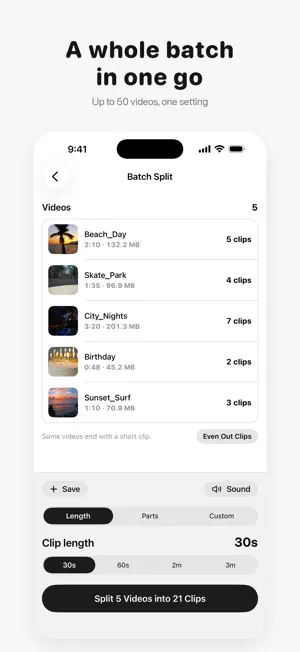

About Video Splitter: Split & Cut
Video Splitter: Split & Cut is an iPhone and iPad app that splits long videos into equal clips for Instagram Stories, WhatsApp Status and anywhere with a length limit. Every cut is frame-exact, clips keep the original quality, and everything happens on your device. HOW IT WORKS 1. Pick a video from Photos or Files. 2. Drag the ends of the strip to trim off what you don't need. 3. Choose a clip length (30s, 60s, 2m or 3m) or a number of parts. 4. Check every clip's start and end before you split. 5. Choose the clips you want and save them to Photos in order, or share them. GREAT FOR • Posting a long video as a run of Instagram Stories or WhatsApp Status updates • Fitting a video under the length limit of TikTok, YouTube Shorts or a messaging app • Cutting a long recording, lecture or game into parts you can find again • Keeping only the good part of a video, saved as one trimmed clip FREE • Clip lengths of 30 seconds, 60 seconds, 2 minutes and 3 minutes • Split into 2 to 50 equal parts • Trim the start and end before splitting • Even Out: equal clips with no tiny leftover at the end, none over your limit • Choose which clips to save or share • Watch every clip before you save it • No watermark and no ads, on every clip PRO • Custom length: any duration you choose, from a tenth of a second to 10 minutes • Manual cuts, placed exactly where you want them • Batch Split: up to 50 videos in one go, with one setting for all • Remove sound: clips without their audio, ready for your own music • Saved presets for the settings you use most • Albums: each video's clips saved into an album of their own Pro is a one-time purchase. There is no subscription and nothing renews. WORKS WITH • Videos from the Camera, Photos and the Files app, including iCloud videos • HEVC, H.264 and ProRes, in MOV and MP4 • HDR, Cinematic and Slo-mo videos from iPhone • Portrait and landscape, at any resolution • Up to 300 clips from one video • 11 languages, switchable inside the app QUESTIONS Does Video Splitter add a watermark? No. Clips have no watermark, in the free version and in Pro. Does it lower the video quality? No. Clips are copied from the original without re-encoding, so they keep its resolution, codec, HDR and bitrate. Is it a subscription? No. Splitting is free, and Pro is a one-time purchase that never renews. Are my videos uploaded anywhere? No. Video Splitter works entirely on your iPhone or iPad. There are no uploads, no account and no analytics. Does it work offline? Yes. Splitting, trimming and saving all work in airplane mode. Can I trim a video before splitting it? Yes. Drag either end of the filmstrip, and only the part you keep is split. A trimmed part that fits in one clip can be saved on its own. How short or long can each clip be? The free lengths are 30 seconds, 60 seconds, 2 minutes and 3 minutes. Pro lets you type any length from 0.1 seconds to 10 minutes. Do I have to save every clip? No. Every clip starts selected, and you tap to leave out the ones you don't want before saving or sharing. Can I remove the sound from the clips? Yes, with Pro. Remove sound makes clips without audio, without re-encoding the video. Does every frame end up in a clip? Yes. Each frame lands in exactly one clip, so nothing repeats at a cut and nothing goes missing between two clips. Questions or problems? Write to [email protected]. We read every message. Terms of Use (EULA): https://amanghuman.com/eula?app=videosplitter Privacy Policy: https://amanghuman.com/privacy?app=videosplitter
What’s new
Version 1.0.2 · Updated October 26, 2026
Watch before you split, and sharing that finishes. • Play any clip: tap a clip in the list to watch just that part. Tap it again to stop. • iPhone Duo: opened wide, the video sits on one side and your settings on the other. Upright, the video and trim strip stay above the fold. iPad in landscape gets the same side-by-side layout. • Uploads to Drive or Dropbox: your iPhone stays awake while the upload window is open, so long uploads finish. • Clips you've shared count as kept: Done no longer asks to discard them. • Clip length (Pro) understands units, like 1m, 20 sec or 4:30. • Restore Purchase now says so when there's nothing to restore. • Popup buttons respond every time, plus smaller fixes.
App privacy
The developer, Amandeep Singh, reported these privacy practices to Apple.
Data Not Collected
The developer does not collect any data from this app.
Alternatives to Video Splitter: Split & Cut
Looking for apps like Video Splitter: Split & Cut? Here are 6 similar apps on the App Store. The highest rated is Cut Trim Split Video Editor (5.0/5), and all 6 are free to download.
-
 Cut Trim Split Video Editor
5.0
Cut Trim Split Video Editor
5.0
-
 Video Splitter - Split Videos
-
 SliceIt: Split Video in Parts
5.0
SliceIt: Split Video in Parts
5.0
-
 Video Splitter: Story Splitter
-
 Storybly - Clip Cutter
5.0
Storybly - Clip Cutter
5.0
-
 WakeWake: Easy Video Splitter
| App | Rating | Price | Last updated | Compare |
|---|---|---|---|---|
| Video Splitter: Split & Cut | 4.5 / 5 (2 ratings) | Free | October 26, 2026 | |
| Cut Trim Split Video Editor | 5.0 / 5 (1) | Free | Oct 4, 2026 | Compare |
| Video Splitter - Split Videos | – | Free | May 19, 2026 | Compare |
| SliceIt: Split Video in Parts | 5.0 / 5 (2) | Free | Oct 7, 2026 | Compare |
| Video Splitter: Story Splitter | – | Free | Aug 11, 2026 | Compare |
| Storybly - Clip Cutter | 5.0 / 5 (1) | Free | Sep 8, 2026 | Compare |
| WakeWake: Easy Video Splitter | – | Free | Oct 26, 2026 | Compare |