

Anytime Voice Reminders
SHENGQIU ZHENG Productivity iPhoneiPadiPod touch
Anytime Voice Reminders is a free Productivity app for iPhone and iPad by SHENGQIU ZHENG. Requires iOS 17.0. Updated November 18, 2026.
- Price
- Free
- on the App Store
- Size
- 3 MB
- Age 4+
- Updated
- Nov 18
- 2026 · v1.0.2
Screenshots
Save to Pinterest


About Anytime Voice Reminders
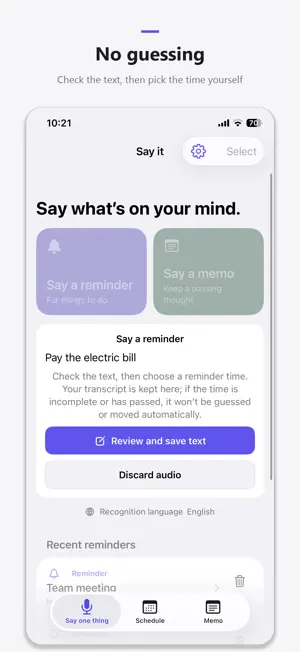
Tap to start a voice reminder. Say what you need to do and when, such as “Remind me in ten minutes to drink water.” End the recording and check the result. When confirmation is needed, review or edit the details before saving. You can also type when speaking is not convenient. Try saying • Meeting tomorrow at 3 pm If the wording isn’t understood or the time has already passed, your words are kept so you can pick the time yourself. Nothing is guessed. Reminders and notes, organized Create a reminder for something with a time, or save a note for an idea you want to keep. Find your records through the calendar, schedule and search. System alarms for one-time reminders On a supported iPhone, you can use a system alarm for a one-time reminder. This requires iOS 26 or later, the setting enabled in the app, and the relevant permission. Daily, weekly or monthly Set repeating reminders for regular tasks, and pause or resume them when needed. Repeating reminders use standard notifications and the time zone saved with the reminder. Monthly reminders skip months that do not contain the selected day. Busy now? Snooze for 15 minutes Set an unfinished one-time reminder to alert you 15 minutes from now. This action does not apply to repeating reminders. Create with Siri Use Siri to create a reminder or save a note. Your iPhone may need to be unlocked. Your language The app is available in 12 languages. Automatic time recognition works when you speak Chinese, English or Japanese. In other languages, your words are still transcribed and you choose the time yourself. Try it, then decide Activate a free 14-day trial. After the trial, a one-time purchase lets you continue creating reminders and notes. There is no auto-renewing subscription. See the App Store purchase screen for the current price. Before you start Voice input requires microphone and speech recognition permissions and depends on device and recognition-language support. Check the result and reminder time. Reminders require the relevant permission. Standard notification alerts are affected by your iPhone notification and Focus settings.
What’s new
Version 1.0.2 · Updated November 18, 2026
- Say only a date, like "Remind me Friday to renew my pass": the reminder is set at your default time (9:00, change it in Settings) - Task before the time works too: "meeting tomorrow at 3 pm" - Better speech recognition on iOS 26, and a "Type it instead" button if nothing is heard - Minor fixes
App privacy
The developer, SHENGQIU ZHENG, reported these privacy practices to Apple.
Data Not Collected
The developer does not collect any data from this app.
Alternatives to Anytime Voice Reminders
Looking for apps like Anytime Voice Reminders? Here are 6 similar apps on the App Store. The highest rated is Kavach User (5.0/5), and 5 of the 6 are free to download.
-
 VoxTask: AI Voice Reminders
-
 OneTapReminder Voice Reminders
-
 AI Reminder: Voice To Do List
-
 Kavach User
5.0
-
 OEQ AI TRANSLATOR
1.0
-
 MausBot: Private AI Agents
4.2
| App | Rating | Price | Last updated | Compare |
|---|---|---|---|---|
| Anytime Voice Reminders | – | Free | November 18, 2026 | |
| VoxTask: AI Voice Reminders | – | Free | Aug 19, 2026 | Compare |
| OneTapReminder Voice Reminders | – | 4.99 USD | Nov 5, 2026 | Compare |
| AI Reminder: Voice To Do List | – | Free | Aug 3, 2026 | Compare |
| Kavach User | 5.0 / 5 (1) | Free | Nov 9, 2026 | Compare |
| OEQ AI TRANSLATOR | 1.0 / 5 (3) | Free | Jun 23, 2025 | Compare |
| MausBot: Private AI Agents | 4.2 / 5 (16) | Free | Nov 21, 2026 | Compare |