

Haru - AI Assistant
INPHIL CHOI Productivity iPhoneiPadiPod touch
Haru - AI Assistant is a free Productivity app for iPhone and iPad by INPHIL CHOI. Requires iOS 27.0. Updated November 25, 2026.
- Price
- Free
- on the App Store
- Size
- 25 MB
- Age 9+
- Updated
- Nov 25
- 2026 · v1.4.0
Screenshots
Save to Pinterest


About Haru - AI Assistant
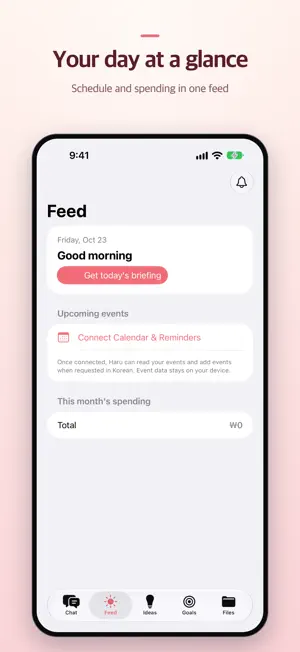
Just ask, and Haru takes care of your calendar, to-dos, expenses, and email. Meet Haru, your assistant. Actions work when you speak Korean; in other languages Haru chats, translates and helps you write. No sign-up. Decisions are made by Apple Intelligence on your iPhone, and your conversations and records stay only on this device. Haru shows you a card for what it's about to do — it only runs after you confirm. ■ Just ask (in Korean) · "Book the dentist at 3pm tomorrow" → Calendar · it understands follow-ups like "move that to 4" · "Add milk to my to-do list" → Reminders · "I spent $12 on lunch" → Expenses, "How much did I spend this month?" · "Write an email to my manager that I'll be 30 minutes late" → Email draft · "Set an alarm for 7", "Text Mom", "Directions to the station" · "I want the longest break with 2 vacation days" → a leave plan that lines up with public holidays ■ Show it, and Haru sorts it out · A photo of an invitation, a bill, or a receipt → turned into a calendar event, to-do, or expense ■ Voice · Haru reads replies aloud with Apple's voice · A more natural AI voice is available with Haru Plus — download it once, use it fully on-device (about 400MB) ■ Hand off computer tasks — Haru PC (free) · Install Haru PC (open source) on your computer, and ask from your phone — "On my PC, tidy up my Downloads folder" · Before anything changes on your computer, an approval card shows up on your phone first · Works away from home, too — end-to-end encrypted, so the relay can't see the content (or skip the relay and connect directly) · How to install: https://inphilchoi.github.io/haru/ ■ Haru Plus (one-time purchase, not a subscription) · Multiple assistants · unlimited photo sorting (a daily limit applies without Plus) · a natural AI voice · Talking to Haru and using Haru PC do not require Plus ■ You can trust it · No ads, no tracking · No data collection · Haru doesn't make payments or transfers on your behalf · If it senses you're struggling, it shares a helpline ■ In your language · Write in English, Japanese or Chinese and Haru answers in the same language — handy for translating, drafting and planning. · Actions like calendar events, to-dos, expenses, email drafts and alarms work when you ask in Korean. · Holiday and leave planning follows the Korean calendar. ※ AI conversation needs a device that supports Apple Intelligence (iPhone 15 Pro or later). On other devices, Haru works as a rule-based assistant. ※ Terms of use (EULA): https://www.apple.com/legal/internet-services/itunes/dev/stdeula/ ※ Privacy policy: https://inphilchoi.github.io/haru-privacy/
What’s new
Version 1.4.0 · Updated November 25, 2026
Haru now has memory. - Say "remember …" (in Korean: "… 기억해 줘") and Haru keeps it, then brings it up in later chats when it's relevant. - Say "forget …" and it's removed. You can see what Haru remembers in Files > Notes and delete items one by one. - Memories stay on this device. Sensitive details such as passwords and card numbers are never saved. - Haru Plus can now be purchased outside Korea as well. Existing purchases stay as they are, and Restore Purchases works.
App privacy
The developer, INPHIL CHOI, reported these privacy practices to Apple.
Data Not Collected
The developer does not collect any data from this app.
Alternatives to Haru - AI Assistant
Looking for apps like Haru - AI Assistant? Here are 6 similar apps on the App Store. The highest rated is GenTeam (4.7/5), and all 6 are free to download.


| App | Rating | Price | Last updated | Compare |
|---|---|---|---|---|
| Haru - AI Assistant | – | Free | November 25, 2026 | |
| SubsCount: Subscriptions | – | Free | Nov 24, 2026 | Compare |
| AunVox | – | Free | Sep 13, 2026 | Compare |
| Prompt Note: AI Prompt Library | – | Free | Nov 6, 2026 | Compare |
| Membot — AI 기록 관리 | – | Free | Jun 10, 2026 | Compare |
| 말랑AI | – | Free | Nov 20, 2026 | Compare |
| GenTeam | 4.7 / 5 (12) | Free | Nov 26, 2026 | Compare |