

Bestino: Keep Your Best Photos
Florian Mahrl Photo & Video iPhoneiPadiPod touchMac
Bestino: Keep Your Best Photos is a free Photo & Video app for iPhone and iPad by Florian Mahrl. Requires iOS 18.0. Updated October 15, 2026.
- Price
- Free
- on the App Store
- Size
- 6 MB
- Age 4+
- Updated
- Oct 15
- 2026 · v1.9
Screenshots


About Bestino: Keep Your Best Photos
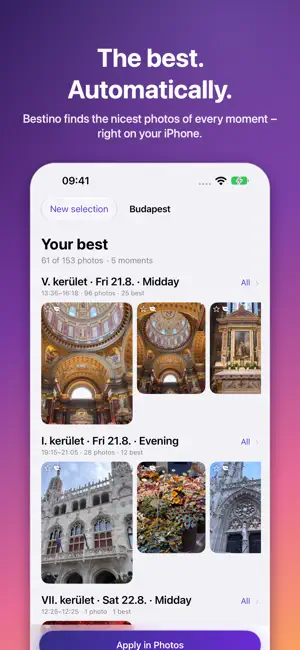
400 photos from the outing, 15 of them of your kid on the slide – which ones are the best? Bestino looks at them the way you do: laughter, open eyes, closeness, sharpness, and whether a photo fits with the others. Then you get the best of each moment – with a heart and in the album “Best” – and you see what can go. FIND THE BEST Bestino splits the day into moments (museum, playground, campfire) and picks the nicest in each. Ambient shots without people get their place too. THIN OUT SERIES Out of 15 nearly identical photos, the ones that differ stay. FREE UP SPACE Duplicates, leftovers of series, misfires and old screenshots go into the album “Rejected” – delete them with one tap, they stay in “Recently Deleted” for 30 days. EVERY DECISION EXPLAINED Tap a photo and read why it's there. Don't agree? Swap it for another one from the series. ON THE IPAD TOO On the iPad the summary sits beside the gallery, photo and reason side by side – with keys like in Lightroom: arrows to browse, P keep, X can go. PLACE AND DATE Camera photos without a place get the place of your iPhone photos taken at the same time. Photos from WhatsApp carry the day you received them – Bestino finds your photo with the same picture and takes its date. You see every suggestion, nothing is written until you tap, and “Undo” is right next to it. EVERYTHING ON YOUR DEVICE No photos leave your iPhone or iPad. Nothing changes in Photos until you apply it. Bestino is free for your first three runs – no matter how big – and afterwards for up to 100 photos per run. Bestino Pro unlocks whole weeks, trips and years: buy once, no subscription, Family Sharing included. From the makers of Filmino: Bestino's best become a film there.
What’s new
Version 1.9 · Updated October 15, 2026
A fresh look: a new icon, and the start page now suggests the right time span right away – with its latest photo up front. One tap on “Find the best” is enough. Now also in Japanese, Portuguese and Korean. Also new: a “Find the best” widget for your Home Screen, a control for Control Center and the Action button, Siri (“Find the best of today with Bestino”) – and Filmino turns your “Best” album into a film.
App privacy
The developer, Florian Mahrl, reported these privacy practices to Apple.
Data Not Collected
The developer does not collect any data from this app.
Alternatives to Bestino: Keep Your Best Photos
Looking for apps like Bestino: Keep Your Best Photos? Here are 6 similar apps on the App Store.
-
 PanPan Photos: Photo Organizer
-
 Photo Duel
-
 Nokosu: Similar Photo Cleanup
-
 Best Shot: Best Photo Picker
-
 Choosr - AI Photo Picker
-
 Tabby Picks
| App | Rating | Price | Last updated | Compare |
|---|---|---|---|---|
| Bestino: Keep Your Best Photos | – | Free | October 15, 2026 | |
| PanPan Photos: Photo Organizer | – | Free | Oct 19, 2026 | Compare |
| Photo Duel | – | Free | Sep 10, 2026 | Compare |
| Nokosu: Similar Photo Cleanup | – | Free | Oct 23, 2026 | Compare |
| Best Shot: Best Photo Picker | – | Free | Sep 17, 2026 | Compare |
| Choosr - AI Photo Picker | – | Free | Oct 21, 2026 | Compare |
| Tabby Picks | – | Free | Jun 9, 2026 | Compare |