

Pill Counter - Offline Tally
Hoyoung Sohn Utilities iPhoneiPadiPod touch
Pill Counter - Offline Tally is a free Utilities app for iPhone and iPad by Hoyoung Sohn. Requires iOS 15.0. Updated October 29, 2026.
- Price
- Free
- on the App Store
- Size
- 48 MB
- Age 4+
- Updated
- Oct 29
- 2026 · v1.4.0
Screenshots


About Pill Counter - Offline Tally
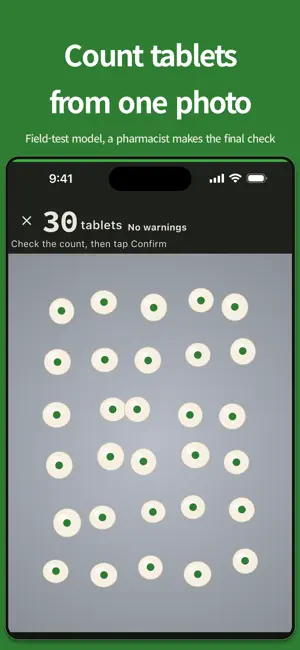
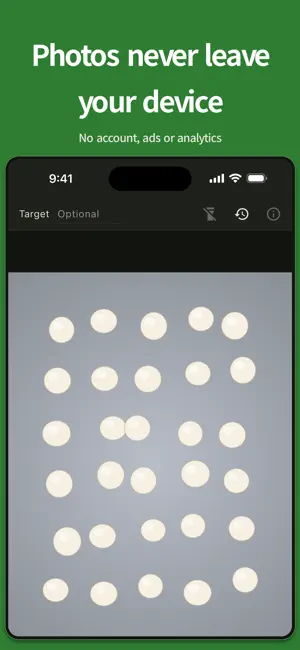
Count tablets spread on a counting tray from a single photo. Built for pharmacy staff. Counting happens on your device. Photos you confirm are sent only if you join the training contribution. It is off by default. No account, no ads, no analytics. Counting is free up to 10 times a day. Pro Lifetime, a one-time purchase, adds unlimited counting, your full history, export and grouping. This build uses a field-test model: treat the count as a reference and always check it by eye. HOW TO USE 1) Spread the tablets in a single layer on the counting tray, with as little overlap as possible. 2) Follow the on-screen level ring, then take one photo. The shutter freezes on that exact frame. 3) Check the count on the result screen. Tap "Edit", then tap the photo to add a tablet, or long-press a point to remove it. Pinch or double-tap to zoom in for precise edits. Confirm to save the photo and count to history. CAPTURE HELPERS - Level ring: shows whether the camera is level with the tray. - Torch: a button turns on the torch in low light. - Target count: enter the quantity you need, and the result screen shows how far the count is under or over it. THREE-TIER RESULT - No warnings: none raised; still check by eye. - Needs review: overlap or lighting means a manual check is recommended. - Retake: the photo is blurry, too dark, or has strong glare, so a new photo is recommended. WHAT IT SUPPORTS TODAY (v1) - Recognition: one tablet type at a time, spread in a single layer. - Less reliable with mixed tablet types or multiple overlapping layers. - Dispensing envelopes are not yet supported. ON YOUR DEVICE; CONTRIBUTING IS OPTIONAL Counting happens on your device. Photos you confirm are sent only if you join the training contribution. It is off by default. You can stop anytime and ask for deletion. The app does not save the photo to your gallery or share it with anyone. You can export records yourself as a PDF or CSV file with no photos, and you choose where it goes. Counting and viewing saved history work offline. Buying and restoring Pro need the App Store and an Apple Account; Apple handles payment and the app never receives card details. HISTORY STAYS ON YOUR DEVICE (LAST 500 RECORDS) A confirmed count (photo, count, target, note) and any drug name you add are saved only on your device and appear in the history list. Up to 500 records are kept; older ones are removed automatically. Delete one record, clear all, or uninstall the app to remove everything. DAILY FREE COUNTS Counting is free up to 10 times a day, plus two unlimited days each month. Pro Lifetime, a one-time purchase, removes the limit. If you started using the app on a device before version 1.3.0, counting on that device has no daily limit. If you reinstall the app, clear its data or move to a new device, it counts as a new install and the 10-a-day limit applies. In that case, please write to [email protected]. PRO LIFETIME (ONE-TIME PURCHASE) Without Pro, your 20 most recent records are viewable; older ones are not deleted. Pro Lifetime opens your full history, PDF and CSV export (no photos) and grouping by drug name. Pro is a one-time purchase, not a subscription. On a new device, Restore Purchase unlocks Pro only; records and photos are not moved. LIMITATIONS AND DISCLAIMER Pill Counter is a counting aid for dispensing workflows. It is not a medical device and does not provide medical advice, diagnosis, or treatment information. The displayed count is for reference only: final quantity verification and dispensing responsibility must always rest with a qualified pharmacist or authorized staff. Do not finalize a dispensing decision based solely on this app's result. PERMISSIONS The only permission is Camera, used for the tablet photo and the torch. CONTACT This app is an independent tool provided by Yesun Mind Institute. It is not connected to any medical institution's patient records or clinical services. Feedback: [email protected]
What’s new
Version 1.4.0 · Updated October 29, 2026
Training contribution is new. Joining is optional and it is off by default. Only if you join, the photos you confirm and your marks are sent. You can stop at any time in Settings and ask for the photos you sent to be deleted. Counting still happens on your device. Marks you delete on the result screen are now saved with the record.
App privacy
The developer, Hoyoung Sohn, reported these privacy practices to Apple.
Data Not Linked to You
The following data, which may be collected but is not linked to your identity, may be used for the following purposes:
- User Content: Photos or Videos, Other User Content
- Usage Data: Product Interaction
- Diagnostics: Other Diagnostic Data
Used for: Analytics, App Functionality, Other Purposes
Alternatives to Pill Counter - Offline Tally
Looking for apps like Pill Counter - Offline Tally? Here are 6 similar apps on the App Store. The highest rated is EvTmate (5.0/5), and all 6 are free to download.
-
 MGY Pill Counter
-
 EvTmate
5.0
EvTmate
5.0
-
 Personal Loans Student Guide
4.5
Personal Loans Student Guide
4.5
-
 Globe Translation
3.0
Globe Translation
3.0
-
 워터 Water – 전기차 급속 충전 네트워크
4.0
워터 Water – 전기차 급속 충전 네트워크
4.0
-
 Voice Recorder, Audio Memos
4.5
Voice Recorder, Audio Memos
4.5
| App | Rating | Price | Last updated | Compare |
|---|---|---|---|---|
| Pill Counter - Offline Tally | – | Free | October 29, 2026 | |
| MGY Pill Counter | – | Free | Oct 29, 2026 | Compare |
| EvTmate | 5.0 / 5 (2) | Free | Oct 24, 2026 | Compare |
| Personal Loans Student Guide | 4.5 / 5 (39) | Free | Sep 18, 2025 | Compare |
| Globe Translation | 3.0 / 5 (4) | Free | Nov 22, 2025 | Compare |
| 워터 Water – 전기차 급속 충전 네트워크 | 4.0 / 5 (1) | Free | Oct 26, 2026 | Compare |
| Voice Recorder, Audio Memos | 4.5 / 5 (977) | Free | Mar 16, 2026 | Compare |