

House Radar
Peter De Paola Utilities iPhoneiPadiPod touch
House Radar is a paid Utilities app for iPhone and iPad by Peter De Paola. Rated 5.0/5 from 1 ratings. Requires iOS 17.0. Updated November 12, 2026.
- Rating
- 5.0
- 1 ratings
- Price
- 2.99 USD
- on the App Store
- Size
- 9 MB
- Age 4+
- Updated
- Nov 12
- 2026 · v1.6
Screenshots


About House Radar
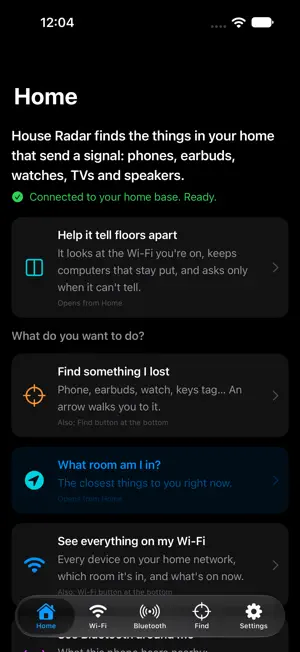
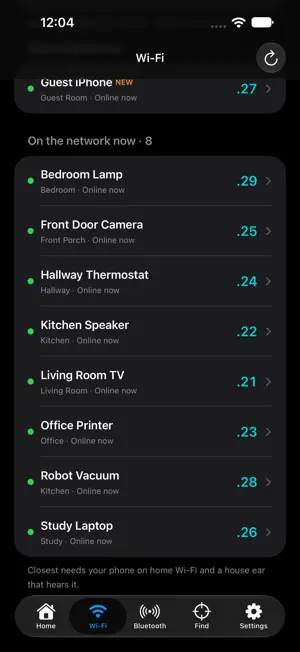
House Radar finds the things in your home that send a signal — phones, earbuds, watches, TVs and speakers — and walks you to them. Open the app and Home tells you what you can do. Tap a card and go. FIND SOMETHING YOU LOST Pick the device and walk. The screen goes from cold blue to hot red as you get closer, with a word that says Warmer, Colder or Right here, and fast beeps when you are on it. When this iPhone can hear it on Bluetooth, an arrow points the way. New here? "How to find something" walks you through it in 6 steps. SEE WHAT'S ON YOUR WI-FI Quick scan lists the devices on the Wi-Fi you're on, with plain names — right from your iPhone. SEE BLUETOOTH AROUND YOU Earbuds, watches, speakers and trackers this phone can hear, closest first. WHOLE-HOUSE FINDING (OPTIONAL) Add a free home base on a Mac that stays on at home. House Radar then lists everything on your home network, flags what just came online, and shows the room for devices you place or that a listener in that room hears. Set up your home walks you through it. No Mac? Tap Try a demo house to see the full hunt with pretend devices. Name your devices once and they follow your account to any iPhone. Signal strength is a guide, not a tape measure — it ranks what is closer.
What’s new
Version 1.6 · Updated November 12, 2026
A new welcome screen. Choose to look at what is around you with just this iPhone, or set up your whole home. THE CAMERA VIEW • Every nearby device shows as a colored circle the moment it is found. The color tells you how strong its signal is. • Color filter: show only the colors you pick — just the strongest signals, say. • The floor colors itself in as you look around, so you can see where the signal is strongest. • More accurate color. A device you are standing right next to now reads as strong instead of weak. • The camera only listens. It no longer tries to connect to anything nearby, so there are no pairing pop-ups. • Pause or interrupt the camera and the circles it already found stay put. ALSO IN THIS UPDATE • The camera now says what is closest to you in one line. Tap it to walk there. • Colors hold steady, and the thing you walk up to turns red when you reach it. • One TV or speaker no longer shows up as several things. • Signals with no name are marked as likely Apple gear (Apple doesn't let apps read the details of its own signals). • A new person with no home base sees what works on their iPhone first. • Fixed: leaving a walk in the camera could leave a blank camera screen.
App privacy
The developer, Peter De Paola, reported these privacy practices to Apple.
Data Linked to You
The following data, which may be collected and linked to your identity, may be used for the following purposes:
- Contact Info: Email Address, Name
- User Content: Other User Content
- Identifiers: User ID
Used for: App Functionality
Alternatives to House Radar
Looking for apps like House Radar? Here are 6 similar apps on the App Store. The highest rated is Sonara: Decibel & Noise Meter (5.0/5), and 5 of the 6 are free to download.
-
 Sonara: Decibel & Noise Meter
5.0
-
 PhotoSpaceSlim: Photo Cleaner
-
 FoldTally: Hinge Counter
-
 PDF to DOCX - Offline
-
 Currency Converter -Forex tool
-
 SpyCam: Hidden Camera Finder
| App | Rating | Price | Last updated | Compare |
|---|---|---|---|---|
| House Radar | 5.0 / 5 (1 rating) | 2.99 USD | November 12, 2026 | |
| Sonara: Decibel & Noise Meter | 5.0 / 5 (2) | Free | Nov 12, 2026 | Compare |
| PhotoSpaceSlim: Photo Cleaner | – | Free | Nov 9, 2026 | Compare |
| FoldTally: Hinge Counter | – | Free | Nov 7, 2026 | Compare |
| PDF to DOCX - Offline | – | Free | Sep 25, 2026 | Compare |
| Currency Converter -Forex tool | – | 1.99 USD | Nov 4, 2026 | Compare |
| SpyCam: Hidden Camera Finder | – | Free | Nov 11, 2026 | Compare |
Compare House Radar with the top alternatives: ratings, updates, ASO score and keyword gaps →