

ScanMojo: PDF Document Scanner
Kinwii AI Business iPhoneiPadiPod touch
ScanMojo: PDF Document Scanner is a free Business app for iPhone and iPad by Kinwii AI. Rated 5.0/5 from 3 ratings. Requires iOS 17.0.
- Rating
- 5.0
- 3 ratings
- Price
- Free
- on the App Store
- Size
- 17 MB
- Age 4+
- Updated
- Oct 31
- 2026 · v1.1.4
Screenshots


About ScanMojo: PDF Document Scanner
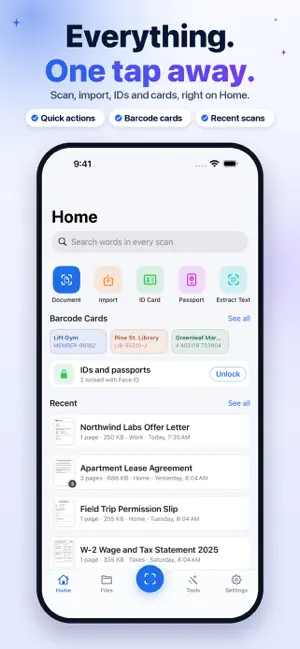
Turn messy paper into clean, searchable PDFs with ScanMojo, the document scanner for iPhone. Scan letters, forms, receipts, notes, IDs and passports, or turn photos into PDFs. Scanning and PDF export are free, with no watermarks, no scan limits and no account required. SCAN IN SECONDS Point your camera at a page and ScanMojo finds the edges and captures it the moment the camera settles. Scan many pages into one document, or import images and PDFs from Photos and Files. CLEAN SCANS, AUTOMATICALLY Pages are cropped, flattened and cleaned up for you: shadows evened out, fingers, staples and punch holes removed, and bent lines of text straightened. Choose Original, Auto, Gray or Black & White, and fine-tune any page. NAMED FOR YOU, FOUND IN SECONDS Each new scan is named after what it is, like "Electric Bill" or "Lease Agreement", using on-device intelligence. Text recognition (OCR) makes every word searchable: search for a word and jump straight to the page it's on, or copy text from any scan. IDS AND PASSPORTS, READY TO USE ID and Passport modes zoom in for sharp focus and capture by themselves once the card is steady and inside the outline. Scan the front, then the back. Passport pages come out flat and aligned, and copies print at true size. SHARE THE WAY YOU NEED Export PDFs, images or text. Every document shows its PDF size, and Smaller PDF makes a copy small enough to email or upload, while your scan stays as it is. Before you send an ID, make a Safe Copy with a watermark saying what it's for and its numbers blacked out. PRIVATE BY DESIGN Scanning, cleanup, text recognition and naming run on your iPhone. We never receive your scanned documents. No account is needed, and you can scan and work with your documents offline. IDs and passports stay locked with Face ID or Touch ID. Device backups and the services you choose when sharing follow their own privacy settings. ALWAYS AT HAND Save barcode cards for library, gym and loyalty memberships. Start a scan from your Home Screen widgets. On iPhone Duo, ScanMojo fills the open screen with a sidebar and pages side by side. DO MORE WITH OPTIONAL SCANMOJO PRO • Sign documents and add text to pages • Merge scans into one PDF, and export many documents at once • Export to Word and Excel • Password-protect PDFs • Print true-size ID and passport copies, front and back on one page • Share Safe Copies with watermarks and covered numbers • Shrink PDFs to a size limit you choose • Sync every scan to iCloud Drive as a PDF • Create as many folders as you need Scanning stays free. Pro is an optional monthly or yearly auto-renewable subscription. Available plans, prices and any eligible trial offer are shown in the app before purchase. Payment is charged to your Apple Account. Subscriptions renew automatically unless canceled at least 24 hours before the current period ends. Manage or cancel your subscription in your Apple Account settings. Requires iOS 17 or later. Support: https://scanmojo.app/support Privacy Policy: https://scanmojo.app/privacy Terms of Use: https://scanmojo.app/terms
What’s new
Version 1.1.4 · Updated October 31, 2026
Smart Reminders from your scans: ScanMojo's on-device AI auto-detects due dates on your documents and letters and puts a bell beside them. Tap it to be reminded before the day. The new Reminders tool lists them all. Enhancements and UX improvements.
App privacy
The developer, Kinwii AI, reported these privacy practices to Apple.
Data Not Linked to You
The following data, which may be collected but is not linked to your identity, may be used for the following purposes:
- Purchases: Purchase History
- Location: Coarse Location
- Identifiers: User ID, Device ID
- Usage Data: Product Interaction, Other Usage Data
- Diagnostics: Performance Data, Other Diagnostic Data
Used for: Analytics, App Functionality
Alternatives to ScanMojo: PDF Document Scanner
Looking for apps like ScanMojo: PDF Document Scanner? Here are 6 similar apps on the App Store.
-
 Budget Hero - Track Expenses
-
 Soledger: Mileage & Expenses
-
 CasHero - Expense Tracker
-
 ShiftCheck: Nurse Pay Tracker
-
 Easy Invoice Maker - Invoicoo
-
 Karyam
| App | Rating | Price | Last updated | Compare |
|---|---|---|---|---|
| ScanMojo: PDF Document Scanner | 5.0 / 5 (3 ratings) | Free | October 31, 2026 | |
| Budget Hero - Track Expenses | – | Free | Sep 28, 2026 | Compare |
| Soledger: Mileage & Expenses | – | Free | Jul 9, 2026 | Compare |
| CasHero - Expense Tracker | – | Free | Aug 12, 2026 | Compare |
| ShiftCheck: Nurse Pay Tracker | – | Free | Sep 15, 2026 | Compare |
| Easy Invoice Maker - Invoicoo | – | Free | Mar 9, 2026 | Compare |
| Karyam | – | Free | Oct 29, 2026 | Compare |