

RetroGuide.TV
Adam Hunt Entertainment iPhoneiPadiPod touch
RetroGuide.TV is a free Entertainment app for iPhone and iPad by Adam Hunt. Rated 5.0/5 from 2 ratings. Requires iOS 17.0. Updated October 27, 2026.
- Rating
- 5.0
- 2 ratings
- Price
- Free
- on the App Store
- Size
- 45 MB
- Age 4+
- Updated
- Oct 27
- 2026 · v1.6
Screenshots
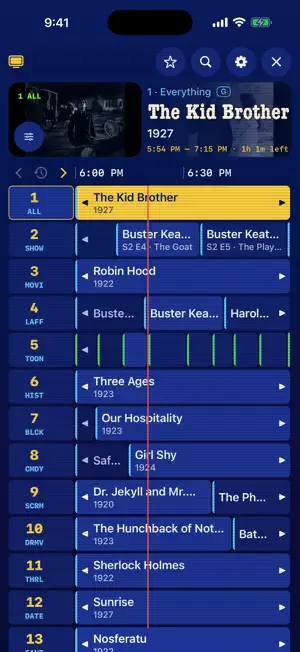
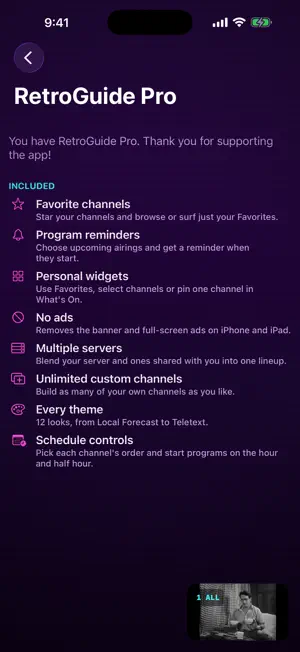
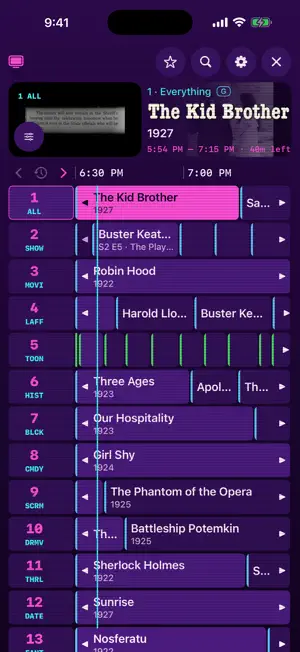
About RetroGuide.TV
Your media library, on the air. RetroGuide.TV turns your Plex or Jellyfin library into always-on TV channels. Open the guide, drop into whatever is playing and let the schedule do the choosing. No shows or movies are included: bring a server you own or have permission to access. A REAL TV LINEUP Automatic channels bring together genres, decades, networks, collections and series marathons. The classic program guide shows what is on now and next, with artwork, live preview and search. Swipe or use the Siri Remote to surf channels and jump back to the last one. PLEX AND JELLYFIN Link Plex with an on-screen code. Discover Jellyfin on your network or enter its address, then use Quick Connect or your username and password. Choose the libraries you want on the air. With Pro, combine multiple Plex and Jellyfin servers in one lineup, with quality and buffering settings for each. WIDGETS, PICTURE IN PICTURE AND SLEEP TIMER On iPhone and iPad, see current programs in a What’s On Home Screen widget and tap a channel to tune in. Keep watching in Picture in Picture while using another app. Set a sleep timer for a duration or the end of the current program. These features are included free. YOUR CHANNELS, YOUR WAY Create a channel from shows, genres, networks, collections, decades and libraries, with a live preview. One custom channel is free. Choose audio and subtitles, adjust subtitle timing, and save track rules that can sync through iCloud. A CAPABLE PLAYER The built-in player supports MKV, HEVC, AV1, HDR and styled subtitles. Compatible files play directly. Playback support depends on the file, device and server settings; Apple’s player is also available. RETROGUIDE PRO — ONE PURCHASE, NO SUBSCRIPTION • Favorite channels and a Favorites guide • Program reminders for upcoming airings • Widgets with Favorites, up to eight selected channels, or one pinned channel • Multiple servers and unlimited custom channels • All twelve themes, from Classic Cable to VHS and Teletext, with matching app icons and widget colors on iPhone and iPad • Schedule order and start-time controls • Library-wide audio and subtitle rules • Remove individual titles from channels • No ads on iPhone and iPad Pro is shared across iPhone, iPad and Apple TV with the same purchase account. Existing Pro owners receive new Pro features at no extra charge. Free includes one server, all automatic channels, the full guide, search, player, one custom channel, basic widgets, Picture in Picture and the sleep timer. Apple TV has no ads. Free iPhone and iPad uses Google AdMob for non-personalized ads and related measurement. No separate RetroGuide.TV account is required. See the Privacy Policy for details. RetroGuide.TV is independent and is not affiliated with or endorsed by Plex, Inc. or the Jellyfin project.
What’s new
Version 1.6 · Updated October 27, 2026
Parental Controls are here. • Set a PIN and choose movie and TV rating limits. • Choose allowed libraries, genres, collections, shows and movies across your connected servers. • Create a separate custom channel lineup for parental controls. Your regular lineup is preserved when you switch back. • Block shows and movies, including matching copies on connected servers. • Clearer channel settings and improved startup recovery layout. Content filters use your server’s metadata. Parental controls are configured separately on each device. Secure connections are now required. Plex and Jellyfin servers must use HTTPS with a trusted certificate, including on local networks and VPNs. Both RetroGuide Player and Apple Player remain available, with your existing selection preserved. Picture in Picture remains available.
App privacy
The developer, Adam Hunt, reported these privacy practices to Apple.
Data Linked to You
The following data, which may be collected and linked to your identity, may be used for the following purposes:
- Location: Coarse Location
- Identifiers: Device ID, User ID
- Usage Data: Product Interaction, Advertising Data
- Purchases: Purchase History
Used for: Third-Party Advertising, Developer’s Advertising or Marketing, Analytics, App Functionality
Data Not Linked to You
The following data, which may be collected but is not linked to your identity, may be used for the following purposes:
- Diagnostics: Performance Data, Other Diagnostic Data, Crash Data
Used for: Third-Party Advertising, Developer’s Advertising or Marketing, Analytics, App Functionality
Alternatives to RetroGuide.TV
Looking for apps like RetroGuide.TV? Here are 6 similar apps on the App Store. The highest rated is Vezeve (5.0/5), and all 6 are free to download.
-
 Vezeve
5.0
Vezeve
5.0
-
 Charles M
5.0
Charles M
5.0
-
 90sTV - Retro TV Channels
5.0
90sTV - Retro TV Channels
5.0
-
 Stream Lucid — Live TV & Guide
5.0
Stream Lucid — Live TV & Guide
5.0
-
 CineFlix India
-
 Spectati: IPTV & Plex Player
5.0
Spectati: IPTV & Plex Player
5.0
| App | Rating | Price | Last updated | Compare |
|---|---|---|---|---|
| RetroGuide.TV | 5.0 / 5 (2 ratings) | Free | October 27, 2026 | |
| Vezeve | 5.0 / 5 (1) | Free | Dec 6, 2023 | Compare |
| Charles M | 5.0 / 5 (1) | Free | Oct 22, 2026 | Compare |
| 90sTV - Retro TV Channels | 5.0 / 5 (1) | Free | Oct 23, 2026 | Compare |
| Stream Lucid — Live TV & Guide | 5.0 / 5 (1) | Free | Jul 6, 2026 | Compare |
| CineFlix India | – | Free | Aug 6, 2026 | Compare |
| Spectati: IPTV & Plex Player | 5.0 / 5 (1) | Free | Oct 23, 2026 | Compare |
Compare RetroGuide.TV with the top alternatives: ratings, updates, ASO score and keyword gaps →