

MCDU Trainer
云启航科(成都)科技有限公司 Education iPhoneiPadiPod touch
MCDU Trainer is a free Education app for iPhone and iPad by 云启航科(成都)科技有限公司. Requires iOS 17.0. Updated October 6, 2026.
- Price
- Free
- on the App Store
- Size
- 22 MB
- Age 4+
- Updated
- Oct 6
- 2026 · v2.0.0
Screenshots
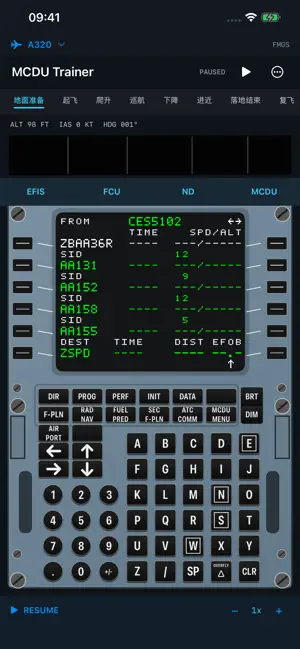
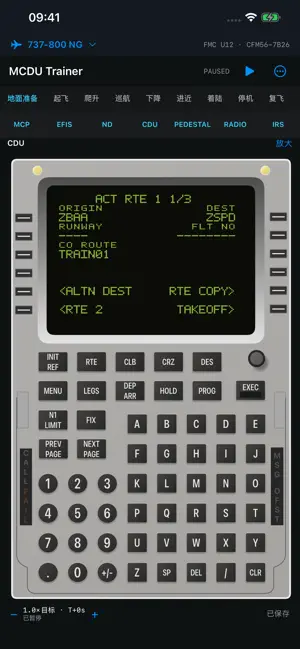


About MCDU Trainer
Practice A320 MCDU and Boeing 737-800 NG CDU operations on iPhone and iPad, and explore how flight plans, controls and instrument indications work together. Choose an aircraft and follow a continuous practice flight from ground preparation through takeoff, climb, cruise, descent, approach and landing. Each aircraft keeps its own flight plan and practice state. Switch aircraft and return to your previous session. Run, pause, flight-phase positioning and saved scenarios help you revisit an operation and inspect its result. • Focus on MCDU/CDU entry, editing and error recovery, including initialization, route and performance operations. • Use the MCDU/CDU, ND, EFIS and FCU/MCP within the same flight and observe changes in guidance and indications. • View the complete instrument workspace on iPad, or scroll and jump between instruments on iPhone. • Practice with local training data, waypoints and scenarios without creating an account. The A320 and 737 have separate state and logic. The 737 training configuration targets the 737-800 NG with a conventional CDU, the FMC U12 family and SFP/26K reference scope. It does not represent the 737 MAX or guarantee the configuration of a particular airline or individual aircraft. Navigation data consists of fixed training snapshots. Coverage and data dates are identified in the app and source documentation; this is not a current operational navigation database. Performance, motion and system responses include nominal training models and simplifications. Communications are local training functions and do not connect to an airline, air traffic control or a live ACARS network. This independently developed practice tool is not an official Airbus, Boeing or Honeywell product or a certified flight training device. Do not use it for real flight navigation, performance calculations or operational decisions. Practice state is stored on the device; automatic cross-device synchronization is not provided.
What’s new
Version 2.0.0 · Updated October 6, 2026
Version 2.0.0 adds Boeing 737-800 NG CDU practice alongside the A320, with separate flight plans and saved flight state. • A complete instrument workspace on iPad and quick instrument navigation on iPhone. • Expanded continuous practice from ground preparation to landing, connecting flight plans, controls and instrument indications. • Improvements to route, performance, radio and navigation operations, plus pause, resume and scenario management. • Refined input feedback, panel layouts and state preservation.
App privacy
The developer, 云启航科(成都)科技有限公司, reported these privacy practices to Apple.
Data Not Collected
The developer does not collect any data from this app.
Alternatives to MCDU Trainer
Looking for apps like MCDU Trainer? Here are 6 similar apps on the App Store.
-
 FMGS-A320
-
 Airbus 320 FMGC MCDU Training
-
 Airbus 220 FMGC MCDU Training
-
 Airbus iA320 ISG
-
 Airbus 350 FMGC MCDU Training
-
 DashBank
| App | Rating | Price | Last updated | Compare |
|---|---|---|---|---|
| MCDU Trainer | – | Free | October 6, 2026 | |
| FMGS-A320 | – | Free | Oct 16, 2026 | Compare |
| Airbus 320 FMGC MCDU Training | – | Free | Oct 10, 2026 | Compare |
| Airbus 220 FMGC MCDU Training | – | Free | Oct 11, 2026 | Compare |
| Airbus iA320 ISG | – | 59.99 USD | Feb 4, 2025 | Compare |
| Airbus 350 FMGC MCDU Training | – | Free | Oct 11, 2026 | Compare |
| DashBank | – | Free | Jan 30, 2025 | Compare |
Compare MCDU Trainer with the top alternatives: ratings, updates, ASO score and keyword gaps →