

Content Dashboard X
AGENTKINETICS LLC Productivity iPhoneiPadiPod touch
Content Dashboard X is a free Productivity app for iPhone and iPad by AGENTKINETICS LLC. Requires iOS 16.4. Updated November 11, 2026.
- Price
- Free
- on the App Store
- Size
- 40 MB
- Age 4+
- Updated
- Nov 11
- 2026 · v1.3.3
Screenshots
Save to Pinterest


About Content Dashboard X
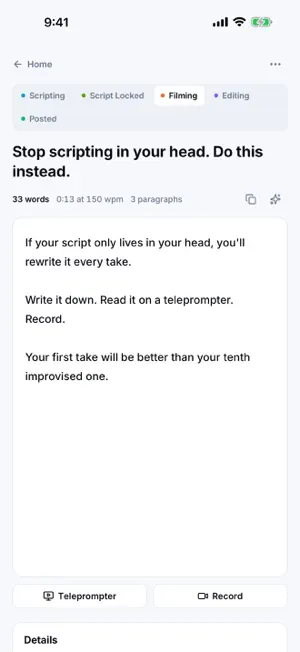
Content Dashboard X takes a short-form video from hook to posted, all in one place. Capture a hook the moment it comes to you and it lands on the Board, in Scripting. Not sure what to say yet? Yap about it: talk it out and watch it turn into text, or type it out when you need to stay quiet, then turn the yap into a script in your own words. Open the card to write the script in a big, quiet editor that shows the word count and talk time as you type. When the script is final, lock it, then open the teleprompter or record with it. The script scrolls at the top of the screen, right under the front camera, while you film. The video saves straight to your Photos, framed 9:16 or 16:9 to match the video. Move each card along the Board as you go: Scripting, Script Locked, Filming & editing, Done, then Posted. When a video is ready, copy its caption and hashtags in one tap. • Home that shows just the next card to work on • Board with a wide Scripting column and Posted folded underneath • Yap: talk or type an idea out, then turn it into a script • Script editor with word count and talk time at a spoken pace • Fullscreen teleprompter with speed, text size and mirror mode • Teleprompter recorder that films while your script scrolls • Caption and hashtags on every card, copied in one tap • Post date on each card, with optional post-day reminders • Follower tracking with a growth trend for each platform • AI help drafting or rewriting a script • Real-time sync with the web dashboard • Light and dark themes Your recordings never leave your device. No ads, no tracking. SUBSCRIPTION All features require a Content Dashboard X subscription, monthly or yearly, which you can start in the app. Payment is charged to your Apple Account when you confirm. The subscription renews automatically unless it's cancelled at least 24 hours before the end of the current period. Manage or cancel it anytime in your Apple Account settings. Already have access on your account? Just sign in. Terms of Use: https://www.apple.com/legal/internet-services/itunes/dev/stdeula/ Privacy Policy: https://content-dashboard-x.vercel.app/privacy
What’s new
Version 1.3.3 · Updated November 11, 2026
Talking into Yap is far more accurate. • Every word you say is transcribed by a cloud speech model, with punctuation, and ums, stutters and false starts cleaned up • Names you use on your cards, like products and certifications, come out spelled right • Your words still appear live as you talk, and firm up into the accurate transcript a moment after each pause • No connection? Nothing is lost: the on-device transcript is kept instead • Prefer on-device only? Turn off Settings > Accurate transcription
App privacy
The developer, AGENTKINETICS LLC, reported these privacy practices to Apple.
Data Linked to You
The following data, which may be collected and linked to your identity, may be used for the following purposes:
- Purchases: Purchase History
- Contact Info: Email Address, Name
- User Content: Other User Content
- Identifiers: User ID
Used for: App Functionality