

Owlkey: AI Keyboard & Writer
Bohdan Beschetnikov Productivity iPhoneiPadiPod touch
Owlkey: AI Keyboard & Writer is a free Productivity app for iPhone and iPad by Bohdan Beschetnikov. Requires iOS 17.0. Updated October 19, 2026.
- Price
- Free
- on the App Store
- Size
- 7 MB
- Age 4+
- Updated
- Oct 19
- 2026 · v1.0.2
Screenshots



About Owlkey: AI Keyboard & Writer
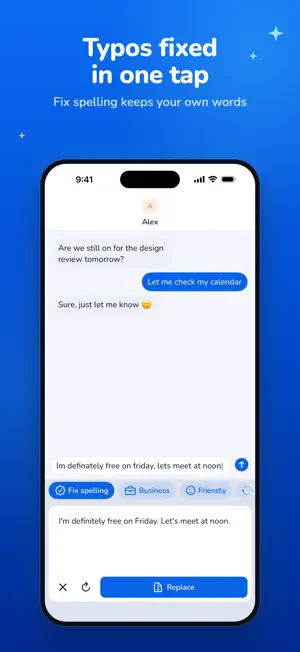
Owlkey is a keyboard for iPhone and iPad with an AI editor built in. Type as usual in any app, tap a preset above the keys and get an edited version you can drop in with one tap: polished for work, warmer for friends, or simply free of typos. HOW IT WORKS 1. Add Owlkey in Settings and turn on Allow Full Access. 2. Type a message, an email or a post in any app. 3. Tap a preset, check the suggestion and tap Replace. Undo is one tap away. BUILT-IN PRESETS • Business: clear, polished and professional • Friendly: warm and casual • Rephrase: the same meaning in new words • Fix spelling: fixes typos, grammar and punctuation, keeps your wording YOUR OWN PRESETS • Save your own instruction, like “Make it shorter”, “Add a polite sign-off” or “Translate into Spanish” • Keep up to 12 custom presets right next to the built-in ones • Hide the presets you don't use 16 TYPING LANGUAGES Keyboard layouts for English, Russian, Ukrainian, German, French, Spanish, Italian, Portuguese, Dutch, Swedish, Finnish, Norwegian, Danish, Polish, Turkish and Arabic. AI edits work with text in any language and keep the language you wrote in. PRIVACY FIRST • Your keystrokes are never recorded • Text is sent only when you tap a preset and is not kept on our server • No account, no sign-up • Without Full Access, Owlkey still works as a regular keyboard SUBSCRIPTION INFO AI edits require Owlkey Pro, available as a weekly, monthly or yearly auto-renewing subscription. Each edit can be up to 4,000 characters, and a daily fair-use limit applies. Payment is charged to your Apple Account at confirmation of purchase. The subscription renews automatically unless cancelled at least 24 hours before the end of the current period, and your account is charged for renewal within 24 hours before the period ends. Manage or cancel any time in your Apple Account settings. EULA: https://www.apple.com/legal/internet-services/itunes/dev/stdeula/ Terms of Use: https://snaitix.github.io/owlkey-legal/terms.html Privacy Policy: https://snaitix.github.io/owlkey-legal/privacy.html
What’s new
Version 1.0.2 · Updated October 19, 2026
Bug fixes and improvements: • Swipe through the AI buttons above the keyboard • Clearer note that AI buttons need Owlkey Pro
App privacy
The developer, Bohdan Beschetnikov, reported these privacy practices to Apple.
Data Not Collected
The developer does not collect any data from this app.
Alternatives to Owlkey: AI Keyboard & Writer
Looking for apps like Owlkey: AI Keyboard & Writer? Here are 6 similar apps on the App Store. The highest rated is SingleVue (5.0/5), and all 6 are free to download.
-
 Planzio: Takvim & Planlama
-
 Bedly: Make Your Bed Habit
-
 SingleVue
5.0
SingleVue
5.0
-
 MangoPad - AI Writing Keyboard
-
 Snaptalky • Smart AI Replies
5.0
Snaptalky • Smart AI Replies
5.0
-
 KeyboardAI - AI Writer
| App | Rating | Price | Last updated | Compare |
|---|---|---|---|---|
| Owlkey: AI Keyboard & Writer | – | Free | October 19, 2026 | |
| Planzio: Takvim & Planlama | – | Free | Oct 9, 2026 | Compare |
| Bedly: Make Your Bed Habit | – | Free | Jul 9, 2026 | Compare |
| SingleVue | 5.0 / 5 (3) | Free | Jun 24, 2026 | Compare |
| MangoPad - AI Writing Keyboard | – | Free | Oct 4, 2026 | Compare |
| Snaptalky • Smart AI Replies | 5.0 / 5 (1) | Free | Feb 21, 2026 | Compare |
| KeyboardAI - AI Writer | – | Free | Oct 22, 2025 | Compare |