

Kivvo - Screenshot OCR
Basile Devereux Productivity iPhoneiPadiPod touch
Kivvo - Screenshot OCR is a free Productivity app for iPhone and iPad by Basile Devereux. Rated 1.0/5 from 1 ratings. Requires iOS 17.0.
- Rating
- 1.0
- 1 ratings
- Price
- Free
- on the App Store
- Size
- 2 MB
- Age 17+
- Updated
- Oct 2
- 2026 · v1.0.0
Screenshots


About Kivvo - Screenshot OCR
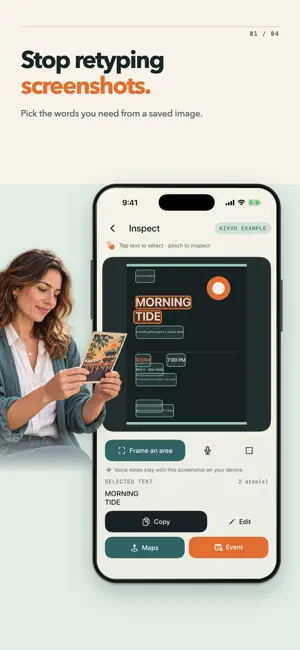
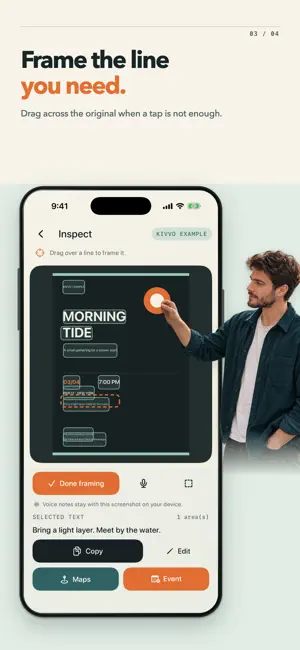
Kivvo turns screenshots and photos into details you can use. Keep the original image in view while you find a place, a date, or a line of text, so you can check where the words came from before you act. Start with a saved image, take a photo of a poster, or try the built-in example. Kivvo recognizes text on the image and shows its position, letting you work from the source instead of retyping it into another app. Use Kivvo to: - Choose the words that matter. Tap one or more text areas, zoom or move the image, or draw a frame around a detail with the on-screen magnifier. - Correct what recognition missed. Edit selected text while keeping its place on the image, then copy it without leaving the capture. Select another detail and keep going. - Check a place before searching. Review the selected text and hand it to Apple Maps only when you choose Open Maps. - Prepare an event with care. Review the title and place, choose a date and year, set a start time and time zone, then open the system Calendar editor to decide whether to save it. - Keep context close. Record an optional voice note on a capture, return to the same original image, and extract more from it later. - Revisit your work. Library brings saved captures, recognized text, and recent actions together. You can also delete a capture or clear local data when you no longer need it. A poster can hold more than one useful detail. Kivvo lets you work through them at your own pace while the original stays in sight. The screenshot tools use on-device text recognition and need no account or in-app purchase.
App privacy
The developer, Basile Devereux, reported these privacy practices to Apple.
Data Not Linked to You
The following data, which may be collected but is not linked to your identity, may be used for the following purposes:
- Diagnostics: Crash Data
Used for: Analytics, App Functionality
Alternatives to Kivvo - Screenshot OCR
Looking for apps like Kivvo - Screenshot OCR? Here are 6 similar apps on the App Store. The highest rated is Kuvix: Protected Journey (4.5/5), and all 6 are free to download.
-
 Maya Harbor
-
 Netriva: Secret Folder
4.2
Netriva: Secret Folder
4.2
-
 Kuvix: Protected Journey
4.5
Kuvix: Protected Journey
4.5
-
 Kinly – Call & Connect
3.0
Kinly – Call & Connect
3.0
-
 Guard Gate
2.5
Guard Gate
2.5
-
 Lingoza: AI Live Translator Go
4.4
Lingoza: AI Live Translator Go
4.4
| App | Rating | Price | Last updated | Compare |
|---|---|---|---|---|
| Kivvo - Screenshot OCR | 1.0 / 5 (1 rating) | Free | October 2, 2026 | |
| Maya Harbor | – | Free | Jul 9, 2026 | Compare |
| Netriva: Secret Folder | 4.2 / 5 (59) | Free | Sep 15, 2026 | Compare |
| Kuvix: Protected Journey | 4.5 / 5 (88) | Free | Sep 16, 2026 | Compare |
| Kinly – Call & Connect | 3.0 / 5 (2) | Free | Jul 15, 2026 | Compare |
| Guard Gate | 2.5 / 5 (2) | Free | Mar 20, 2025 | Compare |
| Lingoza: AI Live Translator Go | 4.4 / 5 (74) | Free | Sep 24, 2026 | Compare |