

Road Order: Multi Stop Planner
RAINBOW TREE LLC Navigation iPhoneiPadiPod touch
Road Order: Multi Stop Planner is a free Navigation app for iPhone and iPad by RAINBOW TREE LLC. Requires iOS 17.0. Updated October 22, 2026.
- Price
- Free
- on the App Store
- Size
- 10 MB
- Age 4+
- Updated
- Oct 22
- 2026 · v1.1
Screenshots


About Road Order: Multi Stop Planner
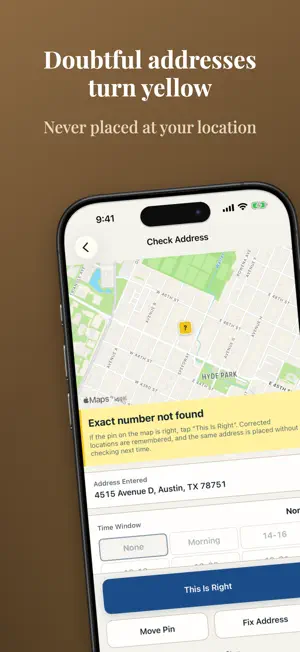
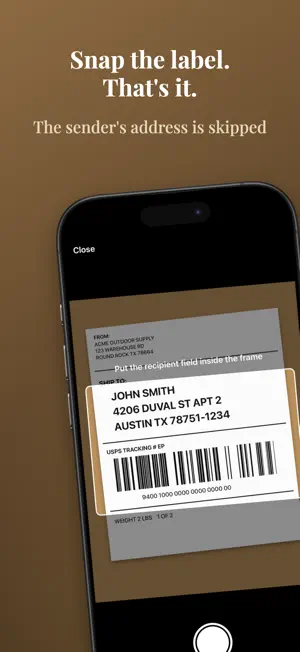
Before you load the van, put today's pile of parcels in an order you can drive without looping back. Add addresses and Road Order arranges your stops by real road travel times checked on Apple Maps. Arranging is free, with no limit on the number of stops. NO LOOPING BACK Parcels for the same address become one stop ("2 parcels"). Stops within 80 m (260 ft) of each other are walked instead of driven. Parking time per stop is counted, so you're far less likely to leave a building and come back later for its second parcel. One more parcel after arranging? It's slotted in where it adds the least detour, numbered like "5a", and every other stop keeps its number (or re-arrange everything). BY ROAD, NOT STRAIGHT LINES Straight-line orders send you the long way around one-way streets, rivers and railways. Road Order checks each leg on Apple Maps and shows how many are checked, e.g. "Road-checked legs 38/41". Once every leg is checked, it becomes the "Road-checked order". Unchecked legs are never called checked (dotted on the map). In our estimate, a 30-stop round came out about 5 minutes shorter than the straight-line order (varies by area and number of stops). DOUBTFUL ADDRESSES TURN YELLOW Addresses not found to the house number, matching another street or ZIP code, sharing a spot with another address, or far from the other stops turn yellow with a one-line reason. An address that can't be found is never dropped at your current location. Fix a pin once and that address is placed correctly from then on. SNAP THE LABEL Photograph a label's SHIP TO section and the recipient's address is offered; the sender's details, phone and tracking numbers are skipped. Photos are read on your iPhone and never saved or sent. You can also type or dictate addresses. ON THE ROAD The next stop is shown large and handed to Apple Maps or Google Maps one at a time. Mark each stop Done, Not Home, Returned or Skip. Off route? Re-arrange the rest from where you are. When you finish, save the sheet as a route with a name and days (Pro). SEND THE DRIVING ORDER Send today's driving order (numbers and addresses) as text to your office or a relief driver by Messages, Mail or any app. Names are included only if you choose. Arrival estimates can be added too (Pro). PRO (ONE-TIME PURCHASE) - Time windows: add Morning or 2–4 PM, get arrival estimates from road travel times and see which stop will be late; re-arrange for windows or keep your order. - Continuous label scanning: keep shooting, then review and add them all at once. - Paste a list of addresses to add them. - Saved routes: save regular customers by day of the week; legs checked on earlier runs carry over, so it's arranged as soon as you open it. - Remember delivery notes: a note like "Leave at door" is kept for each address and shown as the "Previous note" the next time that address is added. - Package type and where it's loaded: tag a stop (Large box, Heavy, Back of cargo...) with a tap and see it large on the delivery screen. - Records: daily counts of Done, Not Home and Returned, CSV export, and a password-protected backup. Arranging stays free. There is no subscription and no per-stop or per-use charge. WHO IT'S FOR - Couriers covering an unfamiliar area (gig, relief and new drivers) - Visiting regular customers by day: route sales, service calls, inspections, collections and route deliveries PLEASE NOTE - Travel times are Apple Maps estimates and change with road conditions. - Don't use the app while driving. Operate it only after you've stopped. - Turn-by-turn navigation is provided by Apple Maps or Google Maps. - The order keeps only improvements checked on the road; it isn't guaranteed to be the shortest possible. - Addresses, recipient names and your delivery sheet are stored only on your iPhone (address text and locations are sent to Apple Maps to look up places and travel times). Privacy Policy: https://rainbowtree.work/privacy/haitatsu-route-en.html
What’s new
Version 1.1 · Updated October 22, 2026
Thank you for using Road Order. In this update, we went over the app in detail to make it more comfortable to use, including parts you may not notice. If you notice anything, please let us know through Contact Us in the app. Your feedback shapes our next improvements.
App privacy
The developer, RAINBOW TREE LLC, reported these privacy practices to Apple.
Data Not Linked to You
The following data, which may be collected but is not linked to your identity, may be used for the following purposes:
- Purchases: Purchase History
- Identifiers: Device ID
- Usage Data: Product Interaction
- User Content: Customer Support
- Diagnostics: Crash Data, Performance Data, Other Diagnostic Data
Used for: Analytics, App Functionality
Alternatives to Road Order: Multi Stop Planner
Looking for apps like Road Order: Multi Stop Planner? Here are 6 similar apps on the App Store. The highest rated is Route Planner for Couriers (5.0/5), and all 6 are free to download.
-
 Multi Stop Planner RouteGo
-
 Multi-Stop Route - EasyDeliver
-
 Route Planner for Couriers
5.0
Route Planner for Couriers
5.0
-
 サポロジ Sender
5.0
サポロジ Sender
5.0
-
 高速渋滞・規制情報
-
 Bodha Multi Stop Route Planner
4.5
Bodha Multi Stop Route Planner
4.5
| App | Rating | Price | Last updated | Compare |
|---|---|---|---|---|
| Road Order: Multi Stop Planner | – | Free | October 22, 2026 | |
| Multi Stop Planner RouteGo | – | Free | Aug 13, 2026 | Compare |
| Multi-Stop Route - EasyDeliver | – | Free | Aug 24, 2026 | Compare |
| Route Planner for Couriers | 5.0 / 5 (1) | Free | Oct 24, 2026 | Compare |
| サポロジ Sender | 5.0 / 5 (1) | Free | Jul 28, 2025 | Compare |
| 高速渋滞・規制情報 | – | Free | Jul 27, 2026 | Compare |
| Bodha Multi Stop Route Planner | 4.5 / 5 (11) | Free | Sep 22, 2026 | Compare |