

TapTap - Comic & Ebook Reader
Jeong Gi Kim Book iPhoneiPadiPod touch
TapTap - Comic & Ebook Reader is a free Book app for iPhone and iPad by Jeong Gi Kim. Requires iOS 15.0. Updated November 18, 2026.
- Price
- Free
- on the App Store
- Size
- 107 MB
- Age 4+
- Updated
- Nov 18
- 2026 · v0.9.3
Screenshots
Save to Pinterest

About TapTap - Comic & Ebook Reader
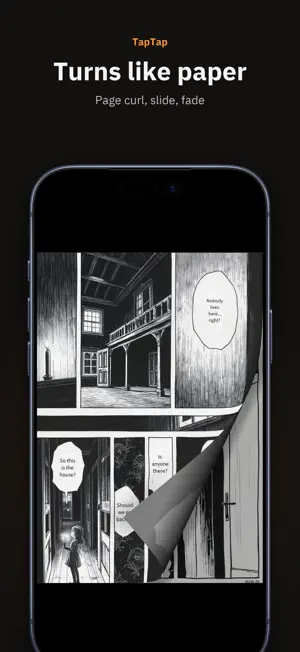
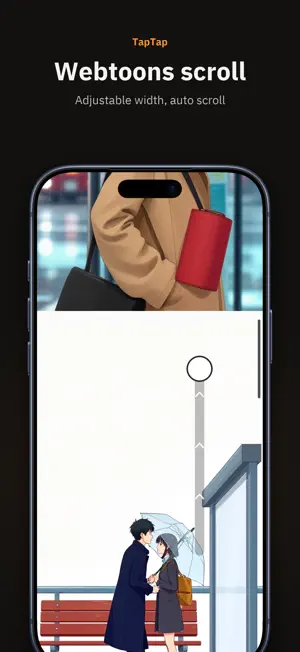
A reader for the comics, novels and ebooks already on your device. Low-resolution comics come out sharp with AI upscaling. No ads, no account. Just open and read. Your files stay on your device and are never uploaded to another server. Reading positions, bookmarks, favorites and settings can sync through your own iCloud or Google Drive. Free for 7 days. After that, one purchase and it is yours for good. (Not a subscription.) [Formats] - CBZ, CBR, CBT, CB7, ZIP, RAR, TAR, 7Z - Folders of images - PDF - EPUB, TXT [Comics and webtoons] - Page mode with left/right turns, or continuous vertical scroll - Both right-to-left (manga) and left-to-right binding - Two pages side by side in landscape - In portrait, images wider than they are tall are split in half automatically - iPad can show two pages side by side in portrait as well - Save your own double-tap zoom, separately for portrait and landscape - Set the size and angle of the touch zones to fit your hand - The theme card sets image enhancement, sepia/green tone and color inversion, kept per comics, scroll and PDF - Press and hold to auto-scroll webtoons, from 25% to 200% speed [AI upscaling] - Sharpens low-resolution comic and webtoon images with AI - Shows the original first, then swaps in the sharper image. Upcoming pages are prepared ahead - Images are upscaled on your device and never uploaded - Real-CUGAN built in, or download the finer x4plus model (about 9 MB) - Separate switches for page and scroll view, with a low, medium or high range - Turns itself off if the device gets too hot [Reading text] - Adjust size, line height, margins, typeface and background while you read - Spacing fix joins words split by a stray space - Two columns in landscape, with EPUB tables of contents and illustrations - TXT can keep its original line breaks when re-wrapping goes wrong - Bundled Sum Serif and Sum Sans, plus 17 more typefaces to download - Backgrounds: white, sepia, sage, navy, gray, black, or your own color [Listen] - Reads TXT and EPUB aloud, highlighting the current sentence as the screen follows - Keeps going with the screen off or in another app - Device voices, plus 10 natural voices to download (about 145 MB) that work offline - Speed, sleep timer and sentence repeat [Straight from your PC] - Run TapTapTool (Windows/Mac) on your PC to browse and download its book folders over the same Wi-Fi - Pair once with a six-digit code; everything sent between them is encrypted - How to: https://nion.kr/en/apps/taptap/manual#mypc [Get books online] - Dropbox, WebDAV, SFTP, FTP, SMB, OPDS (Komga, Kavita, Calibre-Web) - Koofr and Synology NAS come pre-filled - See covers before downloading, and tap to open without downloading - Download whole folders at once - 30 days of download history. Retry anything that failed or stopped - Asks before using mobile data for covers or books - Choose TapTap from Share in the Files app or a browser to add that file to your library. You can also paste a download link directly [Also] - Your first library folder gets a sample comic, ready to read - Your place is saved on every page - Finished books drop off the bookmark list on their own - Keep your favorite folders in the order you like - Lock the app with a passcode, Face ID or Touch ID; the app switcher hides it while locked - External keyboard support - In-viewer brightness; the screen stays awake while you read [Privacy] No ads, no analytics, no tracking. Reading positions and bookmarks stay on your device, and your library files are never uploaded anywhere. The developer keeps only a device identifier, to count the free trial. Turn on sync and your positions, bookmarks, favorites, connections and settings are uploaded to your own iCloud or Google Drive. Passwords and lock settings stay on the device. https://nion.kr/en/apps/taptap/privacy Copy files in with the Files app, get them with TapTapTool, or download them from online sources.
What’s new
Version 0.9.3 · Updated November 18, 2026
Six more languages. - Japanese, Chinese (Traditional), Spanish, Portuguese, German and French - Send feedback by email from Settings > About - On narrow screens the tab bar shows only the selected tab's name. Long-press another tab to see its name, and release to open it - Fixed the window buttons covering the back and close buttons in iPad window mode
App privacy
The developer, Jeong Gi Kim, reported these privacy practices to Apple.
Data Not Linked to You
The following data, which may be collected but is not linked to your identity, may be used for the following purposes:
- Identifiers: Device ID
Used for: App Functionality
Alternatives to TapTap - Comic & Ebook Reader
Looking for apps like TapTap - Comic & Ebook Reader? Here are 6 similar apps on the App Store. The highest rated is Aya Reader (5.0/5), and all 6 are free to download.
-
 쉬뷰 — 소설·만화·PDF 뷰어
-
 VoiceBook AI
-
 Aya Reader
5.0
-
 OutaStory — Read & Listen
-
 HuxNovel
-
 The Last Book Shelf
5.0
| App | Rating | Price | Last updated | Compare |
|---|---|---|---|---|
| TapTap - Comic & Ebook Reader | – | Free | November 18, 2026 | |
| 쉬뷰 — 소설·만화·PDF 뷰어 | – | Free | Nov 9, 2026 | Compare |
| VoiceBook AI | – | Free | Nov 17, 2026 | Compare |
| Aya Reader | 5.0 / 5 (1) | Free | Apr 6, 2026 | Compare |
| OutaStory — Read & Listen | – | Free | Nov 20, 2026 | Compare |
| HuxNovel | – | Free | Nov 22, 2026 | Compare |
| The Last Book Shelf | 5.0 / 5 (6) | Free | Sep 1, 2026 | Compare |