

Quick3D CAD Viewer
Ryo Tazaki Utilities iPhoneiPadiPod touch
Quick3D CAD Viewer is a free Utilities app for iPhone and iPad by Ryo Tazaki. Requires iOS 18.6. Updated October 14, 2026.
- Price
- Free
- on the App Store
- Size
- 28 MB
- Age 4+
- Updated
- Oct 14
- 2026 · v1.1
Screenshots

About Quick3D CAD Viewer
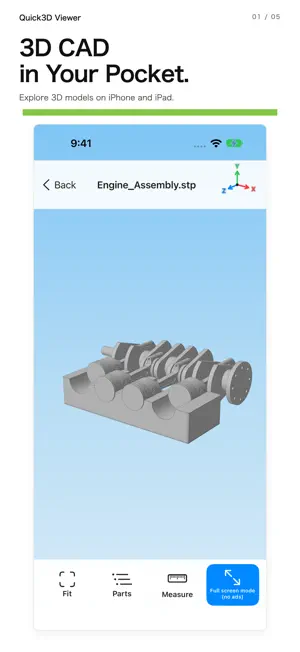
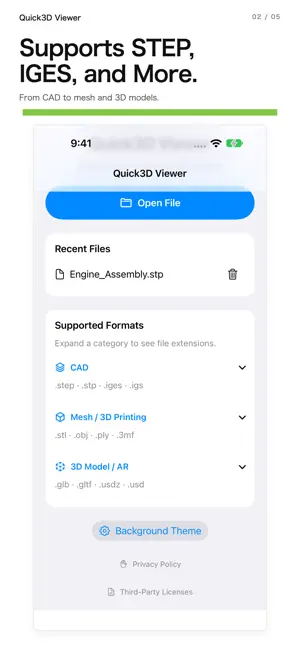
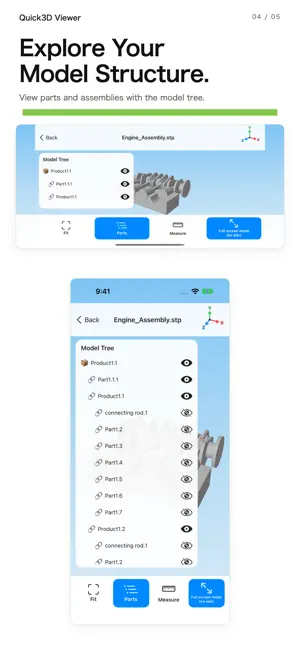
Quick3D Viewer 3D CAD Viewing Made Simple. Quick3D Viewer is a free 3D model viewer for iPhone and iPad. Open and explore a wide range of 3D files, including STEP, IGES, STL, OBJ, and more, right from your mobile device. Whether you're on the factory floor, meeting with clients, or away from your desk, Quick3D Viewer makes it easy to inspect 3D models wherever you go. Key Features ■ Supports Multiple 3D File Formats View STEP / STP, IGES / IGS, STL, OBJ, PLY, 3MF, GLB, and USDZ files. ■ Intuitive 3D Navigation Rotate, zoom, and pan models using simple touch gestures. Explore your designs from different angles. ■ Full-Screen Viewing Hide banner ads in full-screen mode and enjoy more space to inspect your 3D models. ■ Designed for iPhone and iPad View 3D models on your phone or tablet, wherever your work takes you. Perfect For - Inspecting 3D models on the factory floor - Reviewing CAD designs and engineering projects - Sharing designs during meetings - Checking models for 3D printing - Viewing CAD files while on the go 3D CAD in Your Pocket. Make 3D viewing easier with Quick3D Viewer.
What’s new
Version 1.1 · Updated October 14, 2026
【QuickSTEP Viewer is now Quick3D Viewer!】 With version 1.1, we've renamed QuickSTEP Viewer to Quick3D Viewer to reflect its expanded support for 3D file formats. What started as a STEP and IGES viewer has evolved into a more versatile 3D model viewer. ■ What's New • Renamed the app from QuickSTEP Viewer to Quick3D Viewer • Added support for STL, OBJ, PLY, 3MF, GLB, and USDZ files • Improved the 3D model viewing experience • Added a full-screen mode that hides banner ads • Optimized layouts for iPhone and iPad We'll continue improving Quick3D Viewer to make viewing 3D models easier, wherever you go!
App privacy
The developer, Ryo Tazaki, reported these privacy practices to Apple.
Data Used to Track You
The following data may be used to track you across apps and websites owned by other companies:
- Identifiers: Device ID
Data Linked to You
The following data, which may be collected and linked to your identity, may be used for the following purposes:
- Identifiers: Device ID
- Usage Data: Product Interaction, Advertising Data
- Diagnostics: Crash Data, Performance Data
Used for: Third-Party Advertising, Analytics
Data Not Linked to You
The following data, which may be collected but is not linked to your identity, may be used for the following purposes:
- Location: Coarse Location
Used for: Third-Party Advertising
Alternatives to Quick3D CAD Viewer
Looking for apps like Quick3D CAD Viewer? Here are 6 similar apps on the App Store. The highest rated is GLTF Viewer · Convert OBJ/STL (5.0/5), and all 6 are free to download.
-
 GLBViewer by YH
-
 STLFinder
-
 EXCORDER
-
 GLTF Viewer · Convert OBJ/STL
5.0
GLTF Viewer · Convert OBJ/STL
5.0
-
 Scan to CAD: CAD Reader
-
 鉄筋電卓 − 重量・定尺・配筋・生コン
| App | Rating | Price | Last updated | Compare |
|---|---|---|---|---|
| Quick3D CAD Viewer | – | Free | October 14, 2026 | |
| GLBViewer by YH | – | Free | Oct 15, 2026 | Compare |
| STLFinder | – | Free | Sep 10, 2016 | Compare |
| EXCORDER | – | Free | Oct 20, 2026 | Compare |
| GLTF Viewer · Convert OBJ/STL | 5.0 / 5 (1) | Free | Oct 23, 2026 | Compare |
| Scan to CAD: CAD Reader | – | Free | Oct 13, 2026 | Compare |
| 鉄筋電卓 − 重量・定尺・配筋・生コン | – | Free | Oct 22, 2026 | Compare |
Compare Quick3D CAD Viewer with the top alternatives: ratings, updates, ASO score and keyword gaps →