

Metronome by auno
Sil van Diepen Health & Fitness iPhoneiPadiPod touchMac
Metronome by auno is a paid Health & Fitness app for iPhone and iPad by Sil van Diepen. Requires iOS 18.0. Updated November 19, 2026.
- Price
- 0.99 USD
- on the App Store
- Size
- 2 MB
- Age 4+
- Updated
- Nov 19
- 2026 · v1.2.0
Screenshots
Save to Pinterest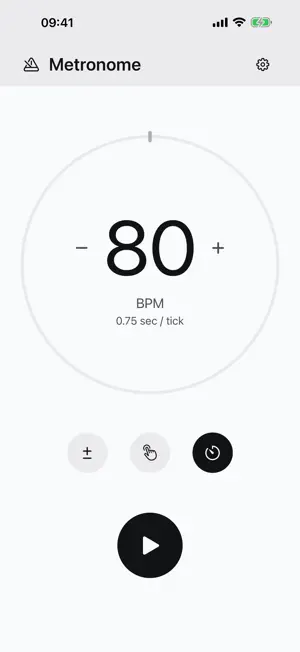


About Metronome by auno
A metronome for moving, not for reading music. Open it and press start. You get a steady beat straight away, with nothing to set up first. No time signatures, no subdivisions, no tempo markings — none of that helps you pace your steps down a corridor, and every one of those controls is something between you and a beat. A STEADY BEAT TO MOVE TO Use it to pace a walk, hold a rhythm through an exercise, keep time in a breathing routine, or give a class something to follow. It keeps time. What you do with the time is yours. SLOWER THAN A MUSICIAN'S METRONOME The range runs from 10 to 240 BPM. The slow end is the point: if you are moving carefully, you need a beat far slower than any tempo marking goes. Set the tempo by single steps, by holding to repeat, by typing a number, or by tapping the round presets for the tempo you usually want. You can also tap it in by hand, on its own screen — never on the main one, so a hand resting on a tablet cannot change the beat of an exercise you are in the middle of. Change the tempo while it runs and it takes effect on the next beat, never mid-beat. BUILD UP OR EASE DOWN Set an end tempo and the beat moves there by itself, a step at a time — 60 to 100 in fives, one step a minute — then holds. For building an exercise up or easing it down without reaching for the device. Each change lands on a beat, never in the middle of one. SEE IT AS WELL AS HEAR IT A ring confirms every beat. You choose how much it moves, from a barely-there pulse to the whole page stepping a shade, because how much is right depends on whether the device is in your hand or across the room. Nothing flashes. Run a timed session and the ring fills as it goes, so you can see how much is left without reading a countdown. SOUND YOU CAN SHAPE Six voices, built on the device as it plays: a sharp click, a wooden knock, a soft pulse, a ringing tone, and two deep bass beats you can feel. Adjust how deep and how long each tick is, add echo or room, and set a three-band equaliser if a room or a hearing aid swallows part of the beat. Every voice is matched for loudness rather than for peak, so changing the sound does not change how loud the app is. TIMED OR CONTINUOUS Run it continuously, or set a session of 1, 2, 5, 10, 15 or 30 minutes, or any length you like. Pause and it picks up where it stopped rather than starting over. Drag the ring to change what is left. At zero it simply stops — no chime, no announcement, no restart. Save a rhythm you use often, with its tempo, sound and length, and load it again in one tap. BUILT TO KEEP TIME The beat comes from a fixed audio timeline rather than a screen timer, so it does not drift over a half-hour session. It keeps playing when the device locks. If a call interrupts it, it stops and waits for you — it never starts making a noise on its own. WITHOUT TOUCHING IT Pause and start from the lock screen, Control Centre or a headphone button. Ask Siri to start or stop the beat, or to start one of your saved rhythms, and put any of those in a shortcut. The screen stays on while a beat runs, unless you turn that off. ON IPHONE, IPAD, MAC AND APPLE TV One purchase covers all four. On a Mac the space bar starts and stops the beat and the arrow keys change the tempo. NOTHING LEAVES YOUR DEVICE No account, no sign-in, no analytics, no microphone, no recording, and the app never connects to the internet. Every sound is generated on the device; none is bundled or streamed. It works in airplane mode because it has nothing to connect to. Available in English, Dutch, German, French and Spanish. Every control is labelled for VoiceOver, and Reduce Motion removes the beat's movement, keeping a gentle change in brightness, while the sound carries on. Metronome is a timing tool. It is not a medical device and does not treat, diagnose or assess anything.
What’s new
Version 1.2.0 · Updated November 19, 2026
New in 1.2 - Metronome for Mac. The same app in a window of its own, with the space bar to start and stop and the arrow keys for the tempo. Same purchase. - Gradual tempo. Set an end tempo and the beat moves there a step at a time, then holds — for building an exercise up or easing it down. Settings → Gradual tempo. - Siri and Shortcuts. "Start Metronome", "Stop Metronome", or start one of your saved rhythms — by voice or in a shortcut. - Pause and start from the lock screen, Control Centre and headphone buttons. - The screen stays on while a beat runs. You can turn that off in Settings → Pulse and vibration. - A hardware keyboard on an iPad works the same way as on the Mac. - Panels no longer scroll when everything in them already fits.
App privacy
The developer, Sil van Diepen, reported these privacy practices to Apple.
Data Not Collected
The developer does not collect any data from this app.
Alternatives to Metronome by auno
Looking for apps like Metronome by auno? Here are 6 similar apps on the App Store. The highest rated is Beto: Running Metronome (5.0/5), and 5 of the 6 are free to download.
-
 Deaf Transcriber
-
 EatSnap: Photo Calorie Counter
1.0
-
 StretchCoach: Pain Relief
1.0
-
 Beto: Running Metronome
5.0
-
 Trigger point - Body
-
 MindWalking: Walk & Meditate
4.5
| App | Rating | Price | Last updated | Compare |
|---|---|---|---|---|
| Metronome by auno | – | 0.99 USD | November 19, 2026 | |
| Deaf Transcriber | – | Free | Nov 10, 2026 | Compare |
| EatSnap: Photo Calorie Counter | 1.0 / 5 (1) | Free | Nov 15, 2026 | Compare |
| StretchCoach: Pain Relief | 1.0 / 5 (1) | Free | Aug 14, 2025 | Compare |
| Beto: Running Metronome | 5.0 / 5 (3) | Free | Aug 14, 2026 | Compare |
| Trigger point - Body | – | 6.99 USD | Aug 12, 2025 | Compare |
| MindWalking: Walk & Meditate | 4.5 / 5 (4) | Free | Nov 8, 2026 | Compare |
Compare Metronome by auno with the top alternatives: ratings, updates, ASO score and keyword gaps →